
Quick answer: How to get more Google reviews comes down to asking every happy customer, at the right moment, with a direct link. Copy your Google review link from your Business Profile, send it by text or email right after a job goes well, and reply to every review you receive. Never pay for reviews or filter who you ask.
Two businesses can do equally good work, but the one with more recent Google reviews usually gets the call. Reviews are often the first thing people read when they compare local companies, and they shape whether someone picks up the phone or keeps scrolling. Most owners know this, yet their review count barely moves, because asking feels awkward and nobody owns the task. This guide shows how to get more Google reviews with a simple routine anyone on your team can follow, includes ready-to-use review request texts, and explains how to respond to reviews, good and bad, the right way.
Key Takeaways
- Most customers will leave a review if you ask at the right time and make it effortless.
- Your Google review link sends customers straight to the review form; use it everywhere.
- Ask right after a clear win: a finished job, a solved problem, a thank-you from the customer.
- Reply to every review, positive or negative, within a few days.
- Google prohibits incentives for reviews, and the FTC’s 2024 rule targets fake and incentivized reviews.
Why Do Google Reviews Matter for Local Businesses?
Google reviews influence both who finds you and who chooses you. They are a visible trust signal on your Business Profile and part of how local businesses build prominence in Google Search and Maps.
For a potential customer, reviews answer the questions your website cannot answer about itself: Did they show up on time? Was the price fair? Would someone hire them again? A steady flow of recent, detailed local reviews tells people the business is active and reliable. That is why reviews belong in every local plan, alongside a complete profile, which we cover in our guide to Google Business Profile optimization.
How Do You Get Your Google Review Link?
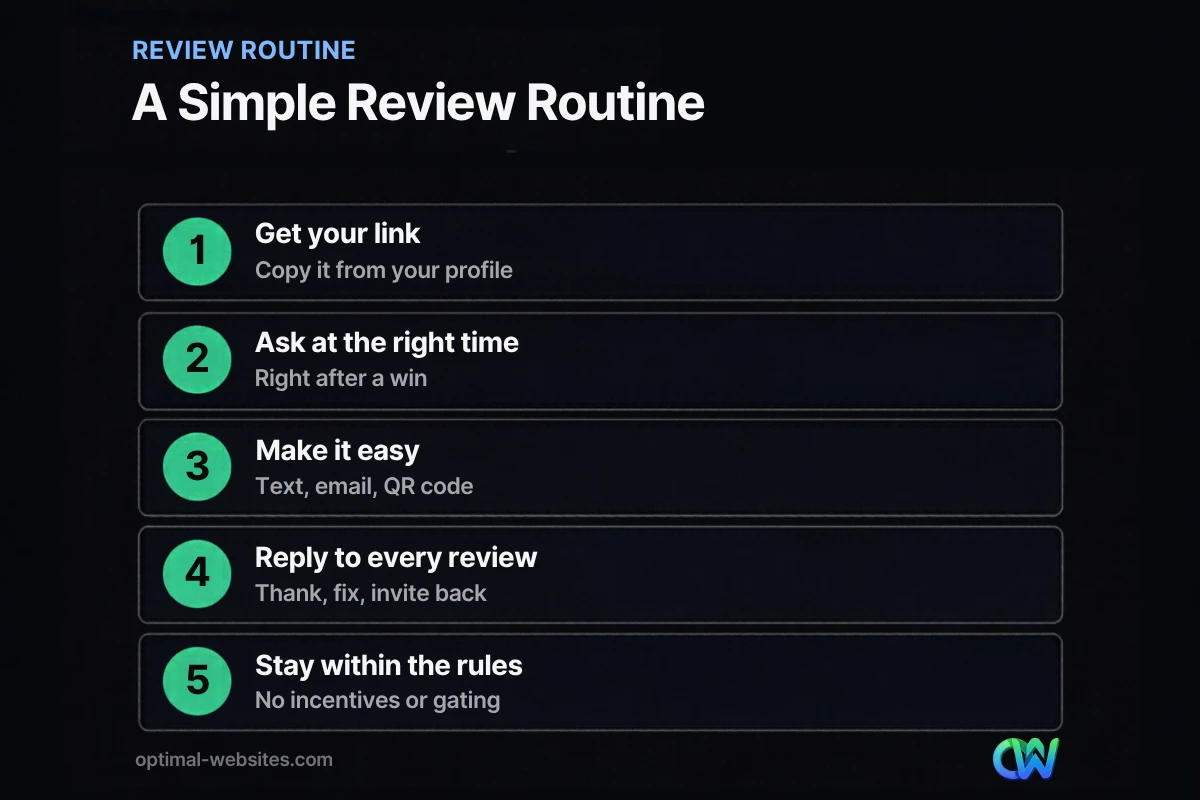
Your Google review link is a short URL that opens the review form for your business. You can find it in your Business Profile, usually through an option to ask for reviews or share a review form.
According to Google Business Profile Help, you can ask customers to leave reviews by visiting a Google link or scanning a QR code. Once you have the link:
- Save it somewhere everyone can find, such as a shared note or your CRM.
- Shorten or label it in your text templates so it looks trustworthy.
- Turn it into a QR code for invoices, receipts, job-site leave-behinds and your counter.
- Add it to your email signature and post-job follow-up emails.
- Put a “Review us on Google” button on your website’s contact or thank-you page.
How to Get More Google Reviews: When Should You Ask?
Ask when the customer is happiest, which is usually right after you deliver the result. The longer you wait, the less likely they are to follow through.
Good moments to ask include:
- When a roofing or construction job is finished and the customer has seen the result.
- When a client thanks you by phone, email or in person.
- After a successful consultation, case milestone or appointment.
- When a customer pays the final invoice and says they are happy.
Build the ask into your process so it happens every time. For example, the technician asks in person at the end of the job, and a text with the link follows the same day.
What Should a Review Request Text Say?
A good review request text is short, personal and includes the link. Mention the customer’s name and the work you did so it does not feel automated.
Review request text templates
After a completed job: “Hi Sarah, thanks again for choosing us for your roof repair. If you have a minute, a quick Google review would really help our small team: [your review link]. Thank you!”
After a consultation or appointment: “Hi James, it was great meeting with you today. If our team was helpful, would you share your experience on Google? It takes about a minute: [your review link]”
Gentle follow-up (one only): “Hi Maria, just a quick reminder in case you missed it. Your feedback helps other homeowners find us: [your review link]. Thanks either way!”
Send one follow-up at most. Repeated reminders turn goodwill into annoyance.
How Do You Respond to Google Reviews?
Respond to every review, thank people for positive feedback, and handle negative reviews calmly and professionally. Your replies are public, so write them for future customers as much as for the reviewer.
Responding to positive reviews
Thank the reviewer by name, mention the specific service, and keep it brief. Vary your wording so replies do not look copied and pasted.
Example reply: “Thanks, David! We’re glad the new gutters held up through last week’s storm. We appreciate you trusting us with your home.”
Responding to negative reviews
- Wait until you are calm, but reply within a few days.
- Acknowledge the experience without arguing about details in public.
- Apologize for the frustration and explain briefly what you are doing about it.
- Move the conversation offline with a direct phone number or email.
- Never share private details about the customer or their job.
If a review is fake or breaks Google’s policies, you can report it through your Business Profile. Reply professionally in the meantime, because reports can take time.
What Review Practices Should You Avoid?
Avoid anything that buys, filters or fakes reviews. Google Business Profile Help says offering free or discounted goods or services in exchange for reviews is strictly prohibited.
The Federal Trade Commission’s rule on fake reviews, announced in August 2024, bans fake reviews, incentives tied to positive or negative sentiment, and using threats or intimidation to suppress negative reviews.
Practices to avoid:
- Offering discounts, gift cards or raffle entries for reviews.
- “Review gating,” where you only send the link to customers you expect to be happy.
- Writing reviews for your own business or asking staff and family to do it.
- Buying reviews from any service, no matter how it is marketed.
- Asking customers to change or remove a negative review in exchange for something.
How Can Your Website Help You Get More Reviews?
Your website can support your review routine and show reviews to visitors who never open Google Maps. A few small additions make a difference.
- A review link on your thank-you page after someone books or pays.
- A short “Leave us a review” page with your Google link and QR code, easy to share by text.
- Recent reviews on service pages, quoted accurately with the reviewer’s permission.
- Clear contact options so unhappy customers reach you before they post publicly.
At Optimal Websites, a WordPress web design agency based in Delaware, we often add review sections and review-link pages to sites for roofers, contractors and law firms, because social proof near the call to action helps visitors decide. If reviews are strong but inquiries are low, our guide on what to fix when your website is not generating leads is a good next step.
How Optimal Websites Can Help
Reviews work best as part of a complete local strategy. Our SEO services cover Google Business Profile setup, review workflows, local pages and website improvements that turn searchers into customers. For the bigger picture, see our guide to local SEO for small business.
Frequently Asked Questions
How do I ask customers for Google reviews without being pushy?
Ask in person first, at a natural moment such as the end of a successful job, then follow up the same day with a short text that includes your Google review link. Keep it personal and optional. One reminder is fine; more than that feels pushy. Most happy customers are glad to help when asking is simple.
Where do I find my Google review link?
Your Google review link is in your Google Business Profile, usually under the option to ask for reviews or share a review form. Copy it, save it where your team can reach it, and use it in texts, emails, invoices and QR codes. It takes customers straight to the review form for your business.
Can I offer a discount for a Google review?
No. Google prohibits offering free or discounted goods or services in exchange for reviews, and the FTC’s 2024 rule bans incentives tied to positive or negative sentiment. If you want to know how to get more Google reviews the right way, focus on timing, a direct link and consistent asking instead of rewards.
Should I respond to Google reviews?
Yes. Responding to Google reviews shows customers that you care, gives context to negative feedback and makes your profile look active. Thank positive reviewers by name and mention the service. For negative reviews, stay calm, acknowledge the issue and offer to resolve it offline. Future customers read your replies too.
How many Google reviews does a business need?
There is no fixed number. What matters is having more recent, detailed reviews than the competitors customers compare you with, and a steady flow over time. A business with a handful of reviews from years ago looks less active than one with regular new local reviews, even if both have similar ratings.
Can I remove a bad Google review?
You cannot remove a review just because it is negative. You can report reviews that break Google’s policies, such as fake reviews, spam or off-topic content, and Google may remove them. For genuine negative feedback, the best response is a calm public reply and an effort to resolve the issue offline.
Ready to Get Started?
Want a steady stream of reviews and a website that turns them into calls? Request a free quote or call (302) 554-9497 to talk about your local SEO.


