
Last updated: October 15, 2026
Quick answer: To learn how to promote blog posts on social media, treat each post as raw material. Pull out its key points, rewrite them as native posts for each platform (carousels, short videos, text posts, pins), link back with tracked URLs, schedule a launch week plus reshares over the following months, and keep the formats that bring clicks.
You spent hours on a blog post, hit publish, shared the link once on Facebook, and watched almost nothing happen. That is a common story among small business owners, and it is why so many company blogs feel like wasted effort. Knowing how to promote blog posts on social media fixes that. A good article can feed weeks of social content, bring the right people to your website, and turn readers into calls and quote requests. This guide gives you a repurposing workflow, a platform-by-platform table, and a scheduling checklist you can reuse for every article.
Key Takeaways
- One link share is not promotion. Turn each blog post into five to ten native social posts in different formats.
- Match the format to the platform: carousels and reels on Instagram, text posts and documents on LinkedIn, pins on Pinterest, short clips on YouTube and TikTok.
- Add UTM tags to every link so you can see which platform actually sends readers and leads.
- Promote in waves: a launch week, a reshare a few weeks later, and a refresh every few months.
- Your blog post has to be worth the click. Fast pages, a clear headline and an obvious next step do the converting.
Why Should You Promote Blog Posts on Social Media?
Promoting blog posts on social media puts your best expertise in front of people who are already scrolling, and gives them a reason to visit your website. Search traffic takes months to build; social distribution can start the day you publish.
Your audience is almost certainly there. According to Pew Research Center’s 2025 social media fact sheet, 84% of U.S. adults say they use YouTube, 71% use Facebook, 50% use Instagram, and 37% use TikTok. The challenge is standing out in a crowded feed.
What counts as blog promotion?
Blog promotion is the planned work of getting a published article in front of the right readers after it goes live. On social media, that means native posts, tracked links, replies to comments and repeat sharing, not a single “new post” announcement.
How to Promote Blog Posts on Social Media: Repurpose One Post Into Many
Repurposing means breaking a blog post into its strongest ideas and rebuilding each one as a post that fits a specific platform. One 1,500-word article usually holds enough material for five to ten social posts.
Here is the workflow we use when we promote client articles:
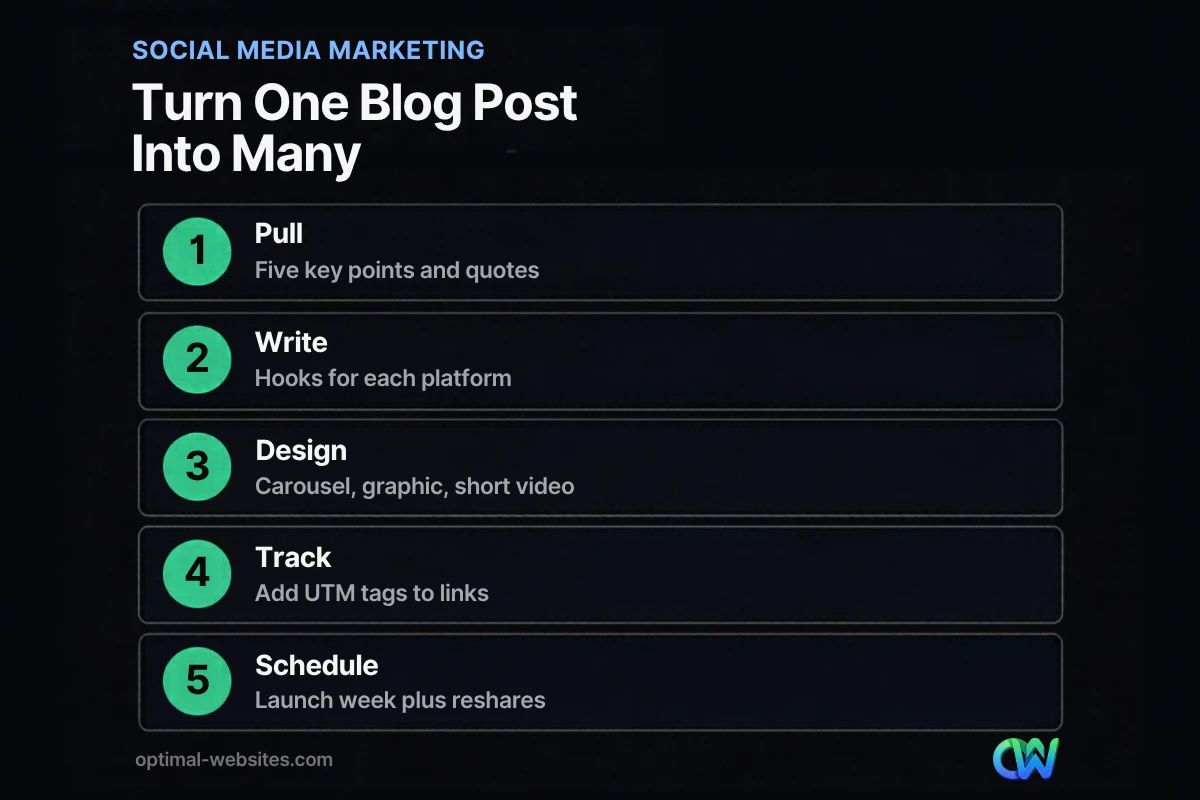
- Pull the raw material. Reread the post and list five key points, two or three quotable lines, any numbers you cited (with the source), and one question the post answers.
- Write a hook for each point. A hook is the first line people see before “see more.” Lead with the problem or the payoff, use “you,” and keep it specific. “Most roof leaks start at the flashing, not the shingles” beats “New blog post: roofing tips.”
- Choose formats. Turn a list into a carousel or LinkedIn document, a single tip into a quote graphic, a how-to into a 30–60 second video, and the whole post into a short text summary.
- Add tracked links. Use UTM parameters so you can see results by platform (details below).
- Build a schedule. Plan a launch week, a reshare a few weeks later, and a refresh every few months.
- Review and recycle. Check which formats brought clicks and conversations, then use that to plan the next article.
What formats can one post become?
| Blog element | Social format | Best platforms |
|---|---|---|
| Numbered list or steps | Carousel or document post | Instagram, LinkedIn, Facebook |
| A single strong tip | Quote graphic or text post | LinkedIn, Facebook, X, Threads |
| A how-to section | 30–60 second vertical video | YouTube Shorts, Instagram Reels, TikTok |
| A checklist or infographic | Tall pin or saved graphic | Pinterest, Instagram |
| The full article | Short summary with link | LinkedIn, Facebook, Google Business Profile |
| A common question | Poll or discussion post | LinkedIn, Facebook groups, Instagram Stories |
Keep each post native
Native content is written and designed for the platform where it appears. Give away a real tip in the post itself, then offer the full article as the next step.
Which Social Platforms Work Best for Blog Promotion?
The best platforms are the ones your buyers already use and that suit your content type. Most small businesses should focus on two or three, not all of them.
| Platform | What works | Tone | Good fit for |
|---|---|---|---|
| Summaries with a link, photos, short video, group discussions | Friendly, local, practical | Local service businesses, contractors, healthcare | |
| Carousels, Reels, Stories with a link sticker | Visual, quick, personal | Before-and-after work, lifestyle and retail brands | |
| Text posts, document carousels, expert commentary | Professional, insight-driven | B2B, law firms, engineering, construction | |
| Tall pins with a clear title that link to the post | Helpful, evergreen | How-to, design, home improvement, recipes | |
| YouTube | Shorts and longer explainers that point to the article | Educational | Any business that can demonstrate a process |
| TikTok | Fast, casual how-to clips | Casual, authentic | Consumer brands with a younger audience |
| X and Threads | Short takes, threads, timely commentary | Conversational | Industry news, founders, startups |
| Google Business Profile | Updates that link to a relevant post | Local and direct | Any business with a local service area |
From our own work: a law firm or engineering firm usually gets more from LinkedIn and Google Business Profile than from TikTok, while a roofing company can turn project photos and a short walkthrough video into Facebook and Instagram posts that point to a related article. If unsure, start where your current inquiries come from.
For simple clips that need no production crew, see our guide to short-form video for social media.
How Often Should You Share the Same Blog Post?
Share a new post several times over its first week in different formats, reshare it a few weeks later, and bring it back every few months while it stays accurate. Evergreen posts can be promoted for years.
There is no universal “right” frequency. What matters most is consistency: a steady rhythm you can keep for a year beats a burst of daily posting followed by silence.
A simple promotion rhythm for each article looks like this:
- Day 1: Native summary post with link on your two main platforms.
- Days 2–4: A carousel or graphic built from the list or key steps.
- Days 5–7: A short video or quote post with a different hook.
- Weeks 3–4: Reshare with a new angle or a comment from a customer question.
- Every 2–3 months: Rotate evergreen posts back into the schedule.
When an older post starts to slip, update it first and then promote it again. Our guide on how to refresh older posts so they rank again walks through that process.
What Should Be on Your Social Media Scheduling Checklist?
A scheduling checklist makes sure every promoted post has a hook, the right format, a working tracked link and a time slot before it goes live. Use the one below for every article.
Before you schedule:
- [ ] The blog post loads quickly on mobile and has a clear headline and call to action.
- [ ] A featured image and social preview (title, description, image) display correctly when the link is pasted.
- [ ] Five key points, two quotes and one question are pulled from the article.
- [ ] Each platform has its own hook, written in that platform’s tone.
- [ ] Visuals are sized for each platform (square or portrait for feeds, vertical for Reels, Shorts and Stories, tall for Pinterest).
- [ ] Every link uses UTM tags and has been tested.
- [ ] Images have alt text.
When you schedule:
- [ ] Launch week posts are spread across different days and formats.
- [ ] A reshare is booked three to four weeks out.
- [ ] Evergreen posts are tagged for rotation in your scheduling tool.
- [ ] Someone is assigned to reply to comments and messages within a business day.
After it runs:
- [ ] Clicks, form fills and calls from each platform are recorded.
- [ ] The best-performing hook and format are noted for the next article.
How Do You Track Which Social Posts Bring Traffic?
Track social traffic by adding UTM parameters to every link and reviewing the results in Google Analytics. UTM tags are short labels added to the end of a URL that tell your analytics where a visitor came from.
The Google Analytics guide to campaign URLs says you should always use utm_source, utm_medium and utm_campaign when you add these parameters. For a blog promotion, that might look like source = linkedin, medium = social, and campaign = the post’s slug. Add utm_content if you want to compare a carousel against a video for the same post.
Then focus on numbers that connect to revenue: sessions from each platform, engaged sessions, and conversions such as form submissions, calls and quote requests. A post with fewer likes that brings two quote requests is the winner.
What Makes a Blog Post Worth Sharing in the First Place?
A blog post is worth sharing when it answers a real question better than the alternatives, loads quickly, and makes the next step obvious. Promotion multiplies what is already there; it cannot fix a weak article.
Write headlines people want to click
Your headline appears in every link preview. Be specific about the problem and the result, speak to the reader with “you,” and deliver what the headline promises. Clickbait that disappoints teaches people to scroll past your next post.
Write for people first
Google’s guidance on helpful, people-first content asks whether readers would want to bookmark or share a page with a friend. That is a useful test for social, too. Original insight from your own work gets shared; generic, rewritten content does not.
Make the landing experience fast and clear
Social clicks mostly arrive on phones. If the page is slow or cluttered, people bounce back to the feed. On the WordPress sites we build with Elementor Pro, we design blog templates mobile-first with readable type, a visible call to action and related posts so social visitors have somewhere useful to go next. If your blog is part of a larger content marketing plan for small businesses, each post should also link to the service page it supports.
How Optimal Websites Can Help
If writing articles and turning them into social content every week is more than your team can take on, we can help with either side or both. Optimal Websites, a WordPress web design agency based in Delaware, offers a blog writing service for search-friendly articles in your voice, and social media marketing services that turn those articles into platform-ready posts.
We work with contractors, engineering firms, law firms, healthcare providers and local service businesses, and because we build fast, mobile-first WordPress sites, the pages your social traffic lands on are ready to convert. You can compare options on our website and content packages page.
Frequently Asked Questions
How do I promote my blog posts on social media for free?
You can promote blog posts on social media for free by sharing native posts on your business pages, repurposing each article into carousels, graphics and short videos, posting in relevant groups where self-promotion is allowed, and asking employees to share. Free native schedulers in Meta Business Suite and LinkedIn Pages handle the timing. Paid boosts are optional and work best on posts that already perform well.
How many times should I share a blog post on social media?
Share a new blog post several times during its first week using different formats and hooks, reshare it three to four weeks later, and rotate it back every few months while it stays accurate. Evergreen articles can be promoted for years. Consistency matters more than any exact number, so pick a rhythm your team can maintain.
What is the best social media platform to promote a blog?
The best platform to promote a blog is the one your customers already use. LinkedIn tends to suit B2B, legal and professional services. Facebook and Instagram suit local and consumer businesses. Pinterest works well for how-to and design content with a long shelf life. Start with two platforms, track clicks with UTM tags, and expand only when you see results.
Should I post the full blog post on LinkedIn or Facebook?
Usually no. Post a native summary with one or two real tips and a link to the full article on your website. That gives people value in the feed while still sending interested readers to your site, where they can contact you. Republishing entire articles on social platforms gives away the traffic your website needs to generate leads.
How do I repurpose blog content for social media?
To repurpose blog content for social media, pull five key points, a few quotable lines and one central question from the article. Turn lists into carousels, single tips into quote graphics, how-to sections into short vertical videos, and checklists into Pinterest pins. Write a new hook for each platform and link back to the original post with a tracked URL.
How long does it take to see results from blog promotion on social media?
Many businesses see clicks within days of a well-built launch week, but leads usually take longer because trust builds over repeated exposure. Give a consistent promotion system at least three months before judging it, and measure conversions from social visitors in Google Analytics, not just likes. Evergreen posts often keep producing traffic long after they are first shared.
Ready to Get Started?
Want your blog posts to work harder on social media and bring in real inquiries? Request a free quote or call us at (302) 554-9497. We will look at your current blog and social channels and suggest a plan that fits your business.


