
Last updated: October 15, 2026
Quick answer: Google Analytics 4 for small business is Google’s free tool for measuring how people find and use your website. Set it up by creating a GA4 property, adding a web data stream, installing the Google tag, marking leads as key events, and linking Search Console. Then focus on a handful of reports instead of everything.
Many owners open Google Analytics once, see dozens of menus, and close the tab. That is costly, because without clean data you cannot tell which marketing actually brings in calls and quote requests, and which is quietly burning budget. This guide covers Google Analytics 4 for small business in plain terms. You will learn how to set GA4 up correctly, how to track the actions that matter (form leads, phone taps, bookings), how to connect Search Console so you can see your Google search data, and which few reports deserve a spot in your monthly routine.
Key Takeaways
- Universal Analytics is gone. Google Analytics 4 (GA4) is the only version of Google Analytics that collects website data today.
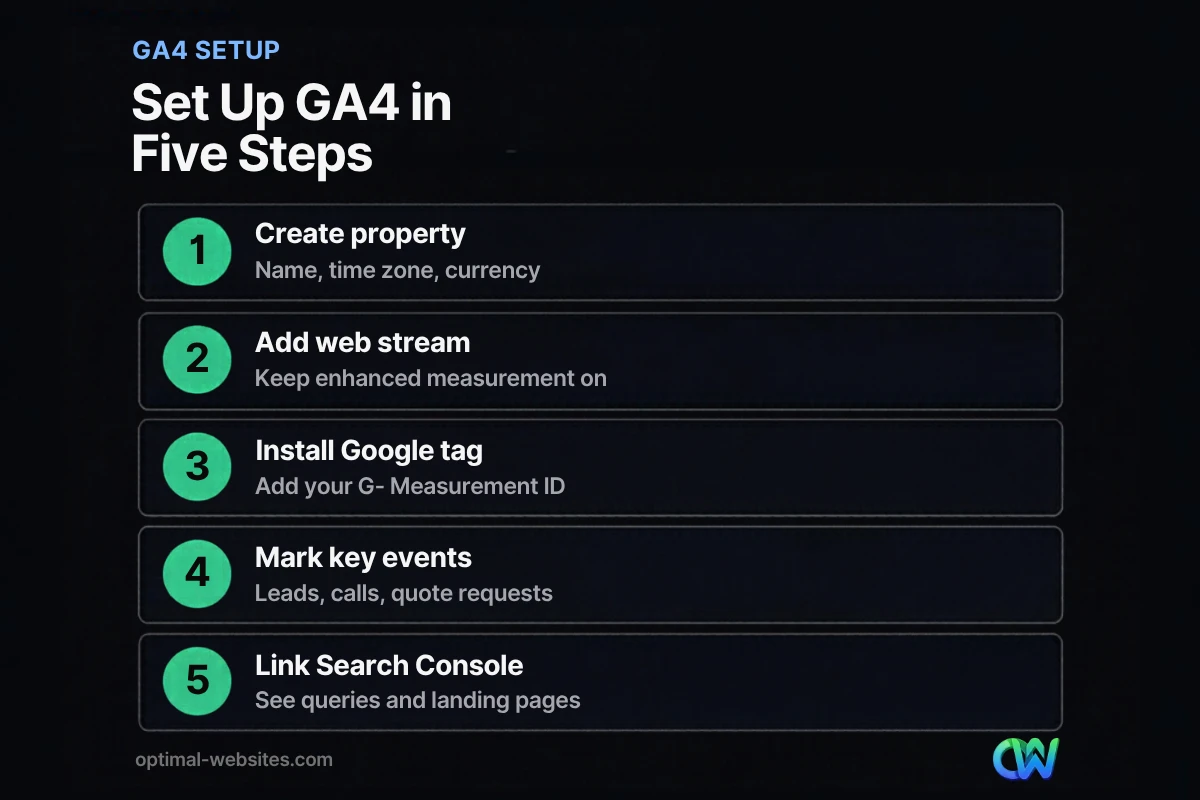
- Setup takes six steps: property, web data stream, Google tag, key events, Search Console link, and data retention.
- Key events are the actions that matter to your business, like a submitted quote form. Mark them, or GA4 cannot tell you what is working.
- Linking Search Console adds the search queries and landing pages that bring people to your site from Google.
- Five or six reports answer almost every small business question. You can ignore the rest.
What Is Google Analytics 4, and Is Universal Analytics Really Gone?
Google Analytics 4 is the current version of Google’s free web analytics platform, built around events (individual actions such as a page view, a scroll or a form submission) instead of the sessions and pageviews of the old system. And yes, Universal Analytics is fully retired.
According to Google’s note on the Universal Analytics shutdown, standard Universal Analytics properties stopped processing data on July 1, 2023. Paid 360 customers received a one-time extension, and access to the Universal Analytics interface and API ended for everyone starting July 1, 2024. If your site still has an old “UA-” tracking code and nothing else, it has not recorded any data since mid-2023.
For a small business, the practical changes come down to three things:
- Everything is an event. A page view, a click on an outbound link and a form start are all events, so you track leads the same way you track any other action.
- Engagement replaces bounce rate as the headline metric. GA4 counts an engaged session as one that lasts longer than 10 seconds, includes a key event, or has 2 or more page views. Bounce rate still exists, but it is now simply the share of sessions that were not engaged.
- Reports are organized by the customer journey. Acquisition tells you where visitors came from, Engagement shows what they did, and key events show whether they took the action you care about.
How Do You Set Up Google Analytics 4 for Small Business?
You set up GA4 by creating a property, adding a web data stream, installing the Google tag on your site, and then configuring key events, Search Console and data retention. The first four steps follow Google’s official GA4 setup instructions; the last two are where most small business setups fall short.
- Create an account and property. Go to analytics.google.com, open Admin, and create an account if you do not have one. Add a property with your business name, your reporting time zone and your currency, then pick your industry and business size.
- Add a web data stream. In Admin, under Data collection and modification, open Data streams, choose Web, and enter your website URL. Leave enhanced measurement turned on so GA4 automatically collects page views, scrolls, outbound clicks, site search, YouTube video plays, file downloads and form interactions.
- Install the Google tag. Copy your Measurement ID (it starts with “G-“) from the stream details. Many website platforms have a field for it. On WordPress, you can use a plugin such as Google’s own Site Kit, add the tag through Google Tag Manager, or paste the tag into your theme’s header. Google notes that data collection may take up to 30 minutes to begin, so check the Realtime report to confirm visits are coming in.
- Mark your key events. Decide which actions count as a lead and mark those events as key events (more on this below).
- Link Search Console. Connect your verified Search Console property so its search data shows up inside GA4.
- Extend data retention. In Admin, under Data retention, standard properties can keep detailed event data for 2 months or 14 months. Choose 14 months. This setting does not change standard reports, but it does control how far back you can go in explorations and funnel reports, which you will want for year-over-year comparisons.
Common setup mistakes to avoid
- Two tags at once. A plugin and a hard-coded tag both firing will double-count your traffic.
- Counting your own visits. You and your team visit the site constantly. Define internal traffic in your Google tag settings and activate the internal traffic data filter so office visits do not skew the numbers.
What Are Key Events in GA4 and How Do You Track Leads?
Key events are the events that measure actions important to the success of your business, such as a submitted contact form, a booked appointment or a tap on your phone number. Google renamed what GA4 used to call “conversions” to key events, and the word “conversion” now refers to what you use in Google Ads.
The distinction matters if you advertise. As Google explains in its article on how key events and conversions differ, you mark an event as a key event in Analytics, and if you link Google Ads, you can create a Google Ads conversion from that key event to measure campaigns and optimize bidding. If you do not run ads, key events are all you need.
Which actions should small businesses mark as key events?
For most service businesses, a short list is enough:
- Quote or contact form submitted. The most reliable approach is to send people to a thank-you page after they submit and track that page view, or to fire a custom event when the form succeeds.
- Phone number tapped. Enhanced measurement only tracks outbound clicks to other domains, so taps on a “tel:” link usually need a custom event, often set up in Google Tag Manager.
- Booking or checkout completed. If you sell online, a purchase event belongs here.
How we handle this on WordPress builds
On the Elementor Pro sites we build for contractors, roofers, law firms and other local service businesses, we treat lead tracking as part of the launch, not an afterthought. Every quote form gets a confirmed success event, and every click-to-call button gets its own event, because on mobile the phone tap is often the most valuable action on the page. Before launch, we submit a test form and tap the phone button, then confirm both show up in the Realtime report.
Should You Link Google Search Console to GA4?
Yes. Linking Search Console to GA4 lets you see the Google search queries and organic landing pages behind your traffic in the same place as your engagement and key event data. Together they answer which searches actually produce leads.
Google first started testing combined Search Console and Analytics reports back in 2020. Today it is a standard feature. Google’s Search Console linking guide lays out the requirements:
- You need the Editor role on the Analytics property and must be a verified owner of the Search Console property.
- In GA4, go to Admin, then Product links, then Search Console links, and click Link. Choose your Search Console property, select your web data stream, and submit.
- The link is one-to-one: one web data stream connects to one Search Console property.
- Search Console data appears in Analytics about 48 hours after Search Console collects it, and the reports cover up to 16 months, the same window Search Console keeps.
One catch trips up many owners: the Search Console reports are unpublished by default. After linking, open the Library section under Reports and publish the Search Console collection so the Google Organic Search Queries and Google Organic Search Traffic reports appear in your menu. If you are still setting up Search Console itself, start with our guide to SEO for small business.
Which GA4 Reports Matter Most for a Small Business?
The reports that matter most are the ones that connect traffic sources to leads: traffic acquisition, landing pages, key events and the two Search Console reports. Six reports cover a solid monthly review.
| Report | Where to find it | What it tells you | Question it answers |
|---|---|---|---|
| Traffic acquisition | Reports > Acquisition > Traffic acquisition | Sessions, engagement rate and key events by channel | Which channels bring visitors who turn into leads? |
| Landing page | Reports > Engagement > Landing page | The first page people see in each session | Which pages are the real front door of your site? |
| Pages and screens | Reports > Engagement > Pages and screens | Views and engagement for every page | Which service pages hold attention, and which get ignored? |
| Key events | Reports > Engagement > Events, plus Admin > Key events | How often each lead action happened | Are form fills and phone taps going up or down? |
| Google Organic Search Queries | Search Console collection (publish it first) | Clicks, impressions, CTR and position by query | What are people searching for when they find you? |
| Google Organic Search Traffic | Search Console collection (publish it first) | Organic landing pages with Search Console and GA4 metrics | Which pages win on Google and also keep visitors engaged? |
A 20-minute monthly review
- Open Traffic acquisition and compare key events by channel to last month.
- Check the Landing page report for pages with high traffic but low engagement. Those pages need a clearer headline, faster load time or a stronger call to action.
- Scan Google Organic Search Queries for searches with many impressions but few clicks. Rewriting those page titles and meta descriptions is often a quick win.
If your traffic is fine but leads are flat, the problem is usually on the page, not in the analytics. Our article on turning more visitors into leads covers what to fix first.
What Can GA4 Not Tell a Local Business?
GA4 only measures what happens on your website, so it misses calls and direction requests that start on Google Maps or your Business Profile. For local businesses, that can be a large share of new customers.
Fill that gap in three ways. First, check the performance data inside your Business Profile, and add a tracking parameter to your Profile’s website link so those visits show up as their own source in GA4. Our guide to Google Business Profile optimization walks through the Profile side. Second, ask new customers how they found you, and log the answer. Third, treat GA4 numbers as directional, since ad blockers and consent choices mean some visits never get recorded.
How Optimal Websites Can Help
Optimal Websites, a WordPress web design agency based in Delaware, builds fast, mobile-first WordPress sites with Elementor Pro and sets up the tracking foundation at launch: the Google tag, lead key events for forms and phone taps, and a Search Console connection. Through our SEO services, we also use that data to decide which pages to improve next.
Most projects launch in 2–4 weeks, and you get video tutorials so you can update your own site afterward. Take a look at our website packages and pricing to see which option fits your business.
Frequently Asked Questions
Is Google Analytics 4 free for small businesses?
Yes. The standard version of Google Analytics 4 is free, and it covers what nearly every small business needs, including traffic reports, key events, and Search Console and Google Ads integrations. Google also sells Analytics 360, a paid tier with higher limits and longer data retention, built for large enterprises.
Can I still use Universal Analytics?
No. Standard Universal Analytics properties stopped processing data on July 1, 2023, and Google ended access to the Universal Analytics interface and API starting July 1, 2024. If your website still only has an old “UA-” tracking code, it is not collecting any data. Set up Google Analytics 4 for small business tracking with a new GA4 property and the Google tag instead.
How long does it take for data to show up in GA4?
Google says data collection may take up to 30 minutes to begin after you install the Google tag. You can confirm it is working right away by visiting your site and checking the Realtime report. Standard reports can take longer to fill in, and Search Console data arrives about 48 hours after Search Console collects it.
What is the difference between a key event and a conversion in GA4?
A key event is an action you mark in Google Analytics because it matters to your business, such as a submitted quote form. A conversion is what you create in Google Ads from a key event to measure ad campaigns and optimize bidding. If you do not advertise on Google, you only need to set up GA4 key events.
How do I track phone calls from my website in GA4?
GA4’s enhanced measurement does not track taps on phone links by default, because it only records outbound clicks to other domains. The usual fix is a custom event that fires when someone taps a “tel:” link, often configured in Google Tag Manager. Mark that event as a key event so phone leads show up in your reports.
Why do GA4 and Search Console show different numbers?
They measure different things. Search Console counts clicks from Google Search results, while GA4 counts sessions on your site after the Google tag loads. Visitors who leave before the page loads, block tracking, or decline cookies may appear in Search Console but not in GA4. Use both for trends rather than expecting the numbers to match exactly.
Ready to Get Started?
Want a website that is fast, built to convert, and set up to measure every lead from day one? Request a free quote or call us at (302) 554-9497 to talk through your project.


