
Quick answer: A website redesign checklist protects your rankings by covering four things: record your current traffic and rankings, inventory every URL, map each old URL to its new home with 301 redirects, and test everything on a staging site before launch. After launch, monitor Search Console for several weeks and fix errors fast.
A redesign should make your business look better and win more customers. Too often it does the opposite: the new site launches, Google traffic drops by half, and the phone goes quiet. The cause is rarely the design itself. It is broken URLs, missing pages, lost content and forgotten redirects. This website redesign checklist walks you through every step, before, during and after launch, so you can modernize your site without throwing away the search visibility you spent years earning.
Key Takeaways
- Benchmark traffic, rankings and leads before you change anything, so you can spot problems quickly.
- Crawl the old site and build a complete URL list, including pages that rarely get visits.
- Map every old URL to the most relevant new URL and use permanent 301 redirects.
- Build and test the new site on staging, including forms, tracking, speed and mobile layout.
- Expect some ranking movement after launch, and monitor Search Console closely for a few weeks.
Why Do Websites Lose Rankings After a Redesign?
Sites usually lose rankings after a redesign because URLs change without redirects, valuable content gets cut, or technical settings block search engines. Each of these tells Google the pages it trusted are gone.
The most common causes we see are:
- Changed URLs with no redirects, so old links and search results lead to 404 errors.
- Removed or thinned content, often when long service pages get replaced by short, design-led sections.
- Lost title tags and meta descriptions that were never copied to the new pages.
- Search engines blocked by mistake, usually a “discourage search engines” setting left on from staging.
- Slower pages, because heavy animations and large images replaced a lighter design.
- Broken tracking, which makes it impossible to tell what went wrong.
If your current site is struggling, our guide on why a website not showing up on Google happens covers indexing problems that a redesign can either fix or make worse.
What Goes on a Website Redesign Checklist Before You Start?
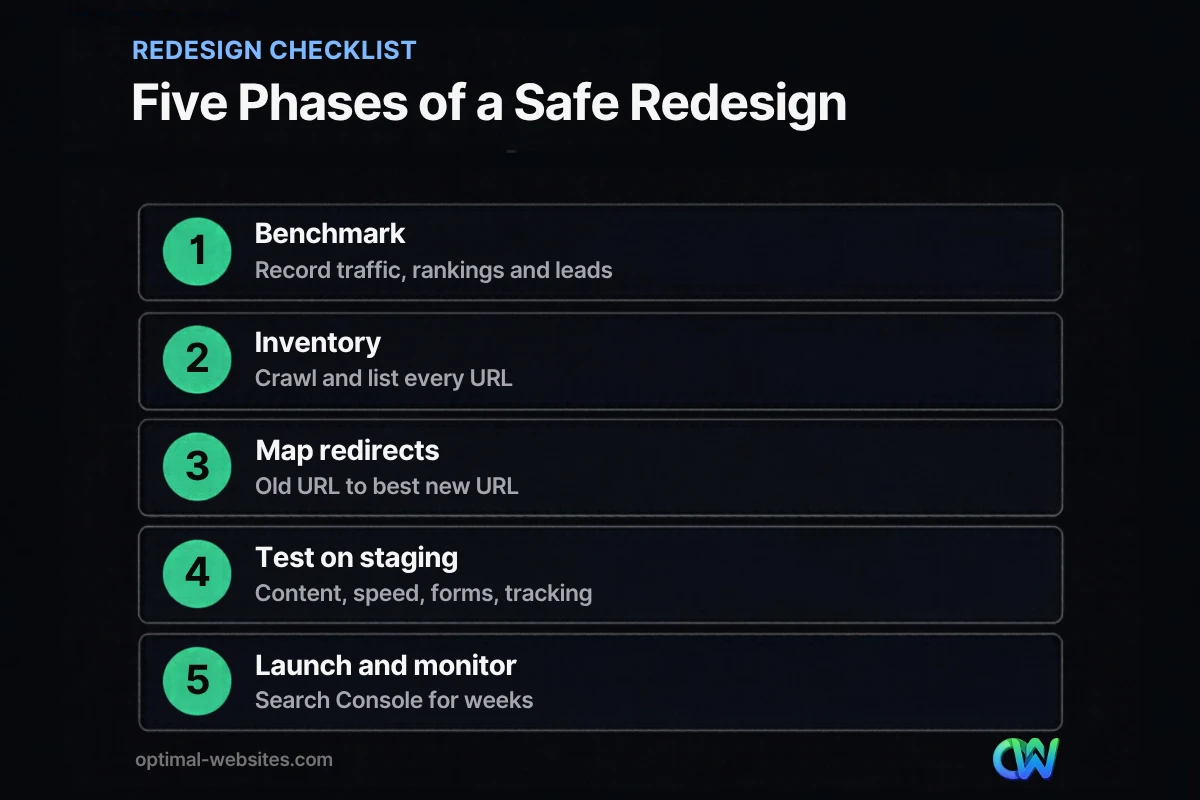
Before a redesign, record how the current site performs, list every URL and decide what content stays. This phase is the foundation of website redesign SEO.
1. Benchmark current performance
Export the last 12 months of data from Google Search Console and Google Analytics: top pages, top queries, clicks, impressions and conversions. Note which pages bring the most leads, not just the most traffic.
2. Crawl and inventory every URL
Use a crawler to list every page, post, image and PDF on the current site. Add URLs from Search Console and analytics, since crawlers can miss pages with no internal links. Save the list in a spreadsheet; it becomes your redirect map.
3. Decide what to keep, merge or remove
Mark each page as keep, merge, rewrite or remove. Pages that rank or convert should stay or improve, not disappear. Thin or duplicate pages can be merged into stronger ones.
4. Save on-page SEO elements
Copy title tags, meta descriptions, headings, image alt text and structured data for pages you are keeping. These are easy to lose when content is rebuilt in a new theme.
How Do You Map 301 Redirects During a Redesign?
Map every old URL to the single most relevant new URL, then set up permanent 301 redirects. Google’s documentation on redirects recommends a permanent server-side redirect whenever possible as the best way to send both Google and visitors to the correct page.
Google’s guide to site moves with URL changes stresses mapping old URLs to new ones and advises keeping redirects for as long as possible, generally at least one year.
Redirect mapping rules
| Situation | What to do |
|---|---|
| Page keeps the same URL | No redirect needed; keep the content and metadata |
| Page moves to a new URL | 301 redirect from old URL to new URL |
| Two pages merge | Redirect both old URLs to the merged page |
| Page is removed with no replacement | Redirect to the closest relevant page, or let it return 404 if nothing fits |
| Domain changes | Redirect every URL one-to-one, not all to the homepage |
Avoid redirect chains, where one URL redirects to another that redirects again. Point each old URL straight to its final destination. And never send every old page to the homepage; Google may treat those as soft 404s.
What Belongs on a Website Migration Checklist Before Launch?
Before launch, test the new site on a private staging copy and run through a full website migration checklist. Catching problems here is far cheaper than fixing them after Google has recrawled.
- All pages from your keep list exist on the new site with their content.
- Title tags, meta descriptions and H1s are in place on every important page.
- The redirect map is loaded and tested, with no chains or loops.
- Internal links point to new URLs directly, not through redirects.
- Forms submit and notifications arrive in the right inbox.
- Analytics and conversion tracking are installed and tested.
- Pages load quickly on mobile and pass a PageSpeed Insights check.
- Images have descriptive file names and alt text.
- A new XML sitemap lists only live, indexable URLs.
- The staging site is blocked from search engines, and the live site will not be.
Speed deserves special attention. A redesign is the perfect time to fix a slow WordPress site, but new sliders, videos and animation libraries can just as easily make it slower.
What Should You Do on Launch Day?
On launch day, push the new site live, switch on redirects, confirm search engines can crawl it, and submit the new sitemap. Then spot-check the most important pages yourself.
- Go live during a quiet period, not before a holiday rush or big promotion.
- Turn off any “discourage search engines” setting and check robots.txt.
- Test 20 to 30 old URLs to confirm they redirect to the right pages.
- Submit the new XML sitemap in Google Search Console.
- Submit a test form and check analytics is recording visits.
- Inspect key pages with the URL Inspection tool in Search Console.
How Do You Redesign Without Losing Traffic After Launch?
Monitor closely for the first few weeks and fix problems as soon as they appear. Google’s site move guidance warns to expect temporary fluctuation in rankings while pages are recrawled and reindexed.
- Check Search Console daily for the first week, then weekly, for crawl errors and 404s.
- Compare clicks and impressions for your top pages against your benchmark.
- Add redirects for any old URLs you missed.
- Update links on Google Business Profile, social profiles and directories that point to old URLs.
- Keep redirects in place for at least a year, and ideally longer.
Some movement is normal. A drop that keeps getting worse after a few weeks usually points to missing redirects, lost content or a technical block, so go back through the checklist.
Should You Redesign or Refresh Your Website?
Redesign when the site is outdated, hard to update or failing on mobile; refresh when the structure works and only the look or content needs updating. A refresh carries less SEO risk because URLs stay the same.
Our article on the hidden costs of an outdated website helps you weigh what an old site is costing you. At Optimal Websites, a WordPress web design agency based in Delaware, many of our rebuilds are for contractors, roofers and law firms moving from old themes to fast, mobile-first WordPress sites built with Elementor Pro. On those projects, keeping URLs that already rank and mapping redirects before launch is part of the plan from day one, not an afterthought.
How Optimal Websites Can Help
A redesign should add leads, not cost you rankings. Our web design services include content migration, redirect mapping, on-page SEO setup and post-launch checks, so your new WordPress site keeps the visibility you have earned. Our fixed-price packages start at $999, and most projects launch in 2–4 weeks.
Frequently Asked Questions
Will a website redesign hurt my SEO?
A redesign does not have to hurt SEO, but a careless one often does. Rankings drop when URLs change without redirects, content is removed or search engines are blocked. Following a website redesign checklist, with a URL inventory, redirect map and staging tests, keeps the risk low. Some short-term movement is normal while Google recrawls.
How long should I keep 301 redirects after a redesign?
Keep 301 redirects for as long as possible, and at least one year. Google’s site move guidance recommends that minimum, and keeping them longer costs little while protecting old links from other websites. Update your own internal links and important external links to the new URLs so visitors do not rely on redirects.
Should I change my URLs during a redesign?
Only if there is a clear benefit, such as fixing messy or confusing URLs. Every changed URL needs a 301 redirect and takes time for Google to process. If your current URLs are clean and descriptive, keep them. That is the simplest way to redesign without losing traffic.
How long does it take to recover rankings after a redesign?
When redirects and content are handled well, rankings usually settle within a few weeks as Google recrawls the site. Larger sites can take longer. If traffic keeps falling after a month, check Search Console for 404 errors, missing redirects, blocked pages and pages that lost content, then fix them quickly.
What is the difference between a website redesign and a migration?
A redesign changes how a site looks and is structured, while a migration moves it to a new domain, platform, host or URL structure. Many projects involve both. A website migration checklist adds steps such as domain-wide redirects, DNS changes and updating Search Console, on top of the usual redesign checks.
Do I need an SEO expert for a website redesign?
You need someone who understands website redesign SEO, whether that is your web designer, an SEO consultant or both. The key tasks are a URL inventory, a redirect map, preserving on-page elements and post-launch monitoring. Ask any designer you hire exactly how they protect rankings before signing.
Ready to Get Started?
Planning a redesign and want to keep your rankings? Request a free quote and we will review your current site and plan a safe migration, or call (302) 554-9497.


