
Quick answer: To fix Core Web Vitals, start with the failing URL groups in Search Console, then work metric by metric: speed up the largest element for LCP, cut heavy JavaScript and plugins for INP, and set image and ad sizes for CLS. Retest in PageSpeed Insights, then validate the fix in Search Console.
Search Console just flagged your site with “Poor” or “Needs improvement” URLs, and the report is full of acronyms. You know a slow site costs you leads, but it is not obvious where to start or which fix matters most. This guide shows you how to fix Core Web Vitals issues in the order that usually pays off fastest, with practical steps for WordPress sites. You will learn how to read the Core Web Vitals report, what typically causes poor LCP, INP and CLS scores, the fixes that work, and how to confirm Google has registered the improvement.
Key Takeaways
- Core Web Vitals measure loading (LCP), responsiveness (INP) and visual stability (CLS) using real visitor data.
- Google’s “good” targets are LCP within 2.5 seconds, INP of 200 milliseconds or less, and CLS of 0.1 or less.
- Fix the metric that fails on the most important page groups first, usually on mobile.
- On WordPress, the biggest wins often come from images, hosting, caching and removing unneeded plugins.
- Field data takes time to update; use Search Console’s validation to confirm the fix.
What Are the Core Web Vitals Targets?
Core Web Vitals are three metrics Google uses to measure real-world page experience: Largest Contentful Paint (LCP), Interaction to Next Paint (INP) and Cumulative Layout Shift (CLS). INP replaced First Input Delay in March 2024.
According to Google’s Core Web Vitals thresholds, a page passes when 75% of visits meet each target:
| Metric | What it measures | Good | Needs improvement | Poor |
|---|---|---|---|---|
| LCP | How fast the main content appears | 2.5 s or less | Up to 4 s | Over 4 s |
| INP | How fast the page responds to taps and clicks | 200 ms or less | Up to 500 ms | Over 500 ms |
| CLS | How much the layout jumps around | 0.1 or less | Up to 0.25 | Over 0.25 |
If you want the basics of each metric first, read Core Web Vitals explained. This post is the hands-on fix list.
How Do You Find What to Fix in the Core Web Vitals Report?
The Core Web Vitals report in Google Search Console shows which groups of URLs fail and which metric is the problem, for mobile and desktop separately. Start there, because it uses real visitor data rather than a single lab test.
Search Console’s Core Web Vitals report groups similar pages together and labels each group Good, Needs improvement or Poor based on its worst metric. Google recommends fixing Poor groups first.
Work through it like this:
- Open the report and choose Mobile first, since Google indexes the mobile version of your site.
- Click the issue with the most URLs, such as “LCP issue: longer than 2.5s.”
- Open an example URL and run it through PageSpeed Insights to see the cause.
- Note the template (homepage, service page, blog post). Fixing the template fixes the whole group.
Our guide on how to read PageSpeed Insights explains the difference between field data and lab data in the report.
How Do You Reduce LCP?
To reduce LCP, make the largest visible element (usually a hero image or headline block) load sooner. That means a faster server response, a smaller and prioritized hero image, and less render-blocking CSS and JavaScript ahead of it.
Common LCP causes and fixes
- Oversized hero image: compress it, serve WebP or AVIF, and size it for the layout instead of uploading a 4000-pixel photo.
- Lazy-loaded hero: never lazy-load the image at the top of the page; it should load immediately.
- Slow server response: cheap shared hosting and no page caching delay everything. Server-level or plugin caching often helps a lot.
- Render-blocking CSS and fonts: remove unused CSS, limit font families and weights, and preload the main font.
- Background-image heroes: CSS background images are discovered late. A regular image element is often found sooner.
On Elementor sites, we check the hero section first: image size, whether it is set as a background, and how many fonts and widget scripts load before it.
How Do You Improve INP?
To improve INP, reduce the work the browser has to do when someone taps or clicks. Most poor INP scores come from too much JavaScript running on the main thread, often from plugins, tracking scripts, chat widgets and sliders.
The web.dev guide to optimizing INP breaks every interaction into three parts: input delay, processing time and presentation delay. For a small business site, the practical fixes are:
- Audit plugins. Deactivate anything you do not use, and replace heavy all-in-one plugins with lighter options.
- Trim third-party scripts. Review chat, heatmap, ad and social embed scripts. Load them only where needed, or after the page settles.
- Simplify heavy widgets. Mega menus, sliders and popups with lots of animation can block responses.
- Keep the page lighter. Very long pages with thousands of elements take longer to update after a tap.
- Test the real interactions. Open the menu, submit the form, tap the accordion. Those are the moments INP measures.
INP is the metric most WordPress owners have not tackled yet, because it only became a Core Web Vital in 2024.
How Do You Fix Layout Shift (CLS)?
To fix layout shift, reserve space for everything before it loads, so content does not jump when images, ads, embeds or fonts arrive. CLS problems are usually the easiest of the three to solve.
| Cause | Fix |
|---|---|
| Images without width and height | Set dimensions or an aspect ratio on every image |
| Cookie banners or bars pushed in at the top | Overlay them instead of pushing content down |
| Embeds (maps, videos, review widgets) | Wrap them in a container with a fixed height or aspect ratio |
| Web fonts swapping in late | Preload key fonts and use matching fallback fonts |
| Content injected above existing content | Insert new content below the fold or on user action only |
If your CLS is poor only on mobile, look at the header first. Sticky headers that change height on scroll are a frequent culprit.
What Order Should You Fix Core Web Vitals In?
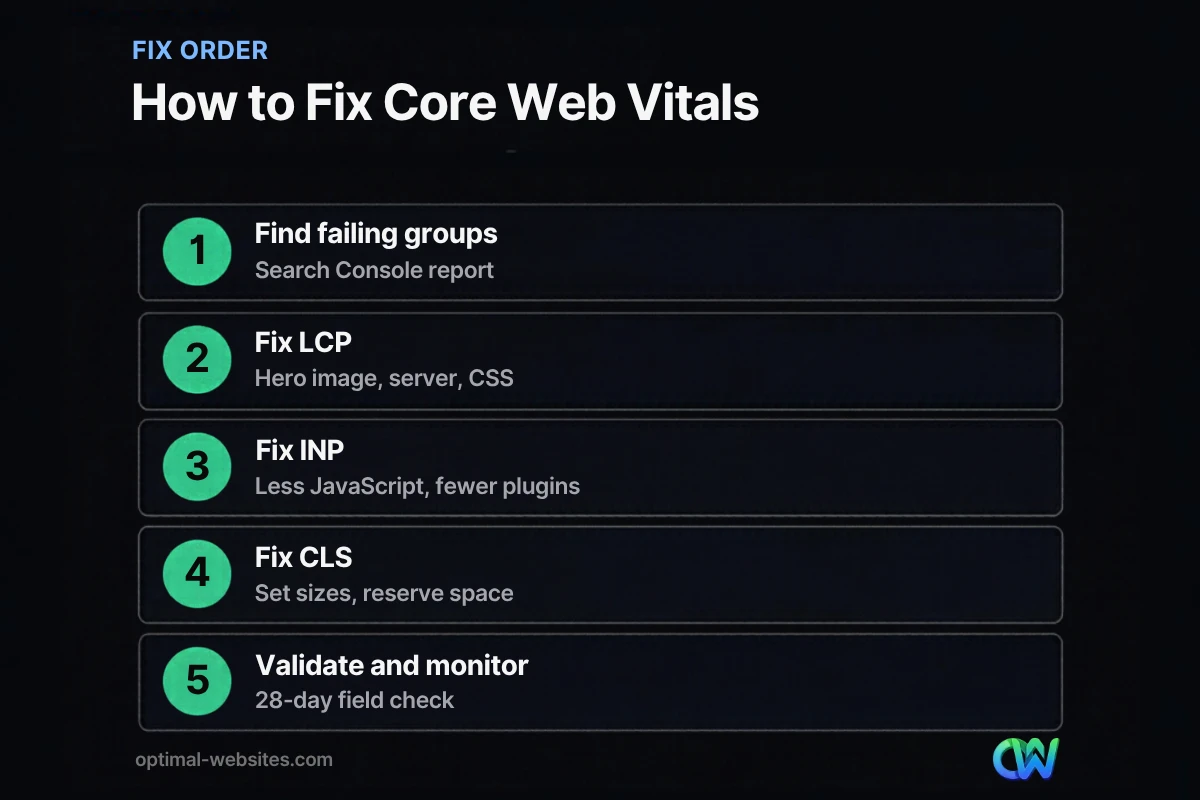
Fix the metric that fails on your most valuable pages first, starting with mobile. For most small business sites that means LCP on the homepage and service pages, then INP sitewide, then any remaining CLS issues.
A practical order:
- Hosting and caching. A faster server improves LCP everywhere at once.
- Images. Compress, resize, and stop lazy-loading the hero.
- Plugins and scripts. Remove what you do not need; this helps INP and LCP.
- Layout stability. Set sizes and reserve space to fix CLS.
- Template-level tuning. Fonts, CSS and Elementor settings on the templates that matter most.
For broader speed work beyond the three metrics, see our guide on how to improve website speed.
How Long Until Google Shows the Fix?
Core Web Vitals use real visitor data collected over a rolling 28-day window, so improvements show up gradually, not overnight. Lab tools like PageSpeed Insights will show the change right away, but Search Console needs fresh field data.
Once you have fixed an issue, use the validation option in the Core Web Vitals report. Search Console then monitors the affected URLs for 28 days and marks the issue as passed if no URL in the group still has the problem. During that time, keep the site stable: a new plugin or a heavy popup can undo the gains.
What We Typically Find on WordPress Sites
At Optimal Websites, a WordPress web design agency based in Delaware, the same patterns come up again and again when we audit slow sites: oversized hero images, page builders loading assets on every page, too many plugins doing small jobs, and cheap hosting without caching. Our mobile-first Elementor Pro builds start with light templates, optimized images and only the widgets each page needs, which makes passing Core Web Vitals much easier from launch.
How Optimal Websites Can Help
If you would rather not dig through reports yourself, our website speed optimization service covers audits, image and script cleanup, caching setup and testing. We explain what we changed and why, then help you validate the fix in Search Console. You can read more about what is included in our speed optimization service overview.
Frequently Asked Questions
How do I fix Core Web Vitals on WordPress?
Start with the Core Web Vitals report in Search Console to find failing page groups, then test an example URL in PageSpeed Insights. On WordPress, the most common fixes are better hosting with caching, compressed and properly sized images, fewer plugins and third-party scripts, and setting image dimensions. Fix the template, then validate in Search Console.
What is a good INP score?
A good INP score is 200 milliseconds or less, measured at the 75th percentile of real visits. Between 200 and 500 milliseconds needs improvement, and over 500 milliseconds is poor. To improve INP, reduce JavaScript work during taps and clicks, remove unused plugins and scripts, and simplify heavy widgets like sliders and mega menus.
How can I reduce LCP quickly?
The fastest ways to reduce LCP are compressing and resizing the hero image, making sure it is not lazy-loaded, turning on page caching, and removing render-blocking CSS or fonts above the fold. If the server itself is slow, moving to better hosting can improve LCP across every page at once.
What causes layout shift on a website?
Layout shift happens when content moves after the page starts showing. Common causes are images and embeds without set dimensions, banners inserted at the top, ads or widgets that load late, and web fonts swapping in. To fix layout shift, reserve space for every element before it loads and avoid inserting content above what visitors are reading.
Why does PageSpeed Insights pass but Search Console still fail?
PageSpeed Insights lab tests use a single simulated visit, while the Core Web Vitals report uses real visitor data from the past 28 days. After a fix, field data takes time to catch up. Real users on slower phones and networks may also have a worse experience than the lab test, so check mobile field data specifically.
Do Core Web Vitals affect rankings?
Core Web Vitals are part of Google’s page experience signals, but relevance and content quality matter more. A fast site will not outrank a much more useful page. Still, when you fix Core Web Vitals, visitors get a faster, more stable site, which tends to help engagement and leads regardless of rankings.
Ready to Get Started?
Failing Core Web Vitals and not sure where to begin? Get a free quote or call (302) 554-9497 and we will review your report with you.


