
Last updated: October 15, 2026
Quick answer: Elementor AI is the set of AI tools built into the Elementor website builder for WordPress. It writes and rewrites text, generates and edits images, builds page sections from prompts, drafts sitemaps and wireframes, and writes custom CSS and code. It speeds up first drafts, but strategy, real content and quality checks still need a person.
If you run a small business, you have probably seen the promise: describe your company, click a button, and get a finished website. Elementor AI gets closer than most tools because it works inside the WordPress editor many sites already use. But a fast draft is not a site that ranks, loads quickly and turns visitors into calls and quote requests. That gap is where revenue is won or lost. This guide covers what Elementor AI does as of October 2026, how its credits work, where it saves time, where it falls short, and a workflow for using it well.
Key Takeaways
- Elementor AI lives inside the Elementor editor and covers text, images, code, page sections (containers) and full-site planning through Site Planner.
- Angie is a separate, agentic AI plugin from Elementor that can build pages, widgets and code snippets from plain-language requests, with a Test Mode before changes go live.
- AI features in paid Elementor plans now run on Elementor One’s shared monthly credit pool, and unused credits do not roll over.
- AI is excellent for first drafts, variations and repetitive work. It does not replace brand strategy, accurate content, conversion planning or launch testing.
What is Elementor AI?
Elementor AI is a collection of generative AI tools built into the Elementor page builder for WordPress. You open it by clicking the AI icon wherever it appears in the editor, then type a prompt describing what you want.
According to Elementor’s getting started guide for Elementor AI (last updated June 1, 2026), the tools are available to all Elementor users who have an Elementor account and the latest version of the plugin. There is one technical requirement worth knowing: the Container feature must be active, because AI-generated layouts are built from containers. If containers are turned off, Elementor AI cannot be activated.
Elementor AI vs. Angie vs. Site Planner
Elementor AI is the in-editor assistant for text, images, code and containers. Site Planner turns a business brief into a sitemap and wireframe. Angie is an agentic AI plugin that Elementor describes as “separate and distinct” from both.
What are the main Elementor AI features?
The core Elementor AI features cover copy, visuals, layout, code and site planning. Here is how each one works, based on Elementor’s help center documentation checked on October 15, 2026.
| Feature | What it does | Where you use it | Worth knowing |
|---|---|---|---|
| Write with AI (text) | Generates new copy or rewrites yours: shorter, longer, simpler, fixed grammar, new tone | Any text control in the editor | Translates into dozens of languages; also works in Gutenberg |
| AI images | Generates images from prompts, removes or replaces backgrounds, creates variations | Image widgets and the Media Library | Also creates logos and product photo variations |
| Create containers with AI | Builds a page section from a description and shows three wireframe variations | The AI icon in an empty container | Regenerating costs extra credits; variations are not saved after a new prompt |
| AI Copilot | Suggests the next section as you hover over an empty container | Editor canvas (turn on in User Preferences) | You accept, reject or snooze each suggestion |
| Custom code and CSS | Writes CSS for widgets and site-wide code snippets, such as tracking tags | HTML widget, Custom CSS panel, Custom Code | Custom CSS and Custom Code are Elementor Pro features |
| Site Planner | Turns a guided brief into a sitemap and wireframe for the whole site | Elementor Site Planner page | Brief can come from an AI chat or a recorded Google Meet call |
| Angie | Agentic AI that builds pages, widgets, forms and snippets | WP Admin and the Elementor editor | Separate plugin with a Test Mode |
Text, images and code inside the editor
The text tool is the one most business owners use first. You can ask it to simplify, shorten, change tone or fix grammar, and Elementor’s own documentation makes the key point: the more specific your prompt, the better the result. The code assistant is handy for small styling fixes, but its output should always be reviewed before it touches a live site.
Site Planner for whole-site drafts
Site Planner is the closest thing to “describe your business and get a website.” The Site Planner documentation (last updated June 7, 2026) walks through a guided brief: business type, services, primary and secondary goals, tone and the pages you want. It then drafts a sitemap and a wireframe layout you can edit page by page.
It is a strong starting point for structure, but the real copy, photos, proof and calls to action come later.
Angie, Elementor’s agentic AI
Elementor’s overview of Angie (last updated September 1, 2026) describes it as a context-aware assistant that reads your active theme, plugins, Elementor settings and custom fields, then performs tasks such as creating pages, drafting posts, building custom widgets and writing CSS or PHP snippets. It can also turn uploaded PDF, CSV or DOCX files into posts.
One safeguard stands out: Angie’s Test Mode keeps new widgets and snippets off the live site until you click Publish to Live. On a business site, treat that review step as mandatory.
How do Elementor AI plans and credits work?
AI in paid Elementor plans now runs on Elementor One, a subscription with a shared monthly pool of credits used across AI generation and other services. Elementor Pro plans on their own do not include that credit pool.
As of Elementor’s pricing page (modified October 12, 2026), the single-site One plan includes 25,000 monthly One credits, and the One Agency plan is built for unlimited sites. The same page states that credits reset monthly and unused credits do not roll over. If you run out, you can wait for the monthly refill or move to a higher tier. The pool is shared with image optimization, accessibility fixes, cookie consent and email delivery.
Credit cost per AI action varies by use case and prompt, so a full container or image prompt costs more than a short text edit. New users without an AI plan are offered a free trial inside the editor, and Angie has its own free plan with daily-renewing credits. We are not listing dollar prices because Elementor’s pricing changes often; check the live page before you buy.
What does Elementor AI do well?
Elementor AI is best at speed: first drafts, variations and repetitive tasks that used to eat hours. Used that way, it is a real productivity tool.
Beating the blank page
Container generation shows three layout options per prompt, so you can compare directions in seconds. Site Planner does the same for your sitemap.
Cleaning up and adapting copy
Rewriting a rough paragraph into a clear one, adjusting tone, fixing grammar or translating a page into Spanish for a bilingual audience are tasks AI handles quickly. That is valuable for businesses that already know what they want to say but struggle with how to say it.
Small technical jobs
Generating a CSS tweak, a tracking snippet or a simple custom widget is faster with AI help. And because the output is editable Elementor content on a WordPress site you own, nothing is locked in. Here is why WordPress works so well for small businesses.
Where does Elementor AI fall short?
Elementor AI produces plausible drafts, not verified, strategic, finished work. Its limits show up in the places that matter most for revenue.
It does not know your business
AI only knows what you tell it. It does not know your license numbers, service area, warranty terms or why customers choose you. Generic copy is easy to spot and rarely persuades anyone to call. Elementor itself advises checking AI-enhanced prompts for accuracy, and the same caution applies to everything AI writes.
It does not plan for conversions
A good-looking section is not a page built to generate leads. Where the phone number sits on mobile, how long the quote form is and which proof sits near the call to action all come from understanding your buyers. Our practical website user experience tips cover many of these details.
It does not guarantee speed, SEO or accessibility
AI layouts can add extra containers and oversized images. Nothing in the generation step tests your Core Web Vitals (LCP, INP and CLS), writes title tags, sets up schema, checks color contrast or confirms your forms reach the right inbox.
Consistency takes a human eye
Container variations disappear once you generate from a new prompt, and regenerating costs more credits. Keeping spacing, typography and styles consistent across a full site is still manual work.
When does a professional web designer still matter?
A professional designer matters whenever the website has to produce business results, not just exist. AI shortens the build. It does not replace judgment.
At Optimal Websites, a WordPress web design agency based in Delaware, we build every site with Elementor Pro, so we see both sides of these tools daily. On projects for contractors, roofers, construction firms and law firms, such as the sites in our portfolio for PCS Roofs and F. J. Collins Law, the work that moves the needle is rarely the first layout. It is the strategy around it:
- Brand and message: turning what makes you different into headlines and proof that real customers respond to.
- Site structure: service pages and location pages organized for both visitors and search engines.
- Mobile-first design: making sure the call button, forms and key details work on a phone first.
- Performance: trimming heavy layouts and images so pages load fast.
- Quality checks: testing forms, tracking, accessibility and every page on real devices before launch.
If you are deciding between a do-it-yourself build and a tailored one, our comparison of a custom website vs. a template lays out the trade-offs.
How should you use Elementor AI to build a website?
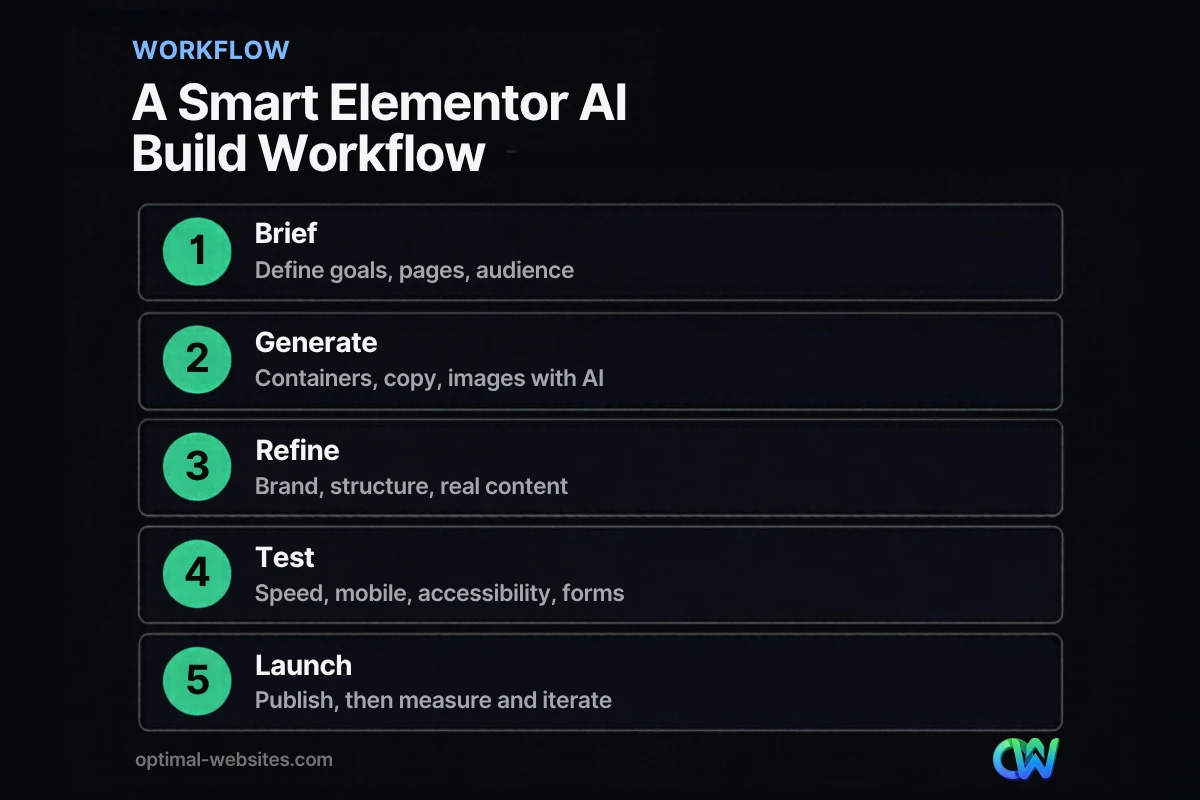
The most effective approach is to let AI handle drafts and let people handle decisions. Follow these steps for a cleaner result:
- Write a real brief first. List your services, service area, ideal customer, top three goals and the action you want visitors to take. Elementor recommends giving the AI as much business context as possible.
- Plan the structure with Site Planner. Generate a sitemap and wireframe, then edit it so every important service has its own page.
- Set global styles before generating sections. Lock in colors, fonts and buttons so AI-generated containers inherit a consistent look.
- Generate sections, then rewrite with real details. Use container prompts for layout ideas, and replace placeholder copy with your actual services, credentials, photos and reviews.
- Review all code in a safe environment. Use Angie’s Test Mode or a staging site for any snippet or custom widget.
- Test before launch. Check page speed, mobile layouts, forms, tracking and accessibility on real devices.
- Measure and iterate. After launch, watch Google Search Console and your lead sources, then refine the pages that underperform.
How Optimal Websites Can Help
Want an AI-assisted build that is ready to rank and generate leads on day one? Our WordPress web design and development team builds fast, mobile-first sites with Elementor Pro, uses modern tools where they save time, and handles the strategy, content and testing that AI skips. Already have an Elementor site that feels sluggish? Our website speed optimization service can tighten it up.
Most projects launch in 2–4 weeks, and every client gets video tutorials so you can edit your own site afterward. You can review our website packages and pricing to see which fits your business.
Frequently Asked Questions
Is Elementor AI free?
Elementor AI can be tried for free, but ongoing use in paid plans draws on Elementor One credits. Users who have not purchased AI are prompted to start a free trial from inside the editor. Angie, Elementor’s separate agentic AI plugin, offers a free plan with daily-renewing credits. Elementor Pro plans by themselves do not include the shared AI credit pool, so check the current pricing page before relying on AI for a full build.
Can Elementor AI build a whole website for me?
Elementor AI can draft a whole website structure, but not a finished, launch-ready site. Site Planner creates a sitemap and wireframe from your brief, and container prompts generate individual sections. You still need accurate copy, real photos, SEO settings and working forms, plus testing. Think of it as a fast first draft.
Do I need Elementor Pro to use Elementor AI?
You do not need Elementor Pro to access Elementor AI, but some results depend on it. Elementor notes that AI-generated containers can include Pro widgets, which free users cannot use. Custom CSS, Custom Code, Atomic Forms and dynamic loops built with Angie also require Elementor Pro. For a business site, Elementor Pro is usually worth having regardless of AI.
What is the difference between Elementor AI and Angie?
Elementor AI is the in-editor assistant for writing text, generating images, building containers and writing code. Angie is a separate agentic AI plugin that can carry out multi-step tasks across WordPress, such as creating pages, building custom widgets, managing snippets and adjusting settings. Angie works with or without the Elementor editor, though it requires an Elementor account to sign in.
Is AI-generated content bad for SEO?
AI-generated content is not automatically bad for SEO, but thin, generic or inaccurate content performs poorly no matter who writes it. Use Elementor AI to draft and edit, then add your real expertise, local details, project examples and customer proof, and fact-check everything before publishing.
Will Elementor AI replace web designers?
Elementor AI will not replace web designers for businesses that depend on their website for leads. It speeds up layout, copy and code drafts, freeing designers for strategy, conversion planning, performance and testing. For a simple personal site, AI may be enough. For a contractor, law firm or medical practice, the human work is what makes the site pay off.
Ready to Get Started?
Want the speed of modern tools with the judgment of an experienced team? Request a free quote or call us at (302) 554-9497 to talk about your next WordPress website.


