
Last updated: October 15, 2026
Quick answer: LinkedIn lead generation is the process of finding, engaging and converting decision makers on LinkedIn into sales conversations. It works best when you combine an optimized profile and company Page, targeted outreach with Sales Navigator, a consistent content plan, social selling habits, and a website landing page that captures and tracks every lead.
If you sell to other businesses, your next client is probably already on LinkedIn. The hard part is getting their attention without sounding like every other cold pitch in their inbox. Done well, LinkedIn lead generation fills your pipeline with buyers who already know your name, understand what you do and are ready to talk. Done poorly, it burns your reputation one ignored message at a time. This playbook gives you a profile and Page checklist, a step-by-step outreach process, a realistic content plan, social selling habits and the metrics that tell you whether any of it is paying off.
Key Takeaways
- Your personal profile and company Page are your landing pages on LinkedIn. Fix them before you send a single message.
- Narrow your audience to one ideal customer profile, then use saved searches to bring new prospects to you every week.
- Warm up prospects by engaging with their posts before you connect, and never pitch in the first message.
- A simple weekly content rhythm builds the expertise that makes outreach land.
- Measure leads, conversations and booked calls, not likes, and send every lead to a website page you can track.
What Is LinkedIn Lead Generation and Why Does It Work?
LinkedIn lead generation is the practice of using LinkedIn’s profiles, Pages, search tools, content and ads to attract business buyers and move them into a sales conversation. It works because LinkedIn is built around professional identity, so you can find people by job title, company, industry and location instead of guessing.
The businesses that win on LinkedIn treat it as a relationship channel first and a sales channel second.
Who should invest in LinkedIn?
LinkedIn makes the most sense when your buyer is a business, not a consumer. Professional services, contractors who bid on commercial work, law firms seeking referral partners, B2B software and consultants all fit well. If you are still deciding which channels deserve your time, our list of B2B lead generation ideas compares LinkedIn with other options.
How Do You Optimize Your LinkedIn Profile and Company Page for Leads?
Optimize your profile and company Page by writing them for your buyer, not for a recruiter. Every prospect you contact will click through to your profile, and many will then check your company Page, so both need to answer “Can this person help me?” in a few seconds.
Start with market research. Look at how your best clients describe their problems in their own posts, job descriptions and comments. Write down the exact words they use. Those phrases belong in your headline and About section because they are what prospects recognize and what LinkedIn search matches.
Personal profile checklist
- Professional photo: A clear, current headshot with a plain background.
- Headline that names the buyer and the outcome: “Helping Delaware contractors win more commercial bids with faster websites” says more than “Owner at XYZ.”
- About section: Open with the problem you solve. LinkedIn shows only the first lines before “see more,” so lead with the hook. End with a clear next step, such as booking a call.
- Featured section: Pin a case-style project page, a useful guide or your booking link.
- Contact info: Add your website URL and make sure it points to a page built to convert.
Company Page checklist
LinkedIn states in LinkedIn’s own Page best practices that Pages with complete information get 30% more weekly views, and that companies posting weekly see a 2x lift in engagement with their content. Completing your Page is the easiest win available.
- Logo and cover image that match your website branding
- A keyword-rich overview that names who you serve and where
- Website, location, industry and company size filled in
- A call-to-action button pointing to your contact or quote page
- Three to five relevant hashtags you use consistently
- Employees connected to the Page so their profiles link back to it
Where your website fits
A LinkedIn profile can start a conversation, but your website closes it. When a prospect clicks your link, they should land on a fast, mobile-friendly page with proof of your work and an obvious way to get in touch. At Optimal Websites we build those pages in WordPress with Elementor Pro, and we see the same pattern across industries like construction, roofing and law: a strong LinkedIn presence sends traffic, but a clear landing page is what turns that traffic into inquiries. If your site is not ready, here is how to turn your website into a lead machine.
What Are the Best LinkedIn Lead Generation Strategies for Outreach?
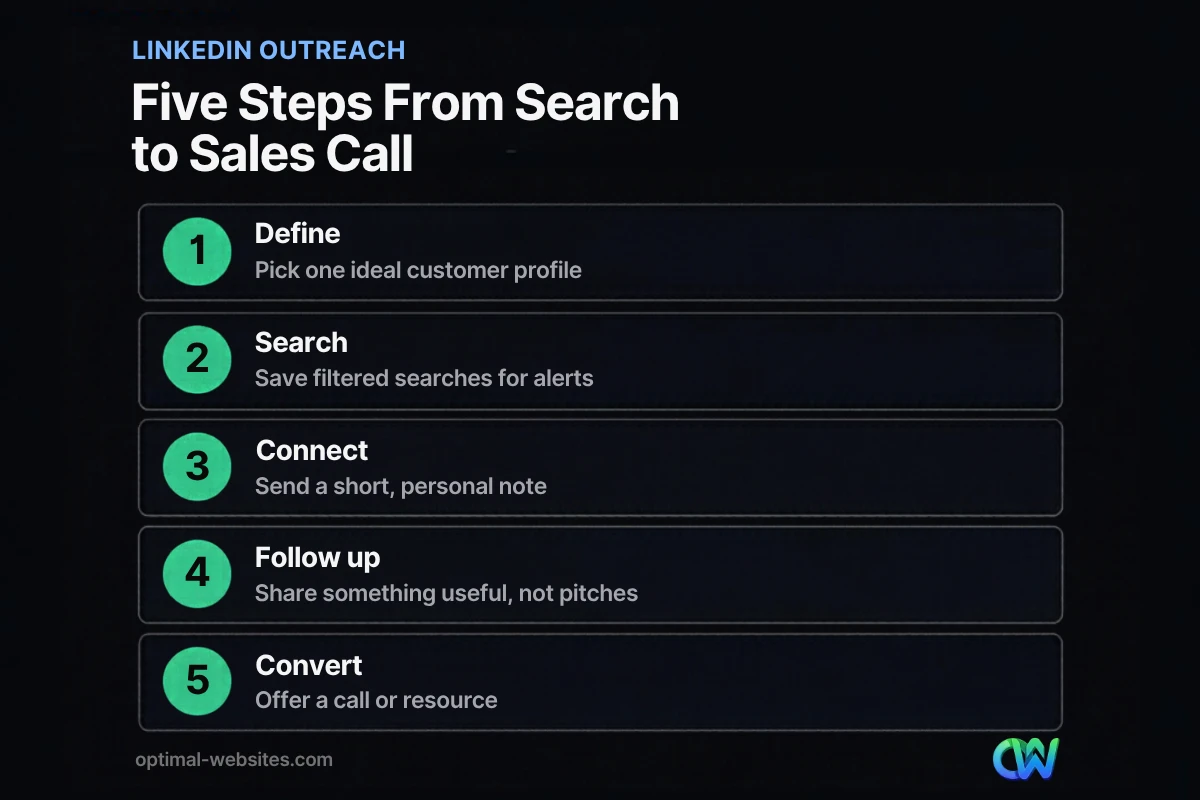
The best LinkedIn lead generation strategies for outreach are targeted, patient and personal. Build a narrow list, engage before you connect, keep the first message short and human, and follow up with value instead of pressure.
Step 1: Define one ideal customer profile
Treating everyone on LinkedIn as a potential customer is the most common mistake. Pick one segment to start: for example, marketing managers at mid-sized companies in a specific industry and region.
Step 2: Build and save targeted searches
LinkedIn search filters let you narrow by title, company, industry and location for free. If you sell to businesses regularly, LinkedIn Sales Navigator adds deeper filters and lead lists. According to the Sales Navigator help center, you can save up to 50 lead searches and 50 account searches and receive weekly emails and alerts when new people match your criteria. That turns prospecting from a daily chore into a weekly review.
Step 3: Save leads and watch their activity
When you save someone as a lead in Sales Navigator, their updates surface in your alerts. Look for a genuine reason to start a conversation.
Step 4: Engage before you connect
Leave a thoughtful comment on two or three of their posts over a week or two. Add a real point of view or a useful resource, not “Great post!” By the time your connection request arrives, your name is familiar.
Step 5: Send a short, personal connection request
Mention something specific: a post they wrote, a shared group or a mutual connection. Do not pitch. A simple note such as “I enjoyed your post on bid timelines. I work with contractors on similar issues and would like to connect” is enough.
Step 6: Follow up with value, then make one clear offer
After they accept, thank them and share something useful: an article, a checklist or a quick observation about their industry. A few touches later, if the fit looks right, offer a short call or a relevant resource. Keep it easy to say yes, and easy to say no.
How Should You Build a LinkedIn Content Plan That Generates Leads?
A LinkedIn content plan generates leads when it consistently shows prospects that you understand their problems and know how to solve them. You do not need to post every day; you need a steady, realistic rhythm built around your buyers’ questions.
Adopt an expert mindset
You are already an expert in your market. If you run a business or sell for a living, you know the details, tradeoffs and mistakes your clients face better than they do. Content is simply the way you make that knowledge visible. The mindset shift from “salesperson” to “trusted expert” is what makes people reply to your messages.
A simple weekly content calendar
| Day | Content type | Purpose |
|---|---|---|
| Monday | Short insight post with an image | Share one lesson from recent client work |
| Wednesday | Comment on 5–10 prospect and peer posts | Build visibility with your target list |
| Thursday | Longer post, document or short video | Answer a common buyer question in depth |
| Friday | Reshare a useful resource with your take | Stay present without heavy effort |
| Monthly | Article or Page newsletter | Build a library of evergreen expertise |
LinkedIn’s Page guidance notes that images typically result in a 2x higher comment rate, so pair your posts with real photos of your work or simple graphics whenever possible.
Newsletters and long-form posts
Newsletters let followers subscribe to your updates. LinkedIn’s newsletter access criteria state that Pages with more than 150 followers and/or connections are eligible to be evaluated, along with a history of original content and good standing. Build your audience first, then launch a monthly newsletter that repurposes your best blog content.
If you already publish on your website, your blog is a ready-made source for LinkedIn posts. Our guide to building a content marketing plan for a small business shows how to turn one article into a month of social posts.
How Does LinkedIn Social Selling Work?
LinkedIn social selling is the practice of using your network, content and conversations to build trust with buyers so that sales happen as a natural next step. Instead of chasing prospects with cold pitches, you become the person they think of when the need appears.
The four pillars of social selling
LinkedIn’s Social Selling Index scores sellers from 0 to 100 based on how well they:
- Establish a professional brand: a complete, buyer-focused profile and useful content.
- Find the right people: targeted search and lead lists.
- Engage with insights: sharing and commenting with real value.
- Build relationships: growing genuine connections with decision makers.
LinkedIn also reports on the same page that sellers with at least four connections at a target account are 16% more likely to close a deal with that company. The lesson for small businesses: connect with several people at your best-fit accounts, not just one.
Social selling habits that build trust
- Lead with value. Offer a free resource, such as a checklist, short guide or video walkthrough, that solves a real problem.
- Focus on one clear offer. Do not list every service. Lead with the one thing that sets you apart.
- Be consistent. Fifteen focused minutes a day beats a two-hour burst once a month.
- Move good conversations offline. When interest is clear, suggest a call or point them to a page on your site where they can book one.
Should You Use LinkedIn Lead Gen Forms and Ads?
Use LinkedIn Lead Gen Forms when you are ready to put budget behind a proven offer, such as a guide, webinar or consultation. They reduce friction because LinkedIn fills in much of the form for the person, which usually beats sending mobile users to a long external form.
According to LinkedIn’s Lead Gen Forms documentation, the forms can be attached to single image, carousel, video, event, message, document and conversation ads. They use dynamic prefill to populate fields with member profile information, and lead data can sync directly to marketing automation platforms or CRMs.
One update from older advice: the free lead gen forms that used to live on LinkedIn Pages and Showcase Pages are no longer available, according to LinkedIn’s help center. Today, Lead Gen Forms run through Campaign Manager as part of paid campaigns.
Organic vs. paid at a glance
| Approach | Cost | Best for | Time to results |
|---|---|---|---|
| Profile and Page optimization | Free | Credibility for every other tactic | Immediate impact on profile visits |
| Organic outreach and social selling | Free (Sales Navigator optional) | High-value, relationship-driven deals | Weeks to months |
| Content and newsletters | Free (time) | Long-term authority and inbound leads | Months |
| Lead Gen Form ads | Paid | Scaling a proven offer | Days to weeks once running |
How Do You Measure LinkedIn Lead Generation Results?
Measure LinkedIn lead generation by tracking the steps that lead to revenue: connections accepted, conversations started, calls booked and deals won. Likes and impressions are early signals, not results.
Metrics worth tracking
- Connection acceptance rate: Low rates usually mean your targeting or note needs work.
- Reply rate: Shows whether your follow-up messages feel relevant.
- Website visits from LinkedIn: Add UTM parameters to your links so they show up clearly in Google Analytics.
- Leads and booked calls: The number that matters most. Record the source of every inquiry.
- Closed deals and revenue: Tie wins back to LinkedIn in your CRM or a simple spreadsheet.
Once a month, review which posts, messages and offers produced replies and leads. Keep what works, cut what does not and change one variable at a time.
How Optimal Websites Can Help
LinkedIn can bring the right people to your door, but your website has to welcome them. Optimal Websites, a WordPress web design agency based in Delaware, builds fast, mobile-first, conversion-focused sites with Elementor Pro, so the traffic you earn on LinkedIn lands on pages designed to capture inquiries. Our lead generation services help you connect LinkedIn activity, landing pages and contact forms into one system you can measure.
We work with contractors, construction firms, roofers, law firms, healthcare providers and local service businesses, and every client gets video training to update their own site. Most projects launch in 2–4 weeks, and you can compare our website packages and pricing before we talk.
Frequently Asked Questions
Is LinkedIn good for lead generation?
Yes, LinkedIn is one of the strongest channels for B2B lead generation because you can find and reach people by job title, company, industry and location. It works best for businesses that sell to other businesses, such as professional services, contractors bidding on commercial work and consultants. Consumer-focused businesses often get better results from other platforms.
How do I generate leads on LinkedIn for free?
You can do LinkedIn lead generation for free by optimizing your profile and company Page, using standard search filters to find your ideal customers, engaging with their posts, sending personal connection requests and publishing helpful content every week. Free tactics take longer than ads, but they build relationships that often turn into higher-value clients.
Is LinkedIn Sales Navigator worth it for a small business?
Sales Navigator is worth it if prospecting on LinkedIn is a regular part of your sales process. It adds advanced filters, lead lists and saved searches with weekly alerts, which saves time when you are building a pipeline. If you only reach out to a few people a month, free LinkedIn search is usually enough to start.
How often should I post on LinkedIn to get leads?
Aim for two to three posts a week plus daily commenting on your prospects’ content. LinkedIn reports that companies posting weekly see a 2x lift in engagement with their content, so consistency matters more than volume. Choose a rhythm you can sustain for months, because LinkedIn lead generation rewards steady effort over occasional bursts.
What should I say in a LinkedIn connection request?
Keep it short, specific and free of sales pitches. Mention something real, such as a post they wrote, a shared group or a mutual connection, and explain briefly why you would like to connect. Save your offer for later, after you have shared something useful and the conversation shows a clear fit.
What is social selling on LinkedIn?
Social selling on LinkedIn means using your profile, network, content and conversations to build trust with buyers before you ask for a sale. LinkedIn measures it with the Social Selling Index, which looks at your professional brand, how well you find the right people, how you engage with insights and how you build relationships.
Do LinkedIn Lead Gen Forms work better than website forms?
Lead Gen Forms reduce friction because LinkedIn prefills fields from the member’s profile, which makes them convenient on mobile. They are only available in paid campaigns, though. Many businesses use both: Lead Gen Forms for ad campaigns and a fast website landing page for organic traffic, profile clicks and follow-up conversations.
Ready to Get Started?
Want your LinkedIn efforts to turn into real inquiries? Request a free quote or call us at (302) 554-9497 to talk about a website built to convert the leads you work so hard to earn.


