

Quick answer: Topic clusters are groups of related blog posts organized around one broad pillar page, all linked together. The pillar covers a core topic in depth, each cluster post answers one specific question, and internal links connect them. This structure helps readers find answers and helps search engines understand what your site covers.
Many small business blogs grow one random post at a time: a holiday tip here, a company update there, an article on whatever came to mind that month. After a year, there are dozens of posts that do not support each other and rarely bring in customers. Topic clusters fix that by giving your blog a plan. Instead of isolated articles, you build organized groups of content around the services you actually sell, linked so that readers and search engines can follow the thread. This guide explains what topic clusters and pillar pages are, why they work, and how to build your first cluster step by step.
Key Takeaways
- A topic cluster is a pillar page on a broad topic plus several posts that each cover one related question.
- Clusters should map to the services you sell, so content attracts buyers, not just readers.
- Internal links between the pillar and cluster posts are what make the structure work.
- Start with one cluster, publish consistently and expand once it is complete.
- Existing posts can often be reorganized into clusters instead of starting from scratch.
What Are Topic Clusters?
Topic clusters are a way of organizing content where one comprehensive pillar page covers a broad subject and a set of cluster posts cover specific subtopics in depth, with links connecting all of them. Together they cover a subject far more thoroughly than any single post could.
A simple example for a roofing company:
- Pillar page: A complete guide to roof replacement
- Cluster posts: How long a roof replacement takes, signs you need a new roof, asphalt vs metal roofing, how to choose a roofing contractor, what roof warranties cover
Each cluster post links back to the pillar, and the pillar links out to each cluster post. A visitor who lands on any one of them can easily find the rest.
Pillar pages vs cluster posts
| Element | Pillar page | Cluster post |
|---|---|---|
| Scope | Broad topic overview | One specific question |
| Length | Longer, comprehensive | Focused, as long as needed |
| Target search | Broad, competitive term | Specific, long-tail question |
| Links | Out to every cluster post | Back to the pillar, across to related posts |
| Update rhythm | Refreshed as clusters grow | Updated when facts change |
Why Do Topic Clusters Help a Blog Rank?
Topic clusters help a blog rank because they make your expertise on a subject obvious, organize your site logically and create a strong internal linking strategy. Search engines can see how pages relate, and readers stay longer because the next answer is one click away.
Google’s SEO Starter Guide explains that organizing your site logically helps search engines and users understand how your pages relate to the rest of your site, and that links are how Google discovers most new pages. Clusters put both ideas into practice.
There are also business benefits:
- Depth signals expertise. Covering a topic from every angle shows you know it well.
- Long-tail traffic adds up. Specific questions are often easier to rank for than broad terms.
- Better user journeys. A reader researching one question naturally moves toward your service page.
- Easier planning. You always know what to write next.
Clusters are not a shortcut. Each post still needs to be helpful, accurate and better than what already ranks.
How Do You Build a Topic Cluster Step by Step?
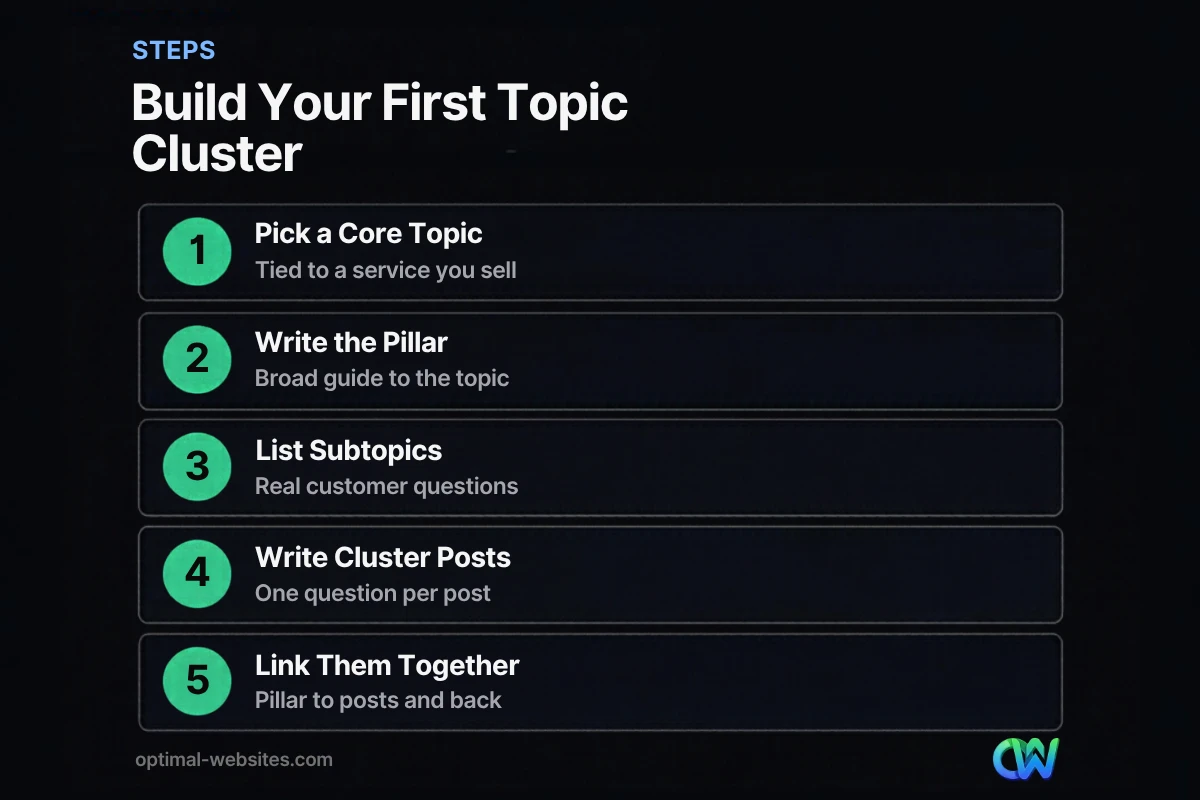
Build a topic cluster by choosing a core topic tied to a service, writing or identifying the pillar page, listing the questions customers ask, writing one post per question and linking everything together. Here is the process in order.
- Pick a core topic tied to revenue. Start with a service you want more leads for, such as “kitchen remodeling” or “estate planning.”
- Research the questions. Use Google’s “People also ask” boxes, autocomplete, Google Search Console queries and the questions your team hears on calls. Our guide on keyword research for local businesses covers this in depth.
- Group the questions. Combine near-duplicates. Each remaining question becomes one cluster post.
- Create the pillar page. Write a broad guide that introduces each subtopic briefly and links to the detailed posts.
- Write the cluster posts. Answer one question clearly in each post, with a direct answer near the top.
- Link them together. Pillar to every cluster post, every cluster post back to the pillar, and related cluster posts to each other.
- Connect to your service page. Every post in the cluster should give readers a clear path to the matching service page.
How many posts should a cluster have?
There is no fixed number. Start with a pillar plus five to eight cluster posts that cover the most common questions, then add more as you find new ones. A small, complete cluster is better than a large, half-finished one.
How Should Internal Linking Work in Content Clusters?
Internal linking in content clusters should connect the pillar to every cluster post and each cluster post back to the pillar, using descriptive anchor text that tells readers what they will find. Add links between closely related cluster posts where they genuinely help.
Google’s guidance on crawlable links and anchor text recommends anchor text that is descriptive and reasonably concise, avoiding generic phrases like “click here” and avoiding keyword stuffing. It also notes that every page you care about should be linked from at least one other page on your site.
Practical rules for your internal linking strategy:
- Use natural, descriptive anchors such as “how long a roof replacement takes”
- Link from the body text where the topic comes up, not just a list at the end
- Vary anchors instead of repeating the same phrase every time
- Avoid linking every other sentence; link where it helps the reader
- Check for broken links when you rename or remove posts
Should Your Pillar Page Be a Blog Post or a Service Page?
Your pillar can be either, depending on intent. If people searching the core topic want to learn, use an in-depth guide as the pillar and link it prominently to your service page. If they want to hire someone, your service page can act as the pillar.
For many small businesses, a two-level structure works well:
- Service page: Targets buying searches, such as “roof replacement in Dover”
- Pillar guide: Targets research searches, such as “roof replacement guide”
- Cluster posts: Answer specific questions and link to both
Strong service pages are the foundation that makes clusters pay off. If yours are thin, start with our guide on how to write a service page.
How Do You Turn Existing Posts Into Topic Clusters?
Turn existing posts into topic clusters by auditing what you have, grouping posts by topic, filling gaps, merging overlapping articles and adding the missing internal links. You rarely need to start from zero.
A quick audit process:
- List every published post with its main topic and target keyword.
- Group posts under the services they relate to.
- Identify duplicates competing for the same question and merge them, redirecting the weaker URL.
- Update outdated posts with current facts and examples.
- Write a pillar page for each group if one does not exist.
- Add internal links between the pillar and every post in the group.
Our guide on how to update old blog posts for SEO walks through the refresh process in detail.
What Does a Blog Content Plan Built on Clusters Look Like?
A blog content plan built on clusters lists each core topic, its pillar page and the cluster posts to write, with dates. It turns “what should we blog about?” into a simple schedule.
| Month | Cluster | Content to publish |
|---|---|---|
| Month 1 | Core service A | Pillar guide plus 2 cluster posts |
| Month 2 | Core service A | 3 cluster posts, link updates |
| Month 3 | Core service B | Pillar guide plus 2 cluster posts |
| Month 4 | Core service B | 3 cluster posts, refresh month 1 posts |
Publishing consistently matters more than publishing often. Two well-researched posts a month that fit a cluster usually beat eight unrelated ones. For more on building a content program, see our guide to content marketing for small business.
How Optimal Websites Can Help
Optimal Websites, a WordPress web design agency based in Delaware, plans and writes blog content organized into topic clusters that support your service pages. Our blog writing services include keyword research, cluster planning, writing, internal linking and publishing on WordPress, so every post has a clear role. Request a free content plan quote to see what a cluster plan could look like for your business.
Frequently Asked Questions
What is a topic cluster in SEO?
A topic cluster in SEO is a group of related content built around one pillar page that covers a broad topic, plus cluster posts that each answer one specific question. All pages link together. The structure helps search engines understand your expertise on the subject and helps visitors find related answers easily.
What is the difference between a pillar page and a cluster post?
A pillar page gives a broad, comprehensive overview of a core topic and links out to more detailed content. A cluster post focuses on one specific question within that topic and links back to the pillar. Pillar pages usually target broader searches, while cluster posts target specific long-tail questions.
How many topic clusters should a small business have?
Most small businesses should start with one or two topic clusters tied to their most profitable services. Complete one cluster before starting the next. Over time, you might build one cluster per core service. A few complete clusters are more valuable than many unfinished ones scattered across your blog.
Do content clusters still work for SEO?
Yes. Content clusters still work because they reflect sound fundamentals: helpful content, logical site structure and clear internal links. They are not a trick, so each post still has to be useful and accurate. Clusters simply make it easier to cover a topic thoroughly and guide readers between related pages.
How long does it take for topic clusters to rank?
Topic clusters usually take several months to show results, depending on competition, your site’s existing authority and how consistently you publish. Early wins often come from specific long-tail questions. Track impressions and clicks for cluster pages in Google Search Console to see progress before rankings for broad terms improve.
Can I build topic clusters with existing blog posts?
Yes. Audit your existing posts, group them by topic, merge any that compete for the same question and fill the gaps with new posts. Then create or update a pillar page and add internal links between every page in the group. Reorganizing existing content is often the fastest way to start a blog content plan.
Ready to Get Started?
Want a blog plan that actually supports your services? Get a free quote or call (302) 554-9497 and we will map out your first topic cluster.


