
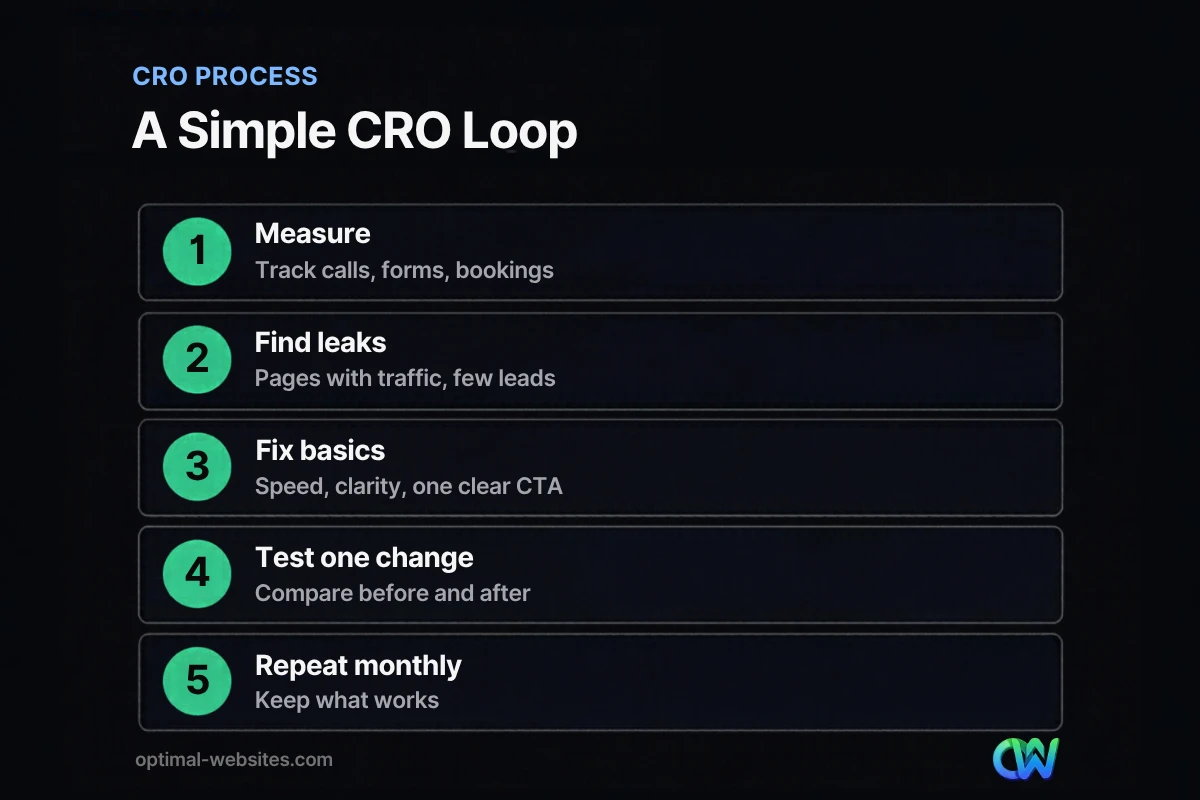
Quick answer: Conversion rate optimization for small business means getting more calls, forms and bookings from the visitors you already have. Track every conversion, find pages with traffic but few leads, fix speed, clarity and calls to action first, then test one change at a time and keep what works.
You already pay for your website, your ads and your time on social media. If only a tiny share of visitors call or fill out a form, every one of those costs goes further when the site converts better. Conversion rate optimization for small business is how you get there without buying more traffic. Most guides assume you have thousands of daily visitors and a full-time analyst. You probably do not. This guide shows how to measure your website conversion rate, where small business sites usually leak leads, what to fix first and how to test changes when your traffic is modest.
Key Takeaways
- Your conversion rate is conversions divided by visitors. Track calls, forms and bookings, not just form fills.
- Fix the basics before testing: page speed, a clear headline, one obvious call to action and trust signals.
- Small sites rarely have enough traffic for classic A/B testing. Use before-and-after comparisons and user feedback instead.
- Shorter, single-column forms with clear labels usually convert better than long ones.
- Use only real reviews and testimonials. Fake ones are now illegal under an FTC rule.
What is conversion rate optimization for small business?
Conversion rate optimization, or CRO, is the process of improving a website so a larger share of visitors take a valuable action, such as calling, requesting a quote or booking an appointment. For a small business, it focuses on the few pages that bring in most of the leads.
Your website conversion rate is the number of conversions divided by the number of visitors in the same period. If 1,000 people visit in a month and 20 call or submit a form, your conversion rate is 2%. Raise it to 3% and you get 10 more leads without spending a dollar more on traffic.
What counts as a conversion?
Most small businesses undercount conversions because they only track forms. Count every action that can turn into revenue:
- Phone calls from the website, including taps on click-to-call links
- Contact and quote form submissions
- Online bookings and appointment requests
- Chat conversations that lead to a quote
- Email clicks and direction requests for local businesses
How do you measure your website conversion rate?
Measure your website conversion rate by setting up conversion tracking in your analytics tool, then comparing conversions to visits for each important page. Without tracking, every change is a guess.
- Set up key events in Google Analytics 4 for form submissions, phone link clicks and booking confirmations.
- Use call tracking if phone calls are your main lead source, so you know which pages and campaigns produce calls.
- Record a baseline for at least four weeks before changing anything.
- Break it down by page and device. Mobile and desktop often convert very differently.
- Track lead quality. Ten good leads beat thirty unqualified ones. Note which leads become customers.
If your site gets traffic but the phone stays quiet, our guide on a website not generating leads walks through the most common causes.
Where do small business websites lose conversions?
Most small business sites lose conversions in the same places: slow pages, unclear headlines, buried calls to action, long forms and weak trust signals. Fixing these usually beats any clever test.
| Leak | What visitors experience | First fix |
|---|---|---|
| Slow mobile pages | Waiting, then leaving before the page loads | Compress images, trim plugins, improve hosting |
| Vague headline | Not sure what you do or where you work | State the service and area in plain words |
| Hidden call to action | No obvious next step | One primary button above the fold and repeated down the page |
| Long or confusing forms | Too many fields, unclear errors | Cut to essential fields, single column, clear labels |
| No proof | Unsure if you are legitimate | Real reviews, photos of real work, licenses and guarantees |
| Phone number hard to find | Mobile visitors cannot call quickly | Click-to-call number in the header on every page |
Speed
Slow pages lose visitors before they see your offer. Use Core Web Vitals as your target: content should load within 2.5 seconds, respond to taps within 200 milliseconds and stay stable while loading.
Forms
Nielsen Norman Group’s form design guidelines recommend keeping fields in a single column, because multiple columns interrupt the user’s flow down the form. Ask only for what you need to follow up. Our guide to building a lead capture form covers field choice, error messages and thank-you pages in detail.
Trust
Trust signals answer the question “Can I rely on these people?” Use real customer reviews, photos of your team and completed jobs, licenses, insurance details and clear guarantees. Never invent or buy reviews. In August 2024, the FTC’s rule banning fake reviews and testimonials made fake reviews, undisclosed insider reviews and paid sentiment-based reviews illegal.
How do you write a call to action that converts?
A strong call to action tells visitors exactly what happens next and why it is worth doing now. Use a specific verb, the benefit and, where possible, remove risk.
Compare these:
- Weak: “Submit” or “Learn More”
- Better: “Get My Free Quote”
- Best for service businesses: “Get a Free Roof Inspection This Week”
Keep one primary call to action per page. Secondary options, like a phone number or a link to pricing, should support it, not compete with it. On mobile, a sticky call or quote button often helps, as long as it does not cover content.
Can a small business do A/B testing without much traffic?
Classic A/B testing needs a lot of traffic to reach reliable results, which most small business sites do not have. You can still test, but use simpler methods and bigger changes.
Options that work with modest traffic
- Before-and-after comparisons. Change one major element, then compare four weeks of conversions to the previous four weeks, watching for seasonal effects.
- Bigger, bolder changes. Testing a new headline and offer is more likely to show a clear result than testing button colors.
- User feedback. Ask five customers to use the site on their phone while you watch. You will spot problems quickly.
- Session recordings and heatmaps. Tools that show clicks and scrolling help you see where people get stuck.
- Run tests on ad landing pages. Paid traffic is easier to split and control.
Keep in mind that Google Optimize was retired in September 2023, so older tutorials that rely on it no longer apply. If you do run A/B tests, you will need a different testing tool.
Which pages should you optimize first?
Start with the pages that get the most traffic from people ready to buy: your homepage, main service pages, location pages and any landing pages tied to ads. Small gains on high-traffic pages add up fastest.
For each page, ask three questions:
- Does a visitor understand what we do and where within five seconds?
- Is the next step obvious on a phone without scrolling?
- Is there proof that we are trustworthy near the call to action?
If the answer to any of these is no, fix that before testing anything else. Our website user experience tips cover navigation, layout and readability improvements that support conversion.
What we see on real projects
On the WordPress and Elementor Pro sites we build for contractors, roofers, law firms and local service businesses, the most reliable conversion improvements come from simple changes: a headline that names the service and area, a click-to-call number in the header, a short quote form near the top of service pages and real project photos. They are not glamorous, but they work because they remove friction.
How Optimal Websites Can Help
Optimal Websites, a WordPress web design agency based in Delaware, builds mobile-first websites designed to turn visitors into leads, with conversion tracking set up from day one. If you already have traffic but not enough calls, our lead generation services focus on the pages, forms and calls to action that bring in business.
For more ideas, read our guide on how to get more leads from your website, or compare packages on our pricing page.
Frequently Asked Questions
What is a good website conversion rate for a small business?
A good website conversion rate depends on your industry, traffic source and offer, so the best benchmark is your own past performance. Track your current rate for a month, then aim to improve it steadily. Pages tied to urgent needs, like emergency repairs, often convert better than general information pages, so compare similar pages to each other.
How long does conversion rate optimization take?
Basic fixes like speed, headlines, calls to action and forms can be done in a few weeks, and you may see changes within a month. Ongoing conversion rate optimization for small business is a monthly habit: review data, fix the biggest leak, measure the result and repeat. Small, steady improvements compound over a year.
Is CRO better than buying more traffic?
CRO and traffic work together, but CRO usually comes first. If your site converts poorly, more traffic just means more visitors leaving. Improving your conversion rate makes every visitor, ad dollar and SEO effort more valuable. Once the site converts well, adding traffic produces a much better return.
Do I need A/B testing software?
Not necessarily. Many small businesses get strong results from before-and-after comparisons, customer feedback and session recordings. A/B testing software is useful once you have steady traffic, especially on ad landing pages. Since Google Optimize was retired in 2023, you would need a different tool if you want formal A/B testing.
What is the most important call to action on a service website?
For most service businesses, the most important call to action is the one that starts a conversation: “Call now” or “Get a free quote.” Make it visible in the header, near the top of every service page and at the end of each page. Use specific, benefit-led wording instead of generic text like “Submit.”
How many form fields should a lead form have?
Keep lead forms as short as possible while still giving you what you need to follow up, usually name, phone or email and a short description of the job. Every extra field adds effort. Use a single column, clear labels and helpful error messages so mobile visitors can finish the form quickly.
Ready to Get Started?
Want more leads from the traffic you already have? Get a free quote or call (302) 554-9497 and we will review your key pages with you.


