
Last updated: October 15, 2026
Quick answer: To update old blog posts for SEO, find posts with impressions but weak clicks in Google Search Console, confirm the search intent, rewrite outdated facts, improve titles and headings, add internal links, and republish with a visible updated date. Merge overlapping posts with a 301 redirect, and delete pages with no traffic, links or purpose.
Your blog archive is probably full of posts that once brought in visitors and now barely register. Some still rank on page two, some compete with each other, and some quote tools or years that make readers click away. That costs you leads, because every post that slips is a page that no longer sends buyers to your services. Learning how to update old blog posts for SEO is usually faster and cheaper than writing new ones from scratch. This guide gives you a repeatable content refresh process, a simple way to decide whether to refresh, merge or delete each post, and the checks we run on WordPress sites before republishing.
Key Takeaways
- Start with data: Google Search Console shows which posts get impressions but few clicks, and those are your fastest wins.
- A real refresh means substantial changes. Changing the date without improving the content will not help rankings.
- Merge posts that target the same search intent, then point the old URL to the new one with a 301 redirect.
- Delete only posts with no traffic, no backlinks and no business purpose.
- Treat content updates as a recurring task, not a one-time project.
Why should you update old blog posts for SEO?
Updating old posts improves pages that already have some authority, links and indexing history, so gains often come faster than with brand-new content. It also protects your credibility, because outdated advice makes your whole business look out of date.
A content refresh is the process of reviewing an existing page and improving its accuracy, depth, structure and search targeting while keeping its URL. It is different from simply editing a typo. The goal is to make the page the most useful answer for the query it targets today.
Google is clear about what does not work. Its guidance on helpful, people-first content lists changing the date of pages to make them seem fresh, when the content has not substantially changed, as a warning sign of search engine-first content. A refresh has to earn its new date.
What counts as “old” content?
Age alone is not the trigger. A three-year-old post that is still accurate and ranking well can stay as it is. Look for these signals instead:
- Traffic or clicks have dropped steadily over the last several months.
- The post mentions retired tools, old prices or past years in the title.
- Two or more of your posts answer the same question.
- The page ranks on page two for a query that matters to your business.
- The advice no longer matches how you actually work with clients.
How do you find which blog posts to update first?
Use Google Search Console to find posts with high impressions and low click-through rate, or posts ranking in positions 8 to 20. Those pages already have visibility, so small improvements can move them into clicks.
The Search Console Performance report shows four metrics for every page and query: clicks, impressions, CTR (clicks divided by impressions) and average position. The default view covers the past three months, so widen the date range to spot longer declines.
Build a simple content inventory
Export your post URLs into a spreadsheet. On WordPress, you can pull them from your sitemap or the Posts screen. For each URL, add:
- Primary keyword or topic the post targets.
- Clicks, impressions, CTR and average position from Search Console.
- Whether it supports a service you sell (yes or no).
- Any backlinks pointing to it, from your SEO tool of choice.
- A decision column: refresh, merge, redirect, delete or keep.
That decision column is the heart of the audit. Sorting by impressions, then filtering for low CTR, gives you a prioritized list in about an hour for most small business blogs.
Should you refresh, merge or delete an old post?
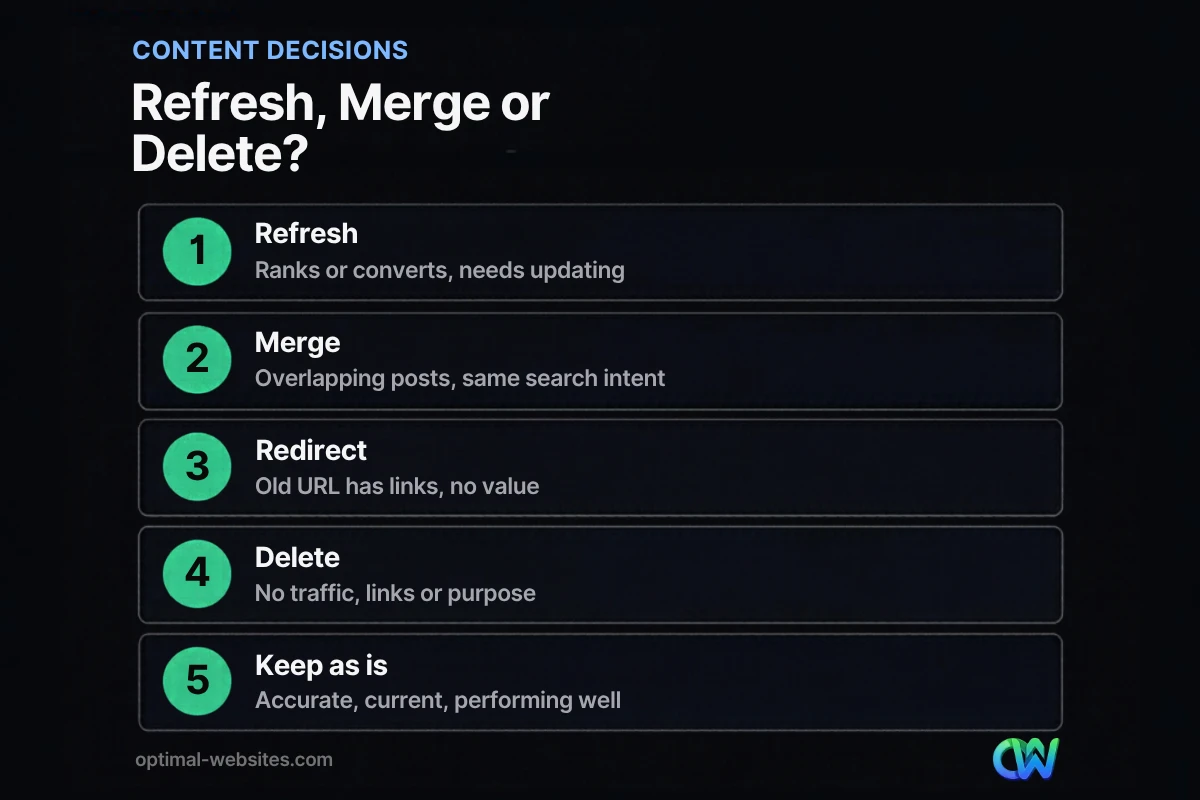
Refresh posts that still match a valuable search intent, merge posts that overlap, and delete posts that have no traffic, links or purpose. Use the table below to decide quickly.
| Situation | Best action | What to do |
|---|---|---|
| Post ranks or converts but has outdated facts | Refresh | Rewrite stale sections, keep the URL, add a visible updated date |
| Post ranks on page two for a valuable keyword | Refresh | Match intent better, improve title and headings, add internal links |
| Two or more posts target the same keyword or question | Merge | Combine the best parts into the strongest URL, 301 redirect the others |
| Post has backlinks but the topic no longer fits your business | Redirect | 301 redirect to the closest relevant page |
| Post has no traffic, no backlinks and no business purpose | Delete | Remove it and let it return a 404 or 410 |
| Post is accurate, current and performing well | Keep | Leave it alone and check again next review cycle |
When merging makes sense
Merging fixes keyword cannibalization, which is when several of your own pages compete for the same query and none of them ranks well. Pick the URL with the most clicks or backlinks as the keeper, move the best unique ideas into it, and set up a permanent 301 redirect from each old URL. Google treats a 301 as a signal that the redirect target should be canonical.
When deleting is the right call
Some posts were written for a news cycle, a promotion that ended, or a topic you no longer serve. If a page has no meaningful traffic or links, removing it keeps your blog focused. Google’s documentation notes that indexed URLs returning a 4xx status code are removed from the index over time. If the page has links from other sites, redirect it instead of deleting it.
What is the step-by-step process to update an old blog post?
Follow the same seven steps every time: check intent, update facts, restructure, optimize on-page SEO, add internal links, improve media and republish. A consistent process keeps quality even when different people handle the updates.
Step 1: Recheck the search intent
Search the target keyword and look at what ranks today. If the top results are step-by-step guides and your post is an opinion piece, the format needs to change, not just the wording. Rewrite the opening so it answers the main question in the first few sentences.
Step 2: Replace outdated facts, tools and examples
Remove anything that is no longer true. Common examples on small business blogs include “Google My Business” (now Google Business Profile), First Input Delay (replaced by Interaction to Next Paint as a Core Web Vital in March 2024), and old pricing or software screenshots. Recheck every statistic against its original source, and drop any you cannot verify.
Step 3: Add depth where readers need it
Look at the questions people ask about the topic and answer the ones your post skips. Add a short FAQ, a comparison table or a checklist where it genuinely helps. Original details, such as how your team actually handles the task, add value that a rewritten summary cannot.
Step 4: Improve the title, headings and meta description
Your title is often the biggest CTR lever. Google’s title link best practices recommend descriptive, concise titles that are unique to each page and free of keyword stuffing. Phrase H2s as the questions people search, and rewrite the meta description so it states a clear benefit.
Step 5: Add and fix internal links
Link from the refreshed post to your relevant service pages and to related posts, and link back to it from newer content. Fix any internal links that now point to deleted or redirected URLs, so readers and crawlers reach the final page in one hop.
Step 6: Improve images, readability and speed
Break long paragraphs into two to four sentences, add subheadings, and compress or replace heavy images. Use WebP files with descriptive alt text. If the page loads slowly on mobile, it is worth taking time to speed up a slow WordPress site before you republish.
Step 7: Republish, request indexing and track results
Add a visible “Last updated” date only after substantial changes. In Search Console, use URL Inspection to request indexing of the updated page. Note the date of the refresh in your spreadsheet and compare clicks, CTR and position after several weeks.
How do you update old blog posts in WordPress without losing rankings?
Keep the same URL whenever possible, and if a slug must change, create a 301 redirect before or at the moment you publish. Most ranking drops after a refresh come from broken URLs, removed content that was ranking, or lost internal links.
On the WordPress sites we build and maintain with Elementor Pro, we follow a few rules during every content refresh:
- Edit in place. Update the existing post rather than creating a new one, so its URL and history stay intact.
- Keep what ranks. Before rewriting, check which queries the page already gets clicks for, and make sure those topics stay covered.
- Redirect every changed slug. Use a redirect plugin or your SEO plugin’s redirect manager, then test the old URL in a browser.
- Update schema and meta. Refresh the SEO title, meta description and any FAQ markup along with the body text.
- Check mobile first. Many of our clients in construction, roofing, law and local services have customers who search from their phones, so we preview every update on a small screen.
If you are newer to search optimization, our guide to SEO basics for small businesses covers the foundations that make each refresh more effective.
How often should you update old blog content?
Review your blog at least once or twice a year, and update high-value posts whenever facts, tools or your services change. Pages that drive leads deserve a closer look every quarter.
A practical rhythm for most small businesses looks like this:
- Quarterly: Check Search Console for your top 10 to 20 posts and fix any that are slipping.
- Twice a year: Run the full refresh, merge or delete audit across the blog.
- As needed: Update posts immediately when a law, platform or price you mention changes.
Content updates are an ongoing task, not a one-time cleanup. Writing one new post and refreshing one older post each month is often a sustainable balance for a small team.
How Optimal Websites Can Help
Many business owners know their blog needs attention but never find the hours to audit it. Optimal Websites, a WordPress web design agency based in Delaware, handles content refreshes as part of our blog writing service: we review your existing posts, decide what to refresh, merge or remove, rewrite outdated sections, and set up redirects so you keep the rankings you already earned.
Because we build fast, mobile-first WordPress sites with Elementor Pro, we can also fix the technical issues that hold content back, from slow pages to messy internal linking. Pair a content refresh with our SEO services for a fuller plan, or see our website and content pricing to find a fit for your budget. If you would rather keep writing in-house, here is what to look for when you hire a blog writer.
Frequently Asked Questions
Does updating old blog posts help SEO?
Yes, updating old blog posts can help SEO when the changes make the page more accurate, complete and useful for the search query. Posts that already have impressions, links and indexing history often respond faster than new posts. Simply changing the published date without improving the content does not help, and Google lists that practice as a warning sign.
Should I change the URL when I update an old blog post?
Usually no. Keeping the same URL preserves the page’s history and any links pointing to it. Change the slug only when the old one is clearly wrong for the topic, such as containing an old year or an unrelated keyword. If you do change it, set up a 301 redirect from the old URL to the new one immediately.
Should I change the publish date when I update a post?
Keep the original publish date and add a visible “Last updated” date when you make substantial changes. That tells readers the information is current without hiding when the post first appeared. Avoid updating the date for minor edits like fixing a typo, because a fresh date on unchanged content does not improve rankings and can mislead readers.
How do I know which old blog posts to refresh first?
Start with Google Search Console. Filter the Performance report for pages with high impressions but low click-through rate, and for pages ranking roughly between positions 8 and 20. Those posts already get visibility, so a content refresh that improves the title, intent match and depth can turn impressions into clicks faster than writing a new post.
Is it bad to delete old blog posts?
Deleting old blog posts is fine when they have no traffic, no backlinks and no business purpose. Removing them keeps your blog focused on topics you actually serve. If a post has links from other sites or still gets visits, redirect it to the most relevant page instead, so you keep that value rather than sending visitors to an error page.
What is the difference between a content refresh and a rewrite?
A content refresh updates an existing post by correcting facts, improving structure and adding missing sections while keeping its core. A rewrite replaces most of the text because the original no longer matches search intent or your standards. Both keep the same URL. Choose a rewrite when the post’s format or angle is wrong, and a refresh when the foundation is still solid.
How long does it take to see results after updating old content?
Results vary by site and competition, but most changes need at least a few weeks to show in Search Console. After you update old blog posts for SEO, request indexing with URL Inspection, record the refresh date, and compare clicks, CTR and average position over the following weeks against the same period before the update.
Ready to Get Started?
Your old posts can work harder for your business. Request a free quote and we will review your blog and recommend what to refresh, merge or remove, or call us at (302) 554-9497.


