Quick answer: Call tracking for small business assigns unique phone numbers to your marketing sources so you can see which ads, listings and pages make the phone ring. Use dynamic numbers on your website, keep your main number consistent across listings, log calls in GA4 and Google Ads, and follow recording consent laws.
If you run a roofing company, a law firm or a plumbing business, your best leads probably call instead of filling out a form. That is great for sales and terrible for measurement. Without call tracking for small business, every phone call looks the same, so you cannot tell whether it came from Google Ads, your Google Business Profile, a yard sign or a blog post.
This guide explains how call tracking works, how to set it up without hurting your local SEO, how to connect it to Google Analytics 4 and Google Ads, and what to do with the data once it starts coming in.
Key Takeaways
- Call tracking connects each inbound call to the ad, listing or page that produced it, so phone leads stop being a blind spot.
- Dynamic number insertion swaps the number on your website based on how each visitor arrived, while static numbers work best for offline ads and single channels.
- Protect local SEO by keeping your real business number in your site code, schema and citations, and handle your Google Business Profile number carefully.
- Track click-to-call taps in GA4 and set up call conversions in Google Ads so phone leads count alongside form fills.
- Recording calls is useful for training and quality, but some states require every party to consent, so announce recording at the start of each call.
What Is Call Tracking for Small Business?
Call tracking is a system that gives different marketing sources their own forwarding phone numbers, then records which number each caller dialed. Every tracking number rings through to your real business line, so customers reach you the same way they always have.
Behind the scenes, the call tracking platform logs details such as the date, time, call length, caller location, the number dialed and, on websites, the page and traffic source the caller came from. Many platforms also offer optional recording, transcription, call tagging and integrations with analytics and ad accounts.
For phone-first businesses, this matters more than almost any other marketing metric. A home service company might get most of its booked jobs by phone. A personal injury firm might sign most of its cases after an intake call. If you only measure form submissions, you are judging your marketing on a fraction of your real leads, and you may cut a channel that is actually working.
How Does Dynamic Number Insertion Work?
Dynamic number insertion (DNI) is a script on your website that replaces the displayed phone number with a tracking number based on how the visitor arrived. Someone who clicked a Google ad sees one number, someone from organic search sees another, and the platform ties each call back to that visit.
Here is the basic sequence:
- A visitor lands on your site from a source such as Google Ads, organic search, Facebook or an email.
- The tracking script reads the referrer, UTM tags or ad click ID and stores the source for that session.
- The script finds your phone number on the page (and in tel: links) and swaps it for a number from a pool assigned to that source.
- The visitor calls, the tracking number forwards to your real line, and the platform records the call with the source, landing page and, in some setups, the keyword.
The number pool is the key detail. If you want to know which specific visitor called, the platform needs enough numbers so that each active visitor sees a unique one for a period of time. Smaller pools are fine if you only need source-level reporting (for example, “paid search” versus “organic”). Your provider can help size the pool based on your traffic.
Because the swap happens in the browser after the page loads, your original number stays in the page’s HTML. That is good for local SEO, since search engines and your structured data still see one consistent business number.
Static vs Dynamic Tracking Numbers: Which Should You Use?
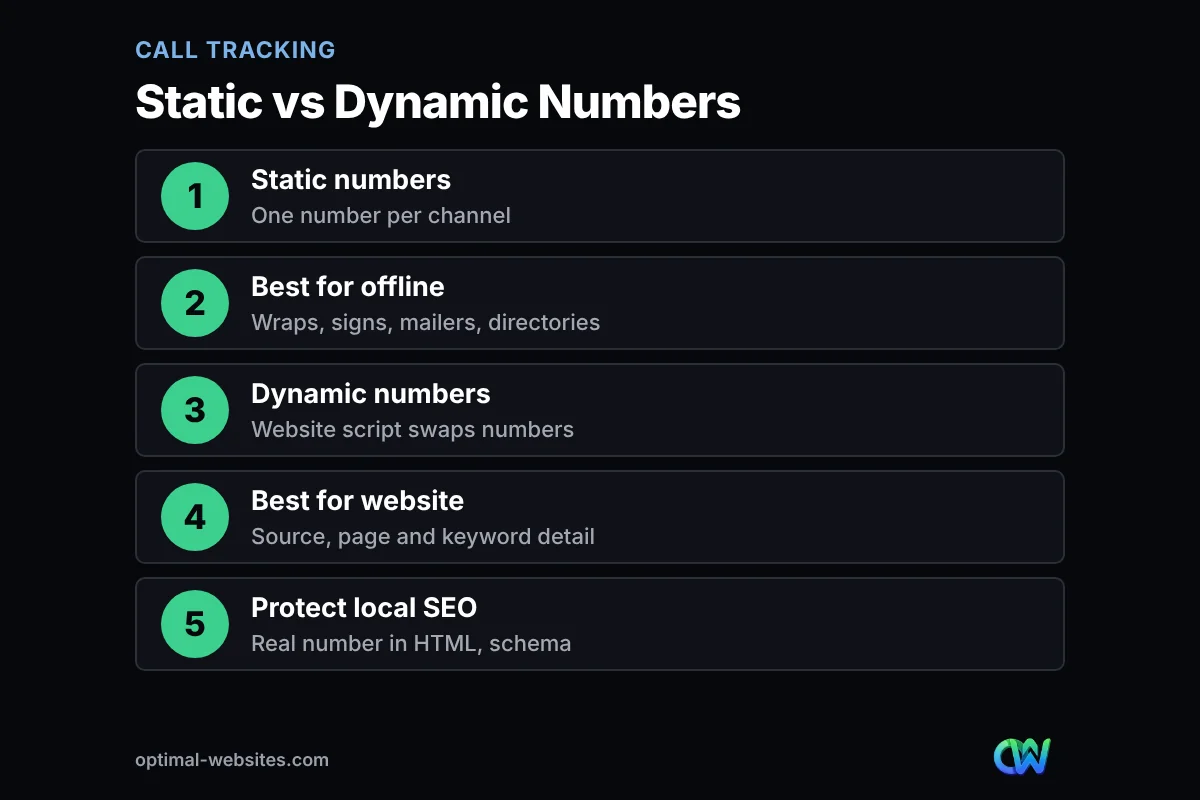
Use static tracking numbers for channels where the number is printed or fixed, and dynamic numbers for your website. Most small businesses end up using both: a handful of static numbers for offline and directory sources, plus DNI for web traffic.
| Factor | Static tracking numbers | Dynamic numbers (DNI) |
|---|---|---|
| How it works | One fixed number per campaign or channel | Website script swaps numbers based on each visitor’s source |
| Best for | Truck wraps, yard signs, mailers, radio, print, directory listings | Website visitors from paid search, organic search, social and email |
| Detail you get | Which channel or campaign drove the call | Source, landing page, campaign and sometimes keyword per call |
| Number of lines needed | One per tracked source | A pool sized to your website traffic |
| Setup effort | Low, just publish the number | Moderate, requires a script and correct tel: link markup |
| Local SEO risk | Higher if used inconsistently on listings and citations | Low when your real number stays in the HTML and schema |
One practical rule: once you print a static number on a truck or mailer, keep paying for it. Customers hold on to old flyers and magnets for years, and a disconnected number means lost jobs.
Will Call Tracking Hurt Your Local SEO?
Call tracking will not hurt local SEO if you keep your name, address and phone number (NAP) consistent where it counts. Problems start when different tracking numbers end up on directory listings, citations and your Google Business Profile with no clear main number.
Google uses your business information across the web to confirm that your listing is accurate. If ten directories show ten different numbers, it becomes harder for Google and customers to trust which one is real. Here is how to avoid that.
Keep your real number as the anchor
Your main local number should appear in your website’s HTML, footer, contact page and LocalBusiness schema, and on directory citations such as Yelp, Bing Places and industry directories. Let DNI handle the website swap for visitors, and do not hard-code tracking numbers into schema or citation profiles.
Handle your Google Business Profile number carefully
Your Google Business Profile lets you list a primary phone number plus up to two additional numbers. A common approach among local SEO practitioners is to use a dedicated local tracking number as the primary number and list your main business number as an additional number, so Google can still match the profile to your website and citations.
Before you do that, read Google’s guidelines for representing your business on Google. They say the phone number must connect to your individual business location, must be under the business’s direct control, and should be a local number rather than a central call center line whenever possible. Premium numbers are not allowed, and numbers that refer callers to another business are prohibited. In practice, that means a local tracking number you own, that rings straight to your office, with your real number listed as an additional phone.
For more on keeping your listing healthy, see our Google Business Profile optimization checklist.
Use local numbers that match your market
Pick tracking numbers with the same area code as your service area. Local numbers look more trustworthy to callers than toll-free numbers, and they fit Google’s preference for local numbers on Business Profiles.
How Do You Track Phone Calls in GA4 and Google Ads?
Track phone leads in GA4 by recording a custom event when someone taps a tel: link and marking it as a key event. In Google Ads, set up call conversion actions so calls from ads and from your website count as conversions.
Click-to-call events in GA4
Most mobile callers tap a phone link instead of dialing manually. You can capture that tap by firing an event (for example, phone_click) whenever a tel: link is clicked, usually with a Google Tag Manager trigger on link URLs that start with “tel:”. Then mark that event as a key event in GA4. Google explains how to create or modify events and mark them as key events.
Keep in mind that a click-to-call event measures intent, not a completed call. Someone might tap the link and hang up before it rings. That is why call tracking platforms, which see the actual call, are more accurate. Many of them can also send completed calls into GA4 as events. If you are still setting up Analytics, start with our guide to setting up Google Analytics 4 for a small business.
Call conversions in Google Ads
Google Ads offers several call conversion types. Calls made directly from ads with call assets can be counted when they last longer than a minimum duration you choose. For calls from your website after an ad click, Google’s guide to tracking calls to a phone number on a website explains how Google forwarding numbers can replace your number on your site at no cost, so you can see which keywords, ads and campaigns lead to calls.
If you already use a separate call tracking platform, Google also supports importing call conversions from that system. Whichever method you choose, set a minimum call length that filters out wrong numbers and quick hang-ups, and avoid counting the same call twice in two different conversion actions.
Is It Legal to Record Business Phone Calls?
Recording business calls is legal in the US when you get the consent the law requires, and that requirement varies by state. Federal law sets a one-party consent minimum, but some states require consent from everyone on the call.
According to the Reporters Committee for Freedom of the Press recording guide, about 11 states primarily require all-party consent, and a few more apply all-party rules only to phone calls or only to in-person conversations. Calls that cross state lines add another layer, since the stricter state’s law may apply.
The simplest safe practice is to play a short message at the start of every tracked call, such as “This call may be recorded for quality and training.” Most call tracking platforms let you turn this whisper or greeting on per number. Also decide who can access recordings, how long you keep them and whether calls may include sensitive details. Law firms, medical practices and anyone handling payment information should be especially careful. This is general information, not legal advice, so check your state’s law or talk to an attorney before you start recording.
What Is the Best Way to Set Up Call Tracking?
The best setup starts with a list of every source that can make your phone ring, then assigns the right type of number to each one. Use this checklist to roll it out without breaking your listings or your website.
- List your lead sources. Include Google Ads, organic search, Google Business Profile, social media, email, directories, vehicles, signs, mailers and referrals.
- Choose number types. Static numbers for offline and directory sources, DNI for your website.
- Pick local area codes that match your service area.
- Audit your website numbers. Find every place your phone number appears, including header, footer, buttons, popups and contact page, and make sure each is a clickable tel: link.
- Install the DNI script and confirm the swap works on desktop and mobile, with your real number still in the HTML and schema.
- Update your Google Business Profile following Google’s guidelines, with your main number listed as an additional phone.
- Connect GA4 and Google Ads so calls show up as key events and conversions.
- Turn on a recording notice if you record calls, and set a retention policy.
- Test every number by calling from a cell phone and confirming the call rings through and lands in reports with the right source.
- Train whoever answers the phone to tag calls (new lead, existing customer, spam, wrong number) so reports stay clean.
From our experience building WordPress sites, the step people skip most is the website audit. Phone numbers end up hard-coded in many places, such as an Elementor header, a sticky mobile call button, a footer widget, a popup and the contact page, and one forgotten number can quietly bypass tracking. We set the phone number in one global place whenever possible and make every instance a proper tel: link so DNI scripts and click events catch all of them.
How Should You Use Call Tracking Data?
Use call tracking data to shift budget toward sources that produce booked jobs, not just rings. The value comes from connecting calls to outcomes, then acting on what you learn every month.
- Compare cost per qualified call by channel. Divide spend by real lead calls (not total calls) for Google Ads, Local Services, directories and print.
- Find your best pages. DNI shows which landing pages and service pages produce calls, so you know where to add content and where to fix weak pages.
- Check missed calls and call times. If many calls come in after hours or go unanswered at lunch, an answering service or call routing change may win more jobs than new ads.
- Coach your team. With consent in place, recordings show how calls are handled, which questions come up and where callers drop off.
- Tie calls to revenue. Mark which calls became jobs or signed clients, then calculate return per channel.
That last step is where call tracking pays off. Once phone leads are tied to revenue, you can measure what your website actually earns instead of guessing. Contractors who want a full plan for turning that data into more jobs can start with our website-first lead generation plan for contractors.
Watch for a few traps as well. Spam and robocalls inflate counts, so filter them out. Repeat callers can make one lead look like three. And a channel with fewer calls may still win if those calls turn into larger jobs, so judge by booked revenue, not volume alone.
How Optimal Websites Can Help
Call tracking works best on a website built to generate calls in the first place: fast pages, clear service content, visible tap-to-call buttons and clean code that tracking scripts can read. Optimal Websites, a WordPress web design agency based in Delaware, builds fast, mobile-first Elementor Pro sites for contractors, law firms and local service businesses, with phone numbers set up correctly for tracking and analytics from day one.
We have built sites for companies such as PCS Roofs, E & S Construction Engineers and F. J. Collins Law, where the phone is a primary way new customers reach out. Our lead generation services can help you turn that traffic into conversations, and website packages are listed on our pricing page, starting at $999. Most projects launch in 2–4 weeks.
Frequently Asked Questions
What is call tracking for small business?
Call tracking for small business is a system that assigns unique forwarding numbers to your ads, listings and website traffic so you can see which source produced each phone call. Calls still ring to your normal line, and the platform logs the source, time, duration and, on your website, the page the caller viewed.
How much does call tracking cost?
Costs vary by provider and depend mostly on how many tracking numbers you need and how many call minutes you use. Recording, transcription and AI call scoring often add to the price. Start by counting your lead sources and estimating your website traffic, then compare a few providers on their official pricing pages before committing.
Does using a call tracking number hurt local SEO?
It does not when you keep your real number as the anchor. Leave your main number in your website HTML, schema and directory citations, use dynamic number insertion for website visitors, and follow Google Business Profile guidelines, typically listing a local tracking number as primary and your main number as an additional phone.
Can GA4 track phone calls?
GA4 can track taps on phone links when you send a custom event, often through Google Tag Manager, and mark it as a key event. It cannot confirm a call actually connected on its own. A call tracking platform that records completed calls gives more accurate data and can often send those calls into GA4.
What is the difference between static and dynamic call tracking?
Static call tracking uses one fixed number per channel, such as a truck wrap, mailer or directory listing. Dynamic call tracking uses a website script to show different numbers based on how each visitor arrived. Most small businesses use static numbers offline and dynamic numbers on their website for page and keyword detail.
Do I need consent to record customer calls?
Often, yes. Federal law requires consent from at least one party, but about 11 states primarily require consent from everyone on the call. The safest habit is a short recording notice at the start of every call. Laws vary, so check your state’s rules or ask an attorney before recording.
Is call tracking worth it for contractors and law firms?
For businesses where most leads call, call tracking for small business is usually worth it because it shows which marketing produces real jobs or signed clients. Without it, you judge your marketing only on form fills and may cut channels that are actually driving your best phone leads.
Ready to Get Started?
If your phone is your main lead source, your website should make calling easy and make every call measurable. Request a free quote or call us at (302) 554-9497.