

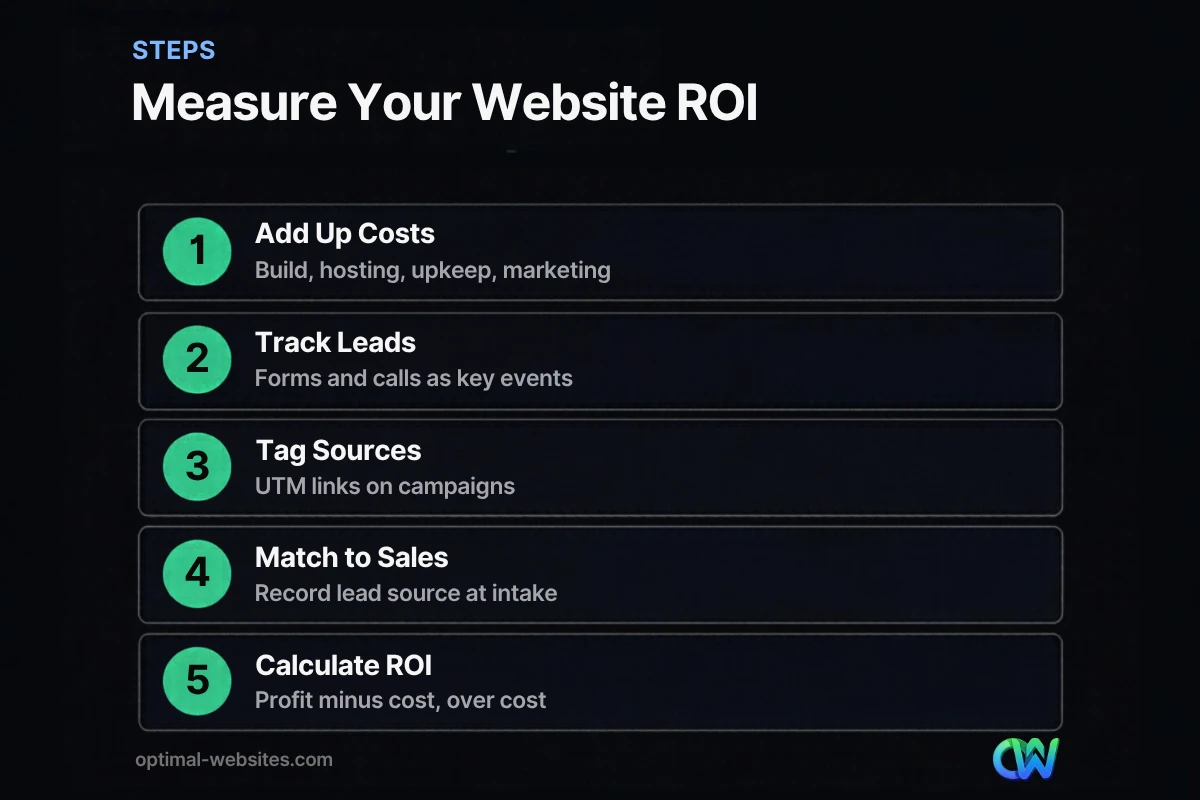
Quick answer: Website ROI compares the profit your website generates with what it costs to build, host, maintain and market. The formula is (profit from website-generated sales minus website costs) divided by website costs. To measure it, track forms and calls as key events, tag campaign links, and record each new customer’s lead source.
Most small business owners know what their website cost. Far fewer know what it earns. Without that number, it is hard to decide whether a redesign is worth it, whether to spend more on SEO or ads, or whether the site is quietly underperforming. Website ROI answers a simple question: for every dollar you put into your site, how much comes back? This guide shows you how to calculate it, which costs and revenue to include, how to measure website leads in Google Analytics 4, and how to work out cost per lead. You will also see how to improve your numbers once you can measure them.
Key Takeaways
- Website ROI = (profit from website-generated customers minus website costs) divided by website costs.
- Count all costs: build, hosting, maintenance, content, tools and the marketing that drives traffic.
- Track forms, calls and bookings as key events, and record lead source for every new customer.
- Cost per lead and lead-to-customer rate show where the money is leaking.
- Improving conversion on the site often raises ROI faster than buying more traffic.
What Is Website ROI?
Website ROI, or website return on investment, is the profit your website generates relative to what you spend on it, expressed as a percentage. A positive ROI means the site earns more than it costs; a negative one means it costs more than it brings in.
The basic formula:
Website ROI = (Profit from website-generated sales minus Website costs) ÷ Website costs × 100
Use profit, not revenue, when you can. A $10,000 job with $6,000 in materials and labor contributes $4,000 in gross profit, and that is the number that pays back your website.
What Costs Should You Include?
Include every cost needed to build, run and promote the website over the period you measure. Leaving costs out makes ROI look better than it really is.
| Cost category | Examples | How to count it |
|---|---|---|
| Build or redesign | Design, development, setup | Spread over expected site life |
| Hosting and domain | Hosting plan, domain renewal, SSL | Annual cost |
| Maintenance | Updates, backups, security, support | Monthly or annual |
| Content | Blog writing, photography, video | Per period |
| Tools | Forms, CRM, call tracking, plugins | Monthly or annual |
| Marketing to the site | SEO, ads, social promotion | Per period |
For example, if a website build costs $1,500 and you expect to use it for three years, count about $500 per year for the build, plus your annual hosting, maintenance and marketing.
How Do You Measure Website Leads?
Measure website leads by tracking every action that signals a potential customer, such as form submissions, phone calls, bookings and purchases, and marking them as key events in Google Analytics 4. Then record where each lead came from.
Set up tracking in GA4
Google Analytics lets you mark key events in Google Analytics for the actions that matter to your business. Typical key events for a service business:
- Contact or quote form submission (usually tracked with a thank-you page or form event)
- Click on a phone number
- Booking completed
- Purchase, for online stores
Marking an event as a key event affects reports from that point forward, not historical data, so set this up as early as possible. Our guide to Google Analytics 4 for small business walks through the setup.
Tag your campaign links
Use UTM parameters on links in emails, social posts and ads so Analytics can tell which campaign sent each visitor. Google’s guide to UTM parameters recommends setting source, medium and campaign together, and using lowercase consistently because values are case sensitive.
Track phone calls
For many local businesses, most leads call instead of filling out a form. Call tracking numbers that change by traffic source, or at minimum tracking clicks on your phone number, close that gap.
Ask at intake
Analytics will never capture everything. Ask every new customer how they found you and record the answer in your CRM or job software. This fills in word-of-mouth, offline and repeat visits.
How Do You Calculate Website Return on Investment?
Calculate website return on investment by multiplying website-generated customers by average profit per customer, subtracting total website costs and dividing by those costs. Work through it with real numbers from your tracking.
Here is a hypothetical example for a local contractor, for illustration only:
- Annual website costs: $500 build share + $600 hosting and maintenance + $2,400 SEO = $3,500
- Website leads in the year: 120 (forms plus tracked calls)
- Leads that became customers: 24 (a 20% close rate)
- Average gross profit per customer: $1,200
- Profit from website customers: 24 × $1,200 = $28,800
- Website ROI: ($28,800 − $3,500) ÷ $3,500 × 100 = about 723%
Your numbers will differ, but the steps stay the same. The SBA advice on marketing budgets recommends breaking down marketing costs and comparing them to revenue to measure return, which is exactly what this calculation does.
What Is a Good Cost Per Lead?
A good cost per lead is one that leaves healthy profit after you account for your close rate and the value of a customer. There is no universal number; it depends on your industry, prices and how well you convert leads into customers.
Calculate it like this:
Cost per lead = Total website and marketing costs ÷ Number of leads
In the example above, $3,500 ÷ 120 leads = about $29 per lead. Then work out what you can afford:
- Maximum affordable cost per lead = Average profit per customer × Close rate
- Example: $1,200 × 20% = $240
If your actual cost per lead is well below the maximum, you can likely spend more on marketing profitably. If it is close to or above it, focus on improving conversion or close rates before adding traffic.
How Do You Measure Website Value Beyond Direct Leads?
Website value goes beyond direct leads: your site supports referrals, ad performance, recruiting and credibility, even when those effects are hard to track. Count direct ROI first, then note these as supporting value.
Indirect value includes:
- Referral validation. Prospects referred by friends often check your website before calling.
- Ad efficiency. Better landing pages lower the cost of every paid click.
- Recruiting. Job seekers judge employers by their websites too.
- Time saved. Clear FAQs, pricing guidance and booking tools reduce repetitive calls.
- AI and search visibility. Traffic from AI assistants and search engines can be tracked separately; see our guide on how to track AI referral traffic.
How Can You Improve Website ROI?
Improve website ROI by converting more of the visitors you already have, lowering ongoing costs and investing in the channels that produce the best customers. Conversion improvements usually pay back fastest because they make every source of traffic more valuable.
High-impact improvements:
- Make contact easy. Click-to-call on mobile, short forms and a clear call to action on every page.
- Speed up the site. Faster pages keep more visitors engaged, especially on phones.
- Strengthen service pages. Specific, helpful pages convert better than generic ones.
- Add proof. Reviews, project photos and credentials build trust.
- Follow up fast. Responding quickly to new leads improves close rates.
- Cut what does not work. Drop campaigns with poor cost per lead and reinvest in what performs.
Our article on what makes a lead generation website covers the on-site elements in more depth. From our experience building WordPress sites with Elementor Pro for contractors and local service businesses, the quickest wins are usually a clearer homepage call to action, a shorter quote form and a phone number that is tappable on every page.
How Optimal Websites Can Help
Optimal Websites, a WordPress web design agency based in Delaware, builds fast, mobile-first websites with the tracking you need to measure website ROI from day one: key events for forms and calls, clean campaign tagging and dashboards you can understand. Our lead generation services focus on turning more visitors into leads. Compare our website packages, starting at $999, to see what fits your budget.
Frequently Asked Questions
How do I calculate website ROI?
Calculate website ROI by taking the profit from customers your website generated, subtracting your total website costs, dividing by those costs and multiplying by 100. Include build, hosting, maintenance, content and marketing costs. Track leads in Google Analytics 4 and record each customer’s lead source so you know which sales came from the site.
What is a good ROI for a small business website?
Any positive website ROI means the site earns more than it costs, but a healthy small business site often returns several times its cost. The right benchmark depends on your industry, prices and close rate. Compare your ROI over time and against other marketing channels rather than chasing a single target number.
How do I measure website leads?
Measure website leads by marking form submissions, phone clicks and bookings as key events in Google Analytics 4, tagging campaign links with UTM parameters and using call tracking where possible. Then ask every new customer how they found you and record it. Combining analytics with intake data gives the most accurate picture.
What should be included in website costs?
Website costs should include the build or redesign (spread over the site’s expected life), hosting, domain, maintenance, security, content creation, software tools and any marketing that drives traffic, such as SEO or ads. Leaving out ongoing costs makes your website return on investment look better than it really is.
How do I calculate cost per lead?
Divide your total website and marketing costs for a period by the number of leads in that period. For example, $3,000 in costs and 100 leads equals $30 per lead. Compare that with your maximum affordable cost per lead, which is average profit per customer multiplied by your close rate.
How long does it take for a website to pay for itself?
It depends on your traffic, conversion rate, close rate and customer value. A site with strong local search visibility and clear calls to action can pay back its build cost relatively quickly, while a site with little traffic may take longer. Track leads monthly from launch so you can see the payback point.
Ready to Get Started?
Want a website that you can measure and that earns its keep? Request a free quote or call (302) 554-9497 and we will help you set up tracking and improve your results.


