
Last updated: October 15, 2026
Quick answer: The best live chat software for small business is the one your team can actually staff, that captures lead details before a visitor leaves, and that connects to your CRM or inbox. Start by choosing the right type (live chat, chatbot, AI assistant, or hybrid), then compare coverage, handoff, integrations, speed, and price.
A visitor lands on your site at 8:45 p.m. with a quick question about pricing or availability. If there is no fast way to ask, many people simply hit the back button and call the next company on the list. That lost conversation is lost revenue. Choosing the right live chat software for small business closes that gap, but the market is crowded, and the wrong setup can annoy visitors, slow your pages, or bury leads in an inbox nobody checks. This guide explains the four main types of website chat, the criteria that matter for a small team, and a simple rollout plan you can follow this month.
Key Takeaways
- Pick the chat type first (live chat, chatbot, AI assistant, or hybrid), then the vendor. The type decides how much staff time you need.
- Be honest about coverage. If a human is not available, say so and capture contact details instead of leaving people waiting.
- End every chat with a clear next step: a booked call, a quote request, or a CRM record.
- Chat widgets add JavaScript, so load them in a way that protects page speed and mobile usability.
- Review transcripts monthly. They show you what your website copy is failing to answer.
What is live chat software for small business?
Live chat software is a tool that adds a messaging window to your website so visitors can ask questions and get answers in real time. For a small business, it works as both a customer service channel and a lead capture tool.
Most platforms include a chat widget, a shared inbox, saved replies, and a record of each conversation. Many now add automation, from scripted menus to AI that drafts or sends answers.
Pew Research Center’s 2026 survey of 5,119 U.S. adults found that 49% now use AI chatbots, up from 33% in 2024. Customers are comfortable typing questions into a chat box, which raises the bar for your website chat.
Live chat vs chatbot vs AI assistant: which type do you need?
There are four main types of website chat, and the right one depends on your staff time, the complexity of your questions, and how your leads are qualified. The table below compares them side by side.
| Type | How it works | Best for | Staff time needed | Main risk |
|---|---|---|---|---|
| Live chat | Real people answer every message | High-value or complex sales, local services with an office team | High during open hours | Slow or missed replies after hours |
| Rule-based chatbot | Scripted menus and buttons route visitors | FAQs, booking links, simple lead forms | Low after setup | Feels rigid when a question falls outside the script |
| AI assistant | Generates answers from your content and data | Sites with many repeat questions and good documentation | Low to medium (review and training) | Wrong or vague answers if content is weak |
| Hybrid | Bot or AI handles first contact, hands off to a person | Most small businesses that want 24/7 coverage | Medium | Poor handoff that makes visitors repeat themselves |
Scripted bots vs data-connected bots
A useful way to think about automation is the difference between bots that only repeat information and bots that can act on it. A scripted bot repeats what is already on your site: hours, service areas, a link to your quote form. A data-connected bot can collect details, check a calendar, look up an order, or create a lead record in your CRM.
The second kind is more valuable but needs clean data and clear permissions. For most small businesses, start with a bot that answers the top ten questions and collects contact details, with a human ready to take over.
What features matter most in live chat software for small business?
The features that matter most turn a conversation into a booked call or qualified lead. Reliable notifications, easy handoff, and a CRM connection beat fancy analytics.
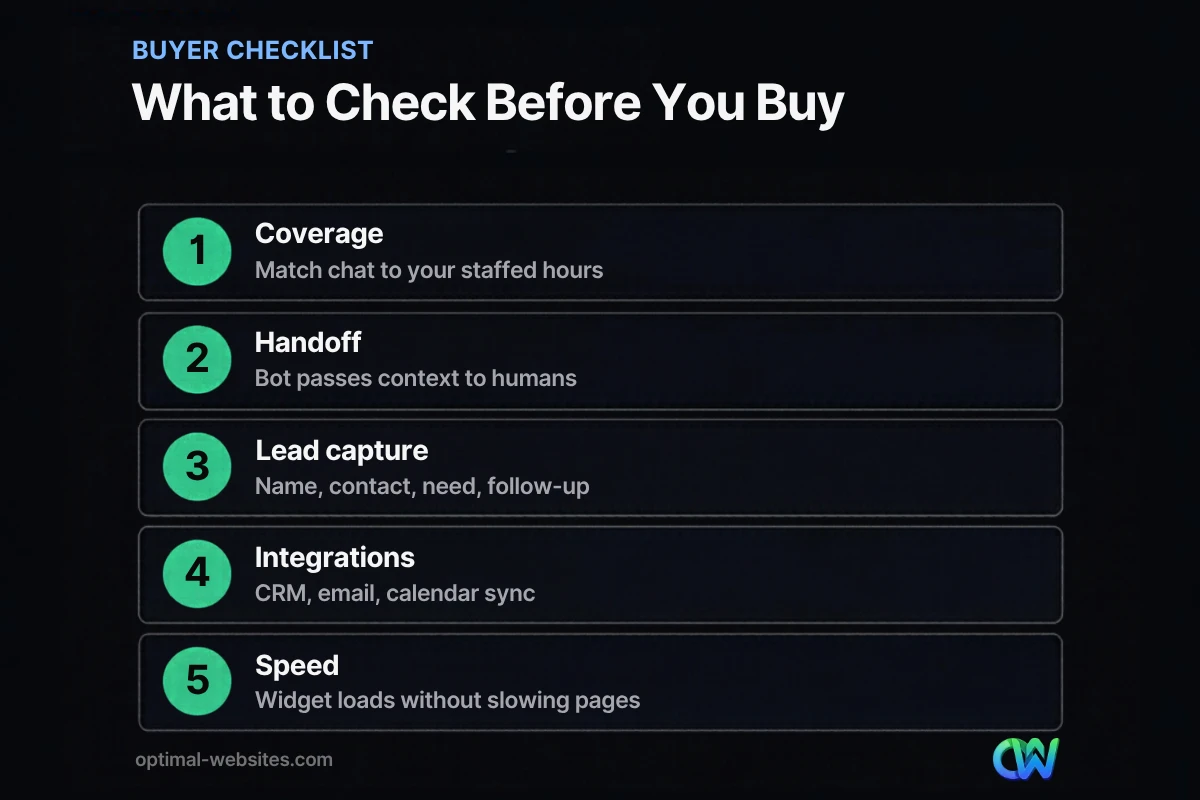
Coverage and availability settings
Your software should let you set business hours and switch the widget’s behavior when nobody is online. Nielsen Norman Group’s guidelines for customer-service chat recommend telling people when live chat is available if it is not always staffed, and estimating how long they will wait before a chat starts. An “away” mode that collects a name, email, phone number, and question is far better than a spinning “connecting” message.
Bot-to-human handoff
If you use any automation, the handoff is the make-or-break moment. NN/g advises labeling the feature simply as “Chat” and telling people they will start with a bot and be transferred to a person if the bot cannot help. It also flags how frustrating it is when an agent asks again for information the visitor already gave. Look for software that passes the full transcript and any collected details to the person who picks up.
Lead capture and qualification
Chat is one of the easiest lead generation tools to add, as long as it collects the right fields: name, best contact method, the service needed, and timing. Contractors might add project location; law firms might add practice area. Ask only what you need to route the lead.
Integrations
Check whether the platform connects to your CRM, email tool, calendar, and help desk, natively or through an automation service. Contact history matters: your team should see past conversations and know whether someone is a new lead or a long-time client.
Team tools
Even a two-person team benefits from a shared inbox, saved replies, internal notes, and mobile push notifications so an owner can answer a hot lead from a job site.
Proactive and context-aware triggers
Good platforms trigger messages based on the page a visitor is on. A short prompt on a pricing or checkout page can help; a pop-up on every page in the first two seconds usually gets closed.
Reporting and privacy
Basic reporting should show chat volume, response times, missed chats, and conversions to leads. Also ask where chat data is stored, how long it is kept, and who can see it. If you handle healthcare or legal matters, confirm the vendor’s compliance options first.
How do you choose the right live chat software for your business?
Match the tool to your team’s capacity and sales process, not to a feature count. A short trial tells you more than any comparison chart.
- List your top 10 visitor questions. Pull them from calls, emails, and contact form submissions. This tells you how much can be automated.
- Decide on coverage. Write down who will answer chats and when. If the answer is “nobody after 5 p.m.,” plan for an away form or a hybrid bot.
- Pick the chat type. Use the table above. Most small businesses land on live chat with an away form, or a hybrid setup.
- Shortlist two or three vendors. Compare pricing per seat, AI or automation add-on costs, integrations, and contract terms. Pricing and features change often, so check each vendor’s current plan page.
- Run a two-week trial. Install the widget on your real site, test it on your phone, and confirm every chat creates a record, a notification, and a follow-up.
- Measure and adjust. After 30 days, review missed chats, response times, and how many conversations turned into calls or quotes.
Where does website chat make the biggest difference?
Chat helps most in industries where customers have questions before they buy and where a fast answer wins the job. It is less useful when visitors already know exactly what they want and can buy in a few clicks.
- Local service businesses. Roofing, construction, and home services customers want to know if you serve their area and how soon you can come out. A quick chat can turn that into a scheduled estimate.
- Professional services. Law firms and consultants can use chat to route inquiries by practice area and book consultations, while being careful not to give advice in a chat window.
- Hospitality. Hotels and venues use chat as a virtual concierge for bookings and amenities.
- Online stores. Prompts on product and cart pages can answer sizing, shipping, and returns questions before a shopper leaves.
Chat is not only for large companies. A small team that answers quickly can deliver a better experience than a big brand with long queues.
How do you set up website chat without hurting your site?
Set up chat so it loads efficiently and works on phones. A widget that slows your site or covers your call-to-action costs more leads than it captures.
Protect page speed
According to web.dev’s performance guidance, most chat widgets download significant amounts of JavaScript that can hurt page load. The recommended fix is a “facade”: a lightweight button that looks like the chat launcher and loads the real widget only when someone interacts with it. Ask your vendor or developer about delayed loading, then check your Core Web Vitals in PageSpeed Insights before and after. For more ideas, see our guide to practical ways to improve website speed.
Design for mobile first
On a phone, a chat bubble can cover buttons or your phone number. Test on several screen sizes and keep tap-to-call visible. Chat should support a truly mobile-friendly website, not compete with it.
Write answers people can scan
If you use an AI assistant, keep its answers short. NN/g research on site AI chatbots recommends skipping small talk, leading with the essential answer, offering follow-up prompts for more detail, and saying plainly when the bot cannot help. Specific answers beat generic ones.
Keep chat as one option, not the only one
NN/g recommends not relying on a floating button as the only way to reach chat, and placing that button in the standard bottom-right position with enough contrast to be noticed. Keep your phone number and contact form easy to find on every page.
What we see on WordPress builds
At Optimal Websites, a WordPress web design agency based in Delaware, we build mobile-first sites with Elementor Pro for contractors, construction firms, law firms, and local service businesses. The chat setups that work best are simple: one clear launcher, an away form after hours, alerts that go to a phone, and leads that land in the same place as contact form submissions. The ones that struggle have too many pop-ups or no one assigned to answer.
How does live chat fit into your lead generation plan?
Live chat is one piece of a lead generation system, not the whole thing. It works best when the rest of your site already builds trust and gives visitors clear reasons to reach out.
Think of chat as the safety net for visitors who are interested but not ready to fill out a form. Strong service pages, clear calls-to-action, and reviews bring people to that point; chat catches the questions that would send them away. For a broader plan, read our guide on how to get more leads from your website.
Use transcripts to improve the site. If people keep asking about service areas or price ranges, add that information to your pages. Better pages mean fewer repetitive chats and more qualified ones.
How Optimal Websites Can Help
If you want chat that brings in leads instead of noise, it helps to plan it alongside the website itself. Our lead generation services cover the forms, calls-to-action, and conversion paths that turn visitors into inquiries, and we can help you set up website chat that fits your team and loads efficiently on WordPress.
Every project includes a mobile-first build and video tutorials so you can edit your own site. You can review our website packages and pricing, and most projects launch in 2–4 weeks.
Frequently Asked Questions
Is live chat worth it for a small business?
Yes, live chat is usually worth it for small businesses that get regular website traffic and sell services where customers have questions before buying. The key is staffing it honestly. If you cannot answer quickly, use an away form or a hybrid bot so visitors can still leave their details and get a reliable follow-up instead of waiting with no reply.
What is the difference between a chatbot and live chat?
Live chat connects visitors with a real person who types replies in real time. A chatbot answers automatically using scripts or AI. Many small businesses use a hybrid: the bot handles common questions and collects contact details, then hands the conversation and transcript to a team member when the question needs a human touch.
How much does live chat software for small business cost?
Pricing varies widely. Many vendors offer a free or entry-level plan, then charge per user per month, and AI features are often billed as an add-on or based on usage. Because plans change frequently, compare current pricing pages directly and factor in the staff time needed to answer chats, which is often the larger cost.
Can a chatbot replace a receptionist or sales rep?
Not entirely. A chatbot can answer repeat questions, share hours and service areas, collect lead details, and book appointments around the clock. It struggles with complex, emotional, or high-value conversations. Most small businesses get the best results by letting the bot handle first contact and routing qualified leads to a person quickly.
Will a chat widget slow down my website?
It can. Most chat widgets load a significant amount of JavaScript, which can affect page load and responsiveness, especially on phones. You can reduce the impact by loading the widget only after a visitor interacts with a lightweight launcher button. Test your site in PageSpeed Insights before and after installing any live chat software for small business.
What should I ask visitors in a chat to capture a lead?
Keep it short: name, the best way to reach them, the service they need, and their timeline. Add one qualifying question that matters for your business, such as project location for contractors or practice area for law firms. Every extra question lowers completion, so collect only what you need to route and follow up on the lead.
Should I use AI for my website chat?
An AI chat assistant can be a good fit if your site has clear, accurate content for it to draw from and you are willing to review its answers. Tell visitors they are chatting with a bot, keep answers short and specific, and make it easy to reach a human. Weak or outdated site content leads to weak AI answers.
Ready to Get Started?
Want website chat that captures leads without slowing your site down? Request a free quote or call us at (302) 554-9497 to talk through your goals.


