
Last updated: October 15, 2026
Quick answer: The best web hosting for small business is the plan that matches your traffic, your platform and your tolerance for technical work. For most WordPress sites, managed WordPress hosting or a quality VPS beats bargain shared hosting, because it delivers faster load times, daily backups, current PHP, strong security and support that understands WordPress.
Your hosting plan is the foundation every page of your website sits on. When it is slow, customers wait. When it goes down, your phone stops ringing and your forms stop sending leads. When it gets hacked, you lose time, trust and sometimes search rankings. Finding the best web hosting for small business is less about picking a famous brand and more about matching the right type of hosting to how your business actually uses its website. This guide explains the main hosting types in plain English, compares them side by side, and gives you a checklist you can use with any provider before you sign up.
Key Takeaways
- Hosting is chosen by type first (shared, VPS, managed WordPress, cloud, dedicated), then by provider.
- For most small business WordPress sites, managed WordPress hosting offers the best balance of speed, security and low maintenance.
- Shared hosting is cheapest but shares resources with other sites, which can hurt speed during traffic spikes.
- Check speed, uptime, backups, security, PHP version, server location and support before you buy.
- The cheapest plan often costs more over time once you factor in slow pages, downtime and cleanup.
What Is Web Hosting and Why Does It Matter for a Small Business?
Web hosting is the service that stores your website’s files and database on a server and delivers them to visitors when they type your address. It matters because your host directly controls how fast your site loads, how often it is available and how well it is protected.
For a local contractor, law firm or healthcare practice, the website is often the first impression and the main lead source. That makes hosting a business decision, not just an IT line item.
What Are the Main Types of Web Hosting?
There are five common types of web hosting: shared, VPS, managed WordPress, cloud and dedicated. They differ in how many resources you get, how much control you have and how much technical work is left to you.
Shared hosting
Shared hosting places your site on a server alongside many other websites, all drawing from the same CPU, memory and storage. It is the cheapest option, but a busy neighbor can slow your site down.
VPS hosting
A virtual private server (VPS) splits one physical server into isolated virtual machines, each with guaranteed resources. You get more consistent performance and more control than shared hosting. A managed VPS shifts server maintenance to the host.
Managed WordPress hosting
Managed WordPress hosting is a service built and tuned specifically for WordPress sites. It typically includes server-level caching, automatic WordPress core updates, daily backups, staging sites, malware scanning and support staff who know WordPress well. For businesses that want a fast site without managing servers, this is often the sweet spot.
Cloud hosting
Cloud hosting runs your site on a network of connected servers, so resources can scale up when traffic rises. It suits seasonal spikes and growing online stores.
Dedicated hosting
Dedicated hosting gives you an entire physical server. It is usually overkill for a small business site and makes sense only for high-traffic sites or specialized software needs.
Shared vs VPS Hosting: Which Is Right for You?
Shared hosting is fine for a brand new, low-traffic site on a tight budget, while VPS hosting is the better choice once your site generates steady leads or sales. The core difference is that VPS resources are reserved for you, so performance stays predictable.
If your site runs an online store, booking system, heavy Elementor pages or paid ad campaigns, you want reserved resources. When comparing shared vs VPS hosting, remember that a managed VPS removes most of the technical burden that makes VPS intimidating.
How Do the Hosting Types Compare?
The table below summarizes how each hosting type stacks up for a typical small business.
| Hosting type | Best for | Performance | Technical effort | Scalability | Relative cost |
|---|---|---|---|---|---|
| Shared | New, low-traffic sites | Variable, depends on neighbors | Low | Limited | Lowest |
| VPS (managed) | Growing sites, steady leads | Consistent | Low to moderate | Good | Moderate |
| VPS (unmanaged) | Teams with a developer | Consistent | High | Good | Moderate |
| Managed WordPress | Most small business WordPress sites | Fast, tuned for WordPress | Low | Good | Moderate |
| Cloud | Traffic spikes, growing stores | Fast, elastic | Low to moderate | Excellent | Variable, often usage-based |
| Dedicated | High-traffic or specialized sites | Maximum | High unless managed | Fixed to one server | Highest |
What Should You Look for in the Best Web Hosting for Small Business?
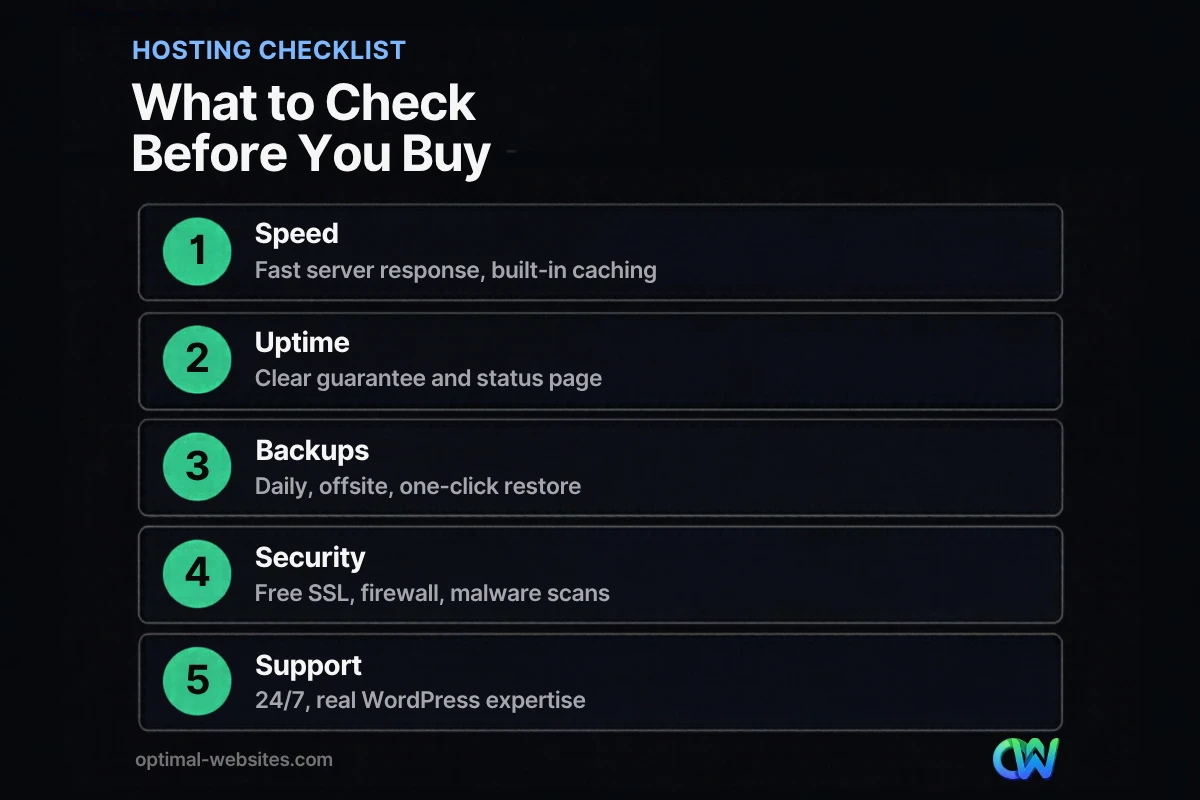
The best web hosting for small business gets seven things right: speed, uptime, backups, security, PHP version, server location and support. Weigh each one against how much revenue your website brings in.
Speed and server response time
Your host determines how quickly the server starts sending your page. Google’s web.dev guidance on Time to First Byte describes good values as 0.8 seconds or less, and poor values as above 1.8 seconds, while noting it is a rough guide rather than a ranking rule. Look for server-level caching, HTTP/2 or HTTP/3 support and an optional content delivery network (CDN).
Server response also feeds into the Core Web Vitals thresholds Google publishes: Largest Contentful Paint within 2.5 seconds, Interaction to Next Paint of 200 milliseconds or less and Cumulative Layout Shift of 0.1 or less. Slow hosting makes those much harder to reach. Our guide to practical ways to improve website speed covers the rest of the picture.
Uptime and reliability
Uptime is the percentage of time your site is online. A 99.9% guarantee sounds near perfect, yet it still allows close to nine hours of downtime per year. Ask whether there is a public status page and what compensation you get when the host misses its target.
Backups and restores
Backups are your insurance policy. Look for automatic daily backups stored offsite (not only on the same server), a retention window of at least a couple of weeks and a one-click restore.
Security
Good hosts include a free SSL certificate for HTTPS, a web application firewall, malware scanning and isolation between accounts. Ask how they handle a hacked site.
PHP and database versions
WordPress runs on PHP, and newer PHP versions are faster and receive security fixes. The WordPress.org server requirements currently recommend PHP 8.3 or greater, MySQL 8.0 or greater (or MariaDB 10.11 or greater) and HTTPS support. Choose a host that keeps current versions available and lets you switch with a click.
Server location
The physical distance between your server and your visitors adds delay. If your customers are in the Mid-Atlantic, a server in the eastern United States usually makes more sense than one overseas.
Support
When something breaks at 6 p.m. on a Friday, support quality is everything. Look for 24/7 help by chat or phone, reasonable response times and staff who understand WordPress, not just generic server questions.
Is Managed WordPress Hosting Worth It?
For most small businesses running WordPress, yes. Managed WordPress hosting costs more than basic shared hosting, but it bundles performance tuning, backups, security and expert support that you would otherwise need to piece together yourself or pay someone to handle.
The real comparison is not the monthly fee but the cost of a slow or hacked site. If you are weighing whether WordPress itself is the right platform, our article on why WordPress works well for businesses explains the strengths it brings.
What Kind of Web Hosting for WordPress Do Online Stores Need?
Online stores need more than a brochure site because cart, checkout and account pages cannot be fully cached. Every shopper action hits the server, so web hosting for WordPress stores should have reserved resources, solid database performance and room to scale during sales or holidays.
If you run WooCommerce, look for a managed WordPress or cloud plan that explicitly supports ecommerce, includes daily (or more frequent) backups and offers staging so you can test updates before they reach live customers. For a deeper look at store setup, see our guide to building a WordPress ecommerce website.
How Do You Choose a Hosting Provider Step by Step?
Start with your needs, shortlist by hosting type, then test providers against the checklist above.
- List what your site does. Forms, booking, a store or member areas all change requirements.
- Pick a hosting type. Factor in traffic and planned growth, then use the comparison table to choose shared, VPS, managed WordPress, cloud or dedicated.
- Shortlist two or three providers. Popularity alone does not tell you whether a plan fits.
- Read the fine print. Introductory prices often renew higher. Check renewal rates, backup retention, support scope and cancellation terms.
- Ask support a real question. Before buying, contact support with a WordPress question and judge the speed and quality of the answer.
- Plan the migration. Moving a live site needs a backup, a staging test and a DNS switch at a low-traffic time.
What Hosting Mistakes Do Small Businesses Make Most Often?
The most common mistake is choosing hosting by price alone. A plan that saves a few dollars a month can cost far more in lost leads, emergency fixes and wasted time.
Other frequent mistakes include letting a designer’s personal account own the hosting, running outdated PHP for years and relying on backups stored on the same server. Hosting is one piece of a healthy site, and our overview of what every business website needs shows how it fits with the rest.
How Optimal Websites Can Help
At Optimal Websites, a WordPress web design agency based in Delaware, we build fast, mobile-first websites with Elementor Pro for contractors, construction firms, roofers, law firms, healthcare practices and local service businesses. Because Elementor pages can be demanding, we pay close attention to the hosting environment each site runs on, including caching, PHP version and backups.
We also offer hosting, so one team can be responsible for both your website and the server it lives on. If your current site feels slow, our website speed optimization service can find where the time is going, whether that is hosting, images or plugins. You can also review our WordPress web design packages to see what a new build includes.
Frequently Asked Questions
What is the best web hosting for small business websites?
The best web hosting for small business websites depends on your site and goals, but for most WordPress sites managed WordPress hosting is the strongest choice. It combines fast performance, automatic backups, security tools and WordPress-savvy support. Very small, low-traffic sites can start on shared hosting, while busy stores may need cloud or VPS hosting.
Is shared hosting good enough for a small business?
Shared hosting is good enough for a new, simple site with low traffic and a tight budget. It becomes a problem once your site drives real leads or sales, because you share resources with many other sites. When comparing shared vs VPS hosting, VPS offers reserved resources and more consistent speed as your business grows.
What is managed WordPress hosting?
Managed WordPress hosting is a hosting service optimized specifically for WordPress. The host handles server tuning, caching, core updates, daily backups, security scanning and often staging sites. Support staff understand WordPress issues, so problems get solved faster. It costs more than basic shared hosting but saves time and reduces risk for business sites.
How much uptime should a web host guarantee?
Look for an uptime guarantee of at least 99.9%, along with a public status page and clear compensation terms if the host misses it. Keep in mind that 99.9% still allows close to nine hours of downtime per year. More important than the number is how the host monitors outages and how quickly it responds.
Does web hosting affect SEO?
Yes, indirectly. Slow server response makes it harder to meet Core Web Vitals and frustrates visitors, and frequent downtime can stop search engines from crawling your pages. Hosting will not rank your site by itself, but a fast, reliable host removes technical barriers so your content and local SEO efforts can perform.
What PHP version should my WordPress host use?
Your host should run a current, supported PHP version. WordPress.org currently recommends PHP 8.3 or greater for web hosting for WordPress, along with MySQL 8.0 or greater or MariaDB 10.11 or greater. Newer PHP versions are faster and receive security patches, so choose a host that lets you upgrade easily from your dashboard.
Ready to Get Started?
Want a fast WordPress website on hosting that keeps it fast? Talk to our team about your goals and we will recommend the right setup. Request your free quote or call us at (302) 554-9497.


