
Quick answer: Local business schema is structured data, usually written in JSON-LD, that tells search engines your business name, address, phone, hours, location and type in a machine-readable format. Google requires only a name and address but recommends more details. It can support rich results, though it never guarantees them.
When someone searches for a plumber, dentist or law firm nearby, search engines have to piece together who you are, where you are and when you are open. Most of that comes from your Google Business Profile and your website. Local business schema is a small piece of code that states those facts clearly so machines do not have to guess. It is not magic and it is not a ranking hack, but it removes ambiguity, which matters for local businesses competing on details. This guide explains structured data in plain English, which properties matter, how to add it to a WordPress site and how to test it.
Key Takeaways
- Local business schema is a type of structured data that describes your business to search engines in a standard vocabulary.
- Google requires only two properties (name and address) for LocalBusiness markup, but recommends many more, such as phone, hours, geo coordinates and URL.
- JSON-LD is the format Google generally recommends, and it is the easiest to add and maintain.
- Structured data can make you eligible for rich results, but Google does not guarantee they will appear.
- Your markup must match what visitors see on the page and what is on your Google Business Profile.
What is local business schema?
Local business schema is code that labels the key facts about a local business, such as its name, address, phone number and opening hours, using the Schema.org vocabulary. Search engines read these labels to understand your business with more confidence.
Think of it as a business card written for machines. A person reading your contact page sees “Open Mon–Fri, 8–5.” A search engine sees text that could mean many things. With LocalBusiness schema, you state it precisely: these are the days, these are the opening and closing times, this is the business they belong to.
What is structured data in general?
Structured data is a standardized format for providing information about a page and classifying its content. Schema.org is the shared vocabulary that Google, Bing and other search engines use. The Schema.org LocalBusiness type includes many more specific subtypes, such as Dentist, LegalService and HomeAndConstructionBusiness, which itself covers trades like plumbers, electricians and roofing contractors.
Does local business schema help SEO?
Local business schema helps search engines understand and trust your business details, and it can make your pages eligible for enhanced results. It is not a direct ranking boost on its own.
Here is what it can and cannot do:
| What schema can do | What schema cannot do |
|---|---|
| Clarify your name, address, phone and hours | Guarantee rich results or a Map Pack spot |
| Reduce confusion between similar businesses | Make up for thin or missing content |
| Support eligibility for rich results | Replace a complete Google Business Profile |
| Connect your site to your profiles via sameAs | Fix a slow or broken website |
Google states that structured data can make results more engaging and may lead to rich results, but markup that does not follow its guidelines may be ineligible. The best way to think about schema is as a consistency signal. When your website markup, your visible contact details and your Google Business Profile optimization all say the same thing, search engines have fewer reasons to doubt you.
Which LocalBusiness schema properties matter most?
Google requires a name and an address, and recommends several more properties that are worth including whenever they apply. Google’s LocalBusiness structured data documentation lists them, and the guidance is to include as many as possible.
Required properties
- name: your business name exactly as customers know it
- address: a full PostalAddress with street, city, state, ZIP and country
Recommended properties
- telephone: include the country and area code
- url: the page for this specific location
- geo: latitude and longitude with at least five decimal places
- openingHoursSpecification: days, opening and closing times, plus seasonal changes if needed
- priceRange: a short indicator such as “$$”, under 100 characters
- department: for distinct departments inside one location, such as a service center
- aggregateRating and review: only for sites that publish reviews of other local businesses, not reviews of yourself
Helpful extras from Schema.org
- areaServed: the cities or regions you serve, useful for service-area businesses
- sameAs: links to your official profiles, such as Facebook, LinkedIn or Yelp
- image and logo: a real photo of your business and your logo
Example: what goes in the markup
Here is how the main properties map to real information for a fictional plumbing company:
| Property | Example value |
|---|---|
| @type | Plumber |
| name | Example Plumbing Co. |
| address | 123 Main St, Newark, DE 19711, US |
| telephone | +1-302-555-0100 |
| url | The location’s page on your site |
| geo | 39.68370, -75.74966 |
| openingHoursSpecification | Monday to Friday, 08:00 to 17:00 |
| areaServed | Newark, Wilmington, Bear, Middletown |
| sameAs | Links to your official social profiles |
In practice, these values go inside a JSON-LD script tag in the page’s HTML. You do not need to write it by hand if you use an SEO plugin, but it helps to know what each field means.
What is JSON-LD and why use it?
JSON-LD is a way of writing structured data as a separate block of code, so it does not have to be woven into your page’s visible HTML. In its introduction to structured data, Google recommends JSON-LD in general, as long as your site’s setup allows it.
The other formats, Microdata and RDFa, add attributes directly to your HTML elements. They work, but they break easily when a designer changes the layout. JSON-LD lives in its own script tag, so a redesign is far less likely to damage it.
How do you add local business schema to a WordPress site?
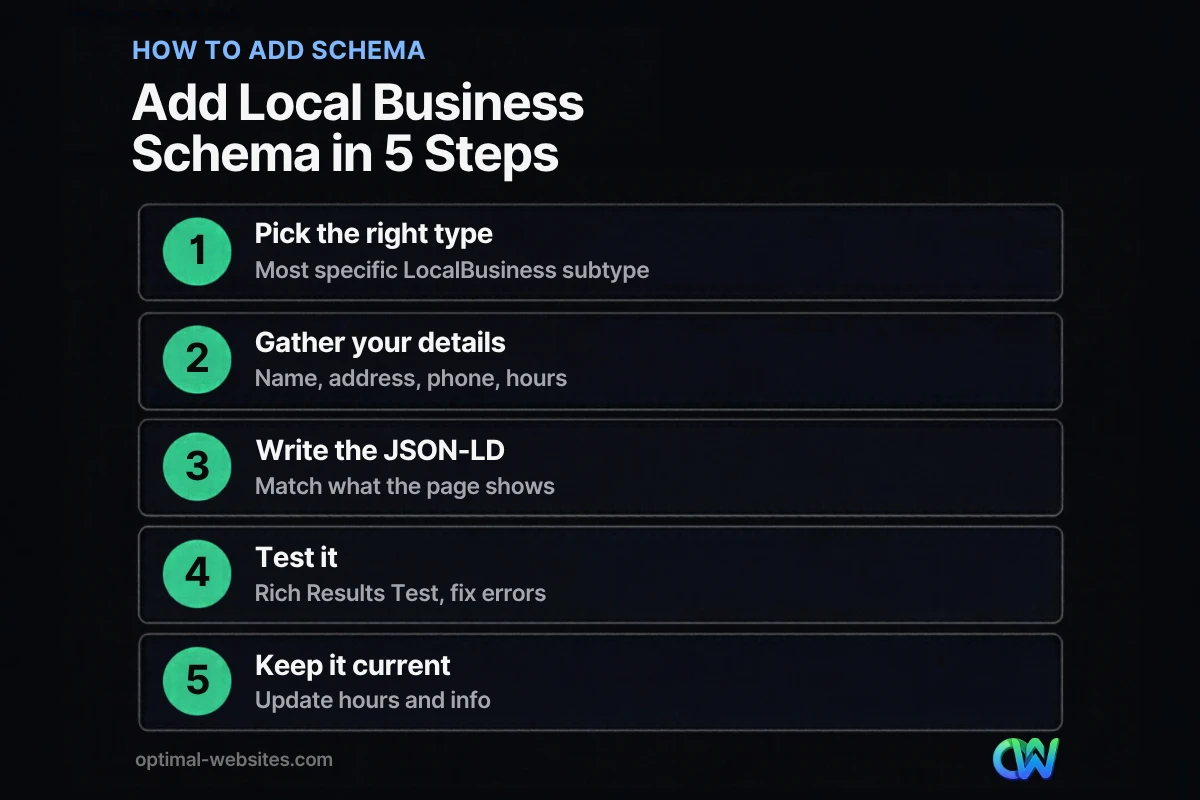
On WordPress, you can add local business schema with an SEO plugin, a dedicated schema plugin or a custom JSON-LD block. The right choice depends on how many locations you have and how much control you need.
- Pick the most specific type. Use Plumber, Dentist or LegalService instead of the generic LocalBusiness when one fits.
- Gather your details. Name, address, phone, hours, geo coordinates, logo, photos and official profile URLs. Use exactly the same name, address and phone as your Google Business Profile.
- Add the markup. Most popular SEO plugins have a local business or organization setting. For more control, add a JSON-LD script through a code snippet or your theme builder.
- Place it on the right page. Single-location businesses usually add it to the homepage or contact page. Multi-location businesses add separate markup to each location page.
- Test and monitor. Run the page through the Rich Results Test, fix critical errors, then check Search Console for warnings over time.
On the WordPress sites we build at Optimal Websites, a WordPress web design agency based in Delaware, we set up business schema during the build and match it to the client’s Google Business Profile. For roofers, contractors and law firms we use the specific subtype and add areaServed for the towns they work in, so the markup reflects how the business actually operates.
What are common local business schema mistakes?
Most schema problems come from mismatched or inflated information, not from missing code. Avoid these:
- Marking up information that is not on the page. Hours, phone and address in your schema should also appear in visible text.
- Inconsistent name, address or phone. If your schema says “Suite 200” and your profile says “Ste. 2,” fix both to match.
- Self-serving review markup. Adding star ratings for your own business from your own testimonials goes against Google’s guidance, which limits review markup on LocalBusiness pages to sites that review other businesses.
- Using a generic type. LocalBusiness works, but a specific subtype gives clearer context.
- One block for many locations. Each location needs its own page and its own markup.
- Set it and forget it. Holiday hours, new phone numbers and moves must be updated in schema too.
For a broader list of page-level checks, see our on-page SEO checklist, and for the bigger picture, our guide to local SEO for small business.
How Optimal Websites Can Help
Schema works best as part of a well-built site with clear location and service pages. Our SEO services include structured data setup and testing, Google Business Profile alignment and on-page fixes, and every WordPress site we build launches with business schema in place. If you are not sure whether your current markup is correct, we can check it and fix any errors.
Frequently Asked Questions
What is local business schema?
Local business schema is structured data that describes a local business to search engines, including its name, address, phone, hours and type. It uses the Schema.org LocalBusiness vocabulary and is usually added as JSON-LD code. It helps search engines understand and verify your details and can make pages eligible for rich results.
Does local business schema improve rankings?
Local business schema is not a direct ranking factor on its own. It helps search engines understand your business accurately and can support eligibility for enhanced results. Rankings in local search still depend mostly on relevance, distance and prominence, so treat schema as a supporting signal alongside your Google Business Profile, reviews and content.
Where should I put LocalBusiness schema on my website?
For a single-location business, add LocalBusiness schema to the homepage or the contact page, where the address and phone are visible. For multiple locations, create a separate page for each location and add markup specific to that location on each page. Avoid placing the same markup on every page of the site.
Do I need a developer to add structured data?
Not always. Many WordPress SEO plugins can generate local business schema from a settings screen. A developer helps when you have multiple locations, need a specific subtype, want to add areaServed or sameAs properties, or need custom JSON-LD that a plugin does not support. Either way, always test the result.
How do I test my local business schema?
Paste your page URL into Google’s Rich Results Test to check for errors and warnings, and use the Schema Markup Validator for general Schema.org checks. After publishing, use Search Console’s URL Inspection tool and enhancement reports to confirm Google can read the markup. Fix critical errors first, then optional warnings.
Can service-area businesses use local business schema?
Yes. Service-area businesses can use LocalBusiness schema and add the areaServed property to list the cities or regions they cover. Keep the address in your markup consistent with how you present it publicly. If you hide your address on your Google Business Profile, think carefully before showing it in visible text and schema.
Ready to Get Started?
Want your business details to be clear and consistent everywhere search engines look? Request a free quote or call (302) 554-9497 and we will review your schema and local SEO setup.


