

Quick answer: A website content checklist lists everything you should gather before a web designer starts building: logo and brand files, copy for each page, real photos of your team and work, reviews and credentials, and access to your domain, hosting and accounts. Having it ready is the simplest way to avoid launch delays.
Most website projects do not stall in design or development. They stall waiting for content. The designer is ready, the layout is approved, and then weeks pass while someone looks for the logo file, writes the About page, or tries to remember who registered the domain. A clear website content checklist fixes that. In this guide you will get a practical list of what to prepare before your build, how to plan copy for each page, which photos for website use actually help, and how to organize everything so your designer can move fast. It works whether you hire an agency or build it yourself.
Key Takeaways
- In our experience, missing content is one of the most common reasons website projects slip past their launch date.
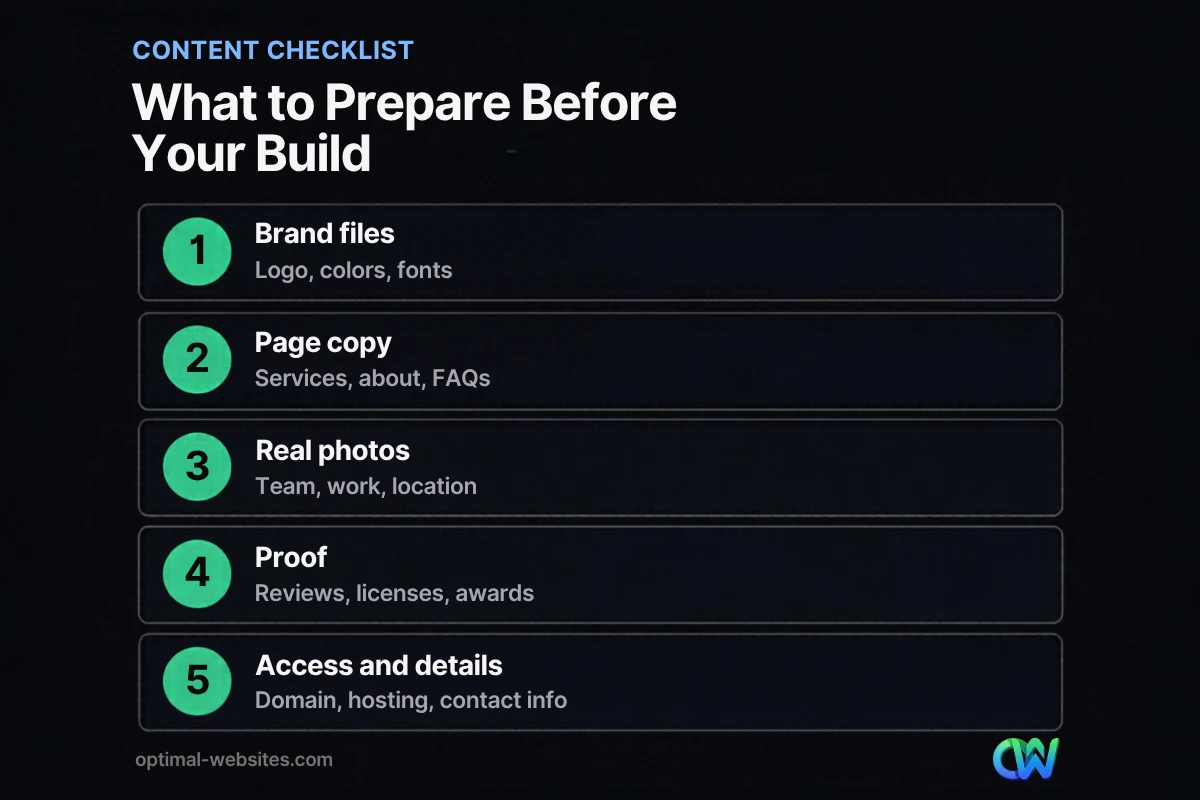
- Gather brand files, page copy, real photos, proof (reviews, licenses) and account access before kickoff.
- Write copy page by page from a simple website content plan rather than all at once.
- Use your own photos wherever possible; stock photos weaken trust for local businesses.
- Put everything in one shared folder with clear file names.
Why Prepare Content Before Web Design?
Preparing content before web design lets the designer build around your real words and images instead of placeholder text. Layouts fit the message, pages get approved faster, and you avoid redesigning sections once the real copy arrives.
Placeholder text hides problems. A hero section that looks great with “Lorem ipsum” may break when your real headline is twice as long. A services grid built for six items looks odd when you only offer four. Content first means fewer surprises.
It also affects timing. If you want to know how long a project usually takes and where it slows down, see our guide on how long it takes to build a website.
What Belongs on a Website Content Checklist?
A complete website content checklist covers five groups: brand assets, written copy, images, proof and trust signals, and technical access. Use the table below as your master list.
| Category | What to gather | Notes |
|---|---|---|
| Brand assets | Logo (vector or high-resolution PNG), brand colors, fonts, any style guide | Ask your logo designer for the original files |
| Copy | Home, services, about, contact, FAQ, service areas | One document per page works best |
| Images | Team photos, project photos, location or office, product photos | Your own images beat stock |
| Proof | Reviews, testimonials with permission, licenses, certifications, awards, associations | Include links or copies you can verify |
| Business details | Address, phone, email, hours, service area, social profiles | Must match your Google Business Profile |
| Access | Domain registrar login, current hosting, Google Business Profile, Analytics, Search Console | Owner-level access, kept by you |
| Legal | Privacy policy, terms, any industry disclaimers | Required content varies by industry |
For a broader view of features and pages, read our guide to what a business website needs.
How Do You Create a Website Content Plan?
A website content plan maps each page to its purpose, the main message, and the content it needs. Start with a sitemap (the list of pages), then fill in one row per page before writing a single paragraph.
- List your pages. Home, one page per main service, about, contact, plus service area pages if you serve several towns.
- Write one goal per page. “Get roof inspection requests from homeowners in our county.”
- Note the main question visitors have. “Do you work in my area, and what does it cost?”
- List the content needed. Copy, photos, a testimonial, an FAQ, a form.
- Assign an owner and due date. Someone has to be responsible for each page.
This turns “write the website” into a set of small, finishable tasks.
What Should Your Website Copy Checklist Include?
Your website copy checklist should cover the words for every page, written for scanning. Visitors rarely read every line: Nielsen Norman Group’s research found that 79% of test users scanned new pages, while only 16% read word by word.
Home page
- A headline that says what you do and where (for example, “Commercial Roofing in Northern Delaware”)
- A short paragraph on who you help and why you are different
- Your main call to action, such as a free estimate or consultation
Service pages
- What the service includes and who it is for
- Your process in a few steps
- Common questions, timelines and what affects price
- A clear next step
About page
- Your story in plain words, the team, years in business, licenses
- What customers can expect working with you
Contact page
- Phone, email, address (or service area), hours and a short form
Write in your own voice. A designer or copywriter can polish wording, but only you know the details that make your business credible.
Which Photos for Website Use Should You Gather?
The best photos for website use are real images of your team, your work and your location. They build trust far better than stock photography, especially for local service businesses where customers want to see who will show up.
Aim to collect:
- Team photos: owner headshot, crew or staff at work
- Project photos: finished jobs, before and after shots, details of quality work
- Location photos: office, storefront, vehicles with your branding
- Process photos: inspections, consultations, equipment in use
Send the largest originals you have, not images pulled from social media. Your designer will resize and compress them; our guide shows how to optimize images for the web. Rename files descriptively. Google’s image best practices recommend short, descriptive file names (for example, “roof-replacement-dover.jpg” instead of “IMG00023.jpg”).
What Accounts and Access Do You Need?
You need owner-level access to your domain registrar, hosting (if you already have it), Google Business Profile, Google Analytics and Google Search Console. These are the accounts most often lost when a previous designer or employee moves on.
Make a short list of each account, who owns it, and the login email. Do not send passwords in plain email; use a password manager or share access by adding your designer as a user. Keep yourself as the owner of every account.
How Should You Organize Content for Your Designer?
Organize content in one shared folder with a subfolder per page and clear file names. The goal is that anyone can find the right file in seconds without asking.
A simple structure:
- 01-Brand (logo files, colors, fonts)
- 02-Home (copy doc, hero photo options)
- 03-Services (one subfolder per service)
- 04-About (bio, team photos)
- 05-Reviews-and-Proof
- 06-Access (list of accounts, no passwords)
If you are still choosing who will build the site, our list of questions to ask a web designer includes what to ask about content help.
How We Handle Content at Optimal Websites
At Optimal Websites, a WordPress web design agency based in Delaware, we share a content checklist at kickoff so clients know exactly what to gather. For contractors, law firms and other service businesses, we help shape copy around each service, suggest which photos to take, and build pages in Elementor Pro that are easy to update later. Every client also gets video tutorials so they can edit text and images themselves after launch. Most projects launch in 2–4 weeks, and having content ready is what keeps them on schedule.
How Optimal Websites Can Help
If writing copy is the part you dread, you do not have to do it alone. Our web design services include planning the sitemap, guiding your content, and building a fast, mobile-first WordPress site. Packages start at $999, with a 50% deposit to start and the final 50% after you approve the site.
Frequently Asked Questions
What should be on a website content checklist?
A website content checklist should include your logo and brand files, copy for each page, real photos of your team and work, reviews and credentials, business details like address and hours, legal pages, and access to your domain, hosting and Google accounts. Gathering these before the build prevents most launch delays.
Should I write website content before or after design?
Write at least a first draft before design starts. Real content lets your designer build layouts that fit your actual message and avoids rework when placeholder text is replaced. You can refine wording during the project, but having content before web design begins keeps the timeline realistic and the pages focused.
How many photos do I need for my website?
There is no fixed number, but plan for a strong hero image on the home page, a few images per service page, team or owner photos for the about page, and a gallery of real projects if you do visual work. Quality and authenticity matter more than quantity, so start with your best real photos.
Can I use stock photos on my business website?
You can use licensed stock photos for backgrounds or abstract concepts, but real photos work better for anything that represents your business, such as your team, your work or your location. Visitors recognize stock images quickly, and for local services, authentic photos are a stronger trust signal.
Who writes the content for a new website?
It depends on your agreement. Some businesses write their own copy, some hire a copywriter, and many agencies help shape or edit content. Even with help, you need to supply the facts: services, process, service areas and what makes you different. Ask your designer what is included before you sign.
What is a website content plan?
A website content plan is a page-by-page outline of your site: each page’s goal, main message, target audience and the content it needs, such as copy, photos, testimonials and forms. It turns writing a website into small tasks with owners and deadlines, which makes the project much easier to finish.
Ready to Get Started?
Have your content ready, or want help getting there? Request a free quote or call (302) 554-9497 to plan your new website.


