
Quick answer: A Wix to WordPress migration that keeps your SEO comes down to five steps: inventory and benchmark your current site, map every old URL to its new address, rebuild and move the content, launch with 301 redirects and an updated sitemap, then monitor Search Console and fix errors for several weeks.
Many businesses start on Wix because it is quick and easy. A few years later they want more control: faster pages, better SEO options, more flexible design, or features Wix does not handle well. The worry is always the same. Will moving the site wipe out the Google rankings you worked to earn? It does not have to. A careful Wix to WordPress migration preserves your content and search visibility by treating URLs and redirects as seriously as design. This guide walks through the process step by step, what transfers and what does not, and the checks that protect your traffic after launch.
Key Takeaways
- You cannot move a Wix design directly into WordPress; plan to rebuild the layout and migrate the content.
- Mapping every old URL to a new one, then adding 301 redirects, is what protects your rankings.
- Wix URLs often include prefixes like /post/ or /product-page/ that change on WordPress.
- Keep your domain name; moving it is separate from moving the website.
- Expect some ranking movement for a few weeks, and keep redirects in place for at least a year.
Why Move From Wix to WordPress?
Businesses move from Wix to WordPress for control and flexibility. WordPress lets you choose your hosting, use any theme or page builder, install plugins for almost any feature, and edit technical SEO details more freely.
Common reasons we hear:
- Wanting faster pages and more control over performance
- Needing features Wix does not support well, or that require workarounds
- Wanting to own the site files and choose a hosting provider
- Planning to grow content, landing pages or e-commerce
If you are still weighing the platforms, read our Wix vs WordPress comparison and the broader benefits of WordPress for business. This post assumes you have decided to move.
What Transfers in a Wix to WordPress Migration?
In a Wix migration, your content (text, images, blog posts, product details) can be moved, but the design and layout cannot. Wix uses its own proprietary editor, so pages are rebuilt in WordPress with a theme or page builder like Elementor Pro.
| Item | Moves to WordPress? | How |
|---|---|---|
| Domain name | Yes | Point DNS to new host or transfer registrar |
| Page text | Yes | Copy into rebuilt pages |
| Images | Yes | Download originals, re-upload, optimize |
| Blog posts | Yes | Manual copy or import from your Wix RSS feed |
| Design and layout | No | Rebuild in WordPress |
| Wix apps and forms | No | Replace with WordPress plugins or Elementor forms |
| Page titles and meta descriptions | Yes, manually | Copy into your SEO plugin |
| URLs | Partly | Often change; handle with redirects |
| Store products and orders | Partly | Export product data where available, rebuild store |
For blogs, the free RSS Importer plugin on WordPress.org can pull posts from a feed. It is an older plugin, so test it on a staging site and expect to fix images and formatting by hand.
How Do You Move From Wix to WordPress Without Losing SEO?
To move from Wix to WordPress without losing SEO, preserve three things: your content, your URL equity (through 301 redirects), and your on-page SEO data. Follow these steps in order.
Step 1: Inventory and benchmark
List every page, blog post and product on your Wix site. Use your sitemap (usually at yourdomain.com/sitemap.xml) and Google Search Console’s Pages report. For each URL, note:
- Monthly clicks and top queries from Search Console
- Page title and meta description
- Inbound links, if you know of important ones
Save a snapshot of current rankings and traffic. You will compare against it after launch.
Step 2: Map every URL
Create a spreadsheet with two columns: old Wix URL and new WordPress URL. Google’s guidance on site moves recommends building this mapping before you start and redirecting each old URL directly to its new equivalent, without chains.
Watch for Wix-specific URL patterns:
- Blog posts often live under /post/ on Wix; WordPress usually uses a different structure.
- Store products may sit under /product-page/.
- Some pages may have auto-generated slugs you never noticed.
Where possible, keep the same slug for pages (for example, /roof-repair stays /roof-repair) so fewer redirects are needed.
Step 3: Rebuild and migrate content
Set up WordPress on your new hosting, ideally on a staging address first. Rebuild the design, then move content page by page. Keep the wording of high-performing pages largely the same during the move; change one big thing at a time so you can tell what affected rankings.
Copy titles and meta descriptions into your SEO plugin, re-add image alt text, and recreate internal links using the new URLs.
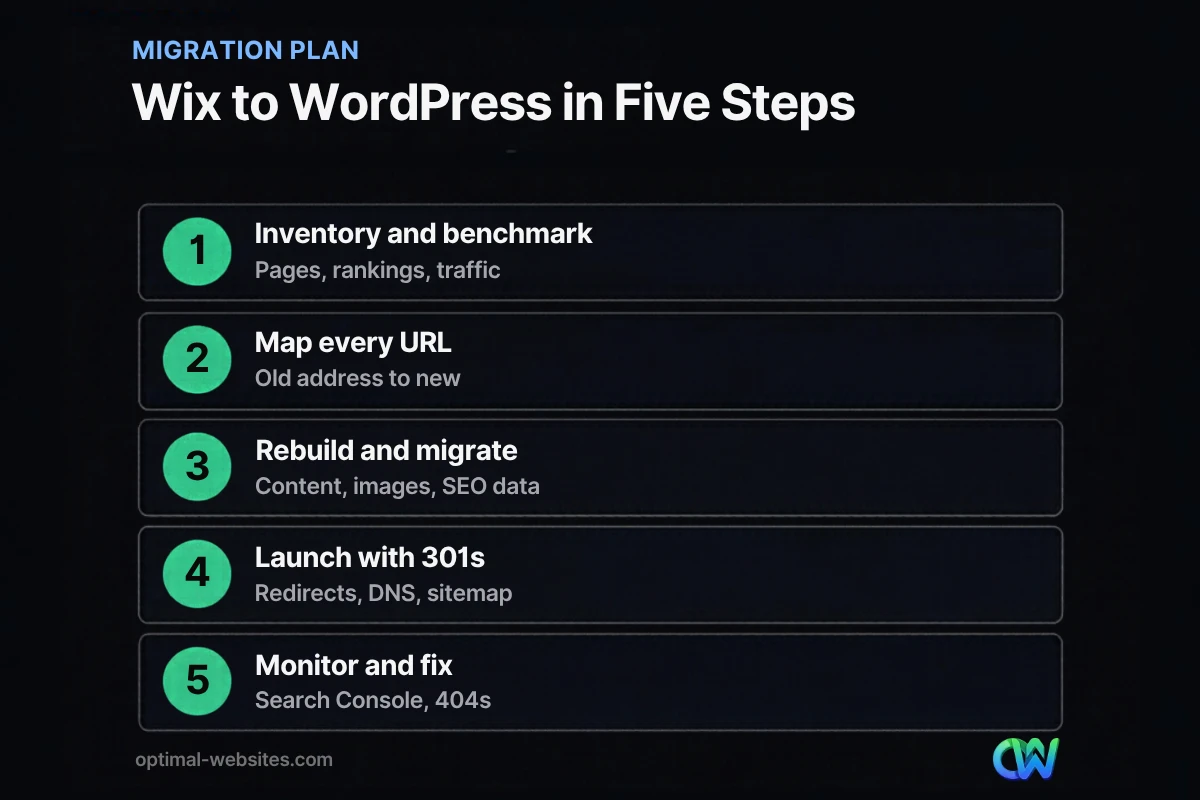
Step 4: Launch with 301 redirects
At launch, point your domain to the new host and activate the redirects from your map. Use permanent (301) redirects at the server or plugin level. Then:
- Submit the new XML sitemap in Google Search Console
- Test a sample of old URLs to confirm each lands on the right new page
- Check that the site uses HTTPS everywhere
If you keep the same domain, you do not need Google’s Change of Address tool. That tool is only for moving to a different domain.
Step 5: Monitor and fix
Google notes that rankings can fluctuate for a while as it recrawls the site. For the first several weeks, check Search Console for crawl errors and 404s, compare clicks against your benchmark, and fix any missing redirects quickly. Keep the redirects in place for at least a year, and longer if you can.
How Do 301 Redirects From Wix Work?
A 301 redirect tells browsers and search engines that a page has moved permanently to a new address. When you set up 301 redirects from Wix URLs to WordPress URLs, visitors and Google follow them automatically, and most of the old page’s ranking value passes to the new one.
Because redirects live on the new site, you set them up in WordPress (through a redirect plugin or your host) using your URL map. The old Wix site does not need to stay active once the domain points to WordPress.
What About Your Domain and Email?
Your domain can stay the same during a Wix migration. If you bought it through Wix, you can either point its DNS records to your new host or transfer the registration to another registrar. Either way, check your email settings first. If business email runs through records on that domain, those records must be copied over exactly, or email can stop working during the switch.
Common Wix Migration Mistakes
- Skipping the URL map and losing rankings for blog posts and products.
- Redesigning and rewriting everything at once, which makes ranking changes impossible to diagnose.
- Forgetting image alt text and meta descriptions.
- Leaving forms untested, so leads disappear after launch.
- Canceling Wix too early, before content and redirects are fully verified.
Our website redesign checklist covers the broader launch checks that apply to any platform change.
How We Handle Wix Migrations
At Optimal Websites, a WordPress web design agency based in Delaware, we rebuild Wix sites in WordPress with Elementor Pro, keeping your content and protecting your search visibility. We map URLs before design starts, set up redirects and sitemaps at launch, and check Search Console afterward. Clients also get video training so they can update pages themselves once the new site is live.
How Optimal Websites Can Help
If you are ready to move from Wix to WordPress, our web design services cover the full migration: planning, rebuild, content move, redirects and launch checks. Packages start at $999, and most projects launch in 2–4 weeks.
Frequently Asked Questions
Can you migrate a Wix site to WordPress?
Yes. Your content, images, blog posts and domain can move to WordPress, but the Wix design cannot be exported into WordPress. The layout is rebuilt with a WordPress theme or page builder, and content is migrated page by page. With URL mapping and 301 redirects, a Wix to WordPress migration can preserve your search visibility.
Will I lose my Google rankings if I move from Wix to WordPress?
You should not lose rankings long term if you map every old URL to a new one, set up 301 redirects, keep page content similar during the move and submit a new sitemap. Google says some fluctuation is normal while it recrawls the site. Monitor Search Console and fix any missing redirects quickly.
How long does a Wix migration take?
A small business site with a few dozen pages typically takes a few weeks, including rebuilding the design, moving content, setting up redirects and testing. Sites with large blogs or online stores take longer because of the number of URLs to map and products to migrate. Planning the URL map early keeps the timeline predictable.
Do I need to keep my Wix plan after migrating?
You need to keep it until the new WordPress site is live, the domain points to your new host, and you have verified content and redirects. If your domain is registered through Wix, decide whether to transfer it or update its DNS. After that, you can cancel the Wix website plan.
How do I set up 301 redirects from Wix to WordPress?
Create a spreadsheet mapping each old Wix URL to its new WordPress URL. After launch, add those redirects in WordPress with a redirect plugin or through your hosting provider, using permanent 301 redirects. Test a sample of old URLs, including blog posts and product pages, to confirm each lands on the correct page.
Can I migrate website content from Wix myself?
You can migrate website content yourself if the site is small: copy text, download and re-upload images, and recreate titles and descriptions. The hardest parts are rebuilding the design and getting redirects right. Many owners handle the content inventory themselves and hire help for the rebuild, redirects and launch checks.
Ready to Get Started?
Thinking about leaving Wix but worried about your rankings? Get a free quote or call (302) 554-9497 and we will plan your migration with you.


