
Quick answer: If you find your website not showing up on Google, first search “site:yourdomain.com” to see whether any pages are indexed. Then use Google Search Console to inspect key URLs and review the Page indexing report. Common causes are a new site, a noindex tag, robots.txt blocking, missing sitemaps, duplicate pages, thin content or strong competition.
You launched a website, searched for your business, and found nothing. Or your homepage appears but your service pages do not. It is one of the most common and frustrating problems small business owners face, because a website nobody can find does not bring in customers. The good news: when a website is not showing up on Google, the cause is usually identifiable and often fixable in an afternoon. This guide shows you how to tell whether Google has indexed your site, how to find the exact reason in Google Search Console, and how to fix the nine most common causes, from a stray noindex tag to thin content.
Key Takeaways
- First check whether your site is indexed at all with a site: search, then confirm in Google Search Console.
- “Not indexed” and “indexed but not ranking” are different problems with different fixes.
- The Page indexing report and URL Inspection tool tell you exactly why a page is excluded.
- Technical blockers such as noindex tags, robots.txt rules and the WordPress “discourage search engines” setting are common and easy to fix.
- Once a site is indexed, ranking depends on relevance, content quality, links and local signals.
Why is my website not showing up on Google?
Your website is not showing up on Google for one of two reasons: Google has not indexed it, or it is indexed but not ranking high enough for the searches you tried. Figuring out which one applies is the first step.
- Not indexed means Google has not added your pages to its index, so they cannot appear for any search. Causes are usually technical or because the site is new.
- Indexed but not ranking means Google knows about your pages but shows other sites first. Causes are usually content, competition, links or local signals.
How do you check if Google has indexed your site?
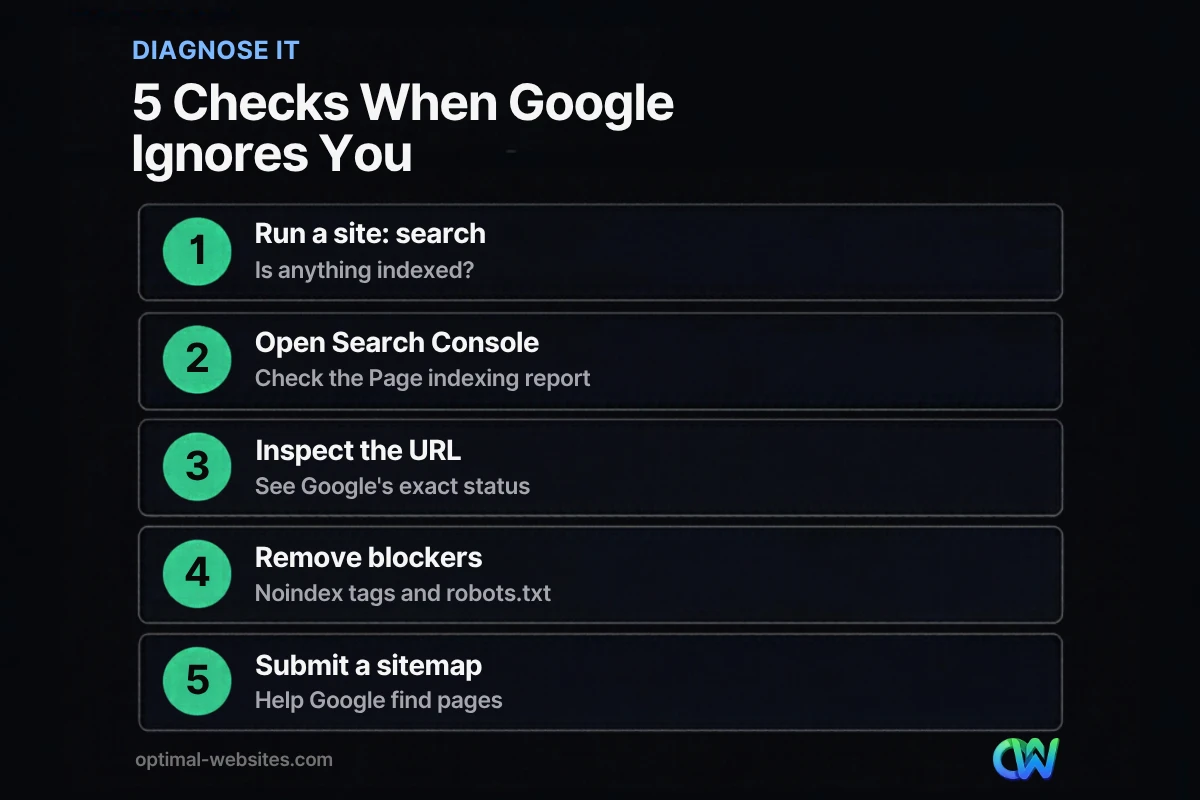
Check whether Google has indexed your site by searching for “site:yourdomain.com” in Google and then confirming in Google Search Console. The site: search is a quick signal; Search Console gives the official answer.
Google’s SEO Starter Guide explains that if a site: search returns results pointing to your site, you are in the index. If nothing appears, check the technical requirements first.
For details, set up Google Search Console and use two tools:
- URL Inspection. Paste any URL to see whether it is on Google, when it was last crawled and any problems found.
- Page indexing report. Shows which pages Google can find and index, and lists the reasons other pages were not indexed.
What are the most common reasons a site is not indexed?
The most common reasons a site is not indexed are that it is very new, a noindex tag is blocking it, robots.txt prevents crawling, Google has not found the pages yet, or the pages are duplicates or low value. The Page indexing report names the reason for each page.
| Status in Search Console | What it means | Typical fix |
|---|---|---|
| URL marked “noindex” | A noindex rule told Google not to index the page | Remove the noindex tag or setting |
| Blocked by robots.txt | Your robots.txt file stops Google from crawling | Edit robots.txt to allow important pages |
| Discovered, currently not indexed | Google found the URL but has not crawled it yet | Improve internal links, submit sitemap, be patient |
| Crawled, currently not indexed | Google crawled the page but chose not to index it | Improve content quality and uniqueness |
| Duplicate without user-selected canonical | Google sees the page as a duplicate of another | Set a canonical or consolidate pages |
| Not found (404) or server error | The page is broken or the server failed | Fix the URL, redirects or hosting issues |
How do you fix a noindex tag?
Fix a noindex tag by finding where it is set and removing it from pages you want in Google. A noindex rule tells search engines not to include the page in results, and Google’s documentation on noindex confirms Google will drop a page with that rule even if other sites link to it.
On WordPress sites, check these places:
- Settings > Reading. The “Discourage search engines from indexing this site” box is often left checked after a site moves from staging to live.
- Your SEO plugin. Plugins such as Yoast or Rank Math let you set noindex per page, per post type or per taxonomy.
- Theme or page builder settings. Some templates add their own robots rules.
After you fix it, use URL Inspection and click “Request indexing” for your most important pages.
Do not combine robots.txt blocking with noindex
Google can only see a noindex rule if it can crawl the page. The same Google documentation warns that a page blocked by robots.txt might still appear in results if other pages link to it, because Google never sees the noindex. Use one method on purpose, not both by accident.
How do you submit a sitemap to Google?
Submit a sitemap to Google through the Sitemaps report in Google Search Console, or by adding a “Sitemap:” line to your robots.txt file. Most WordPress SEO plugins generate a sitemap automatically.
Google’s own guidance notes that submitting a sitemap is a hint, not a guarantee that every URL will be crawled or indexed. It still helps, especially for new sites and pages with few internal links.
- Find your sitemap URL, often /sitemap_index.xml or /sitemap.xml.
- Open Search Console and go to Sitemaps.
- Enter the sitemap URL and submit.
- Check back for errors and the number of discovered pages.
Why is my site indexed but not ranking?
Your site is indexed but not ranking because Google considers other pages more relevant, more helpful or more trusted for the searches you tried. Indexing gets you into the race; ranking depends on how you compare to everyone else.
Common reasons:
- You are searching the wrong terms. Try searches your customers actually use, including your service plus your town.
- Thin content. A services page with three sentences rarely beats a detailed competitor page.
- One page for everything. Separate pages for each service give Google a clear page to rank.
- Few links or mentions. New sites have little authority until other sites reference them.
- Weak local signals. For local searches, your Google Business Profile, reviews and consistent business details matter. Our local SEO starter plan covers them.
- Technical issues. Slow pages, poor mobile layouts or broken links make it harder to compete.
How long does it take for a new website to show up on Google?
A new website can take anywhere from a few days to several weeks to show up on Google, and ranking well takes longer. Google’s SEO Starter Guide notes that some changes take effect in a few hours while others can take several months.
You can help Google find a new site faster by:
- Verifying it in Google Search Console and submitting a sitemap.
- Requesting indexing for the homepage and key service pages.
- Linking to the site from your Google Business Profile and social profiles.
- Making sure every important page is linked from your navigation or other pages.
What should you do after Google indexes your site?
After Google indexes your site, focus on measuring and improving. Track which pages get impressions and clicks in Search Console, and use analytics to see what visitors do once they arrive.
If you have not already, set up Google Analytics 4 to track form submissions and calls. Then work on the content and authority signals described in our guide to SEO for small business.
What we see when sites go missing from Google
When business owners tell us their site is not on Google, the cause is very often simple: the “discourage search engines” box left on after launch, a staging site that was indexed instead of the real one, or an old site’s pages redirecting nowhere after a redesign. Checking these first saves a lot of guesswork.
How Optimal Websites Can Help
Optimal Websites, a WordPress web design agency based in Delaware, checks indexing settings, sitemaps, redirects and Search Console on every site we launch. If your website is not showing up on Google, our SEO services can diagnose the cause, fix technical blockers and build the content and local signals that help you rank.
Frequently Asked Questions
Why is my website not showing up on Google?
Your website is not showing up on Google either because it is not indexed or because it is indexed but ranking low. Search “site:yourdomain.com” to check indexing, then use Google Search Console. Common causes include a new site, noindex tags, robots.txt blocks, missing sitemaps, duplicate or thin pages and strong competition.
How do I know if my site is indexed by Google?
Search Google for “site:yourdomain.com”. If results from your site appear, at least some pages are indexed. For an exact answer, verify your site in Google Search Console, use the URL Inspection tool on important pages and review the Page indexing report, which lists indexed pages and reasons others were excluded.
What does a noindex tag do?
A noindex tag tells search engines not to include a page in their results. Google drops pages with a noindex rule even if other sites link to them. It is useful for thank-you pages or private content, but if it is left on important pages by mistake, those pages will not appear in Google at all.
How do I submit my sitemap to Google?
To submit a sitemap to Google, open Google Search Console, go to the Sitemaps report, enter your sitemap URL and click Submit. You can also add a Sitemap line to your robots.txt file. Submitting is a hint rather than a guarantee, but it helps Google discover new and updated pages faster.
What does “crawled, currently not indexed” mean?
“Crawled, currently not indexed” means Google visited the page but decided not to add it to its index for now. It often points to thin, duplicate or low-value content. Improve the page with original, useful information, link to it from relevant pages on your site and check again later.
Can I pay Google to index my website?
No. You cannot pay Google to index your website or to rank higher in organic results. Google Ads can show paid ads, but indexing and organic rankings are free and based on Google’s systems. Focus on removing technical blockers, submitting a sitemap and publishing helpful content customers are searching for.
Ready to Get Started?
Still can’t find your site on Google? Get a free quote or call (302) 554-9497 and we will help you find the cause.


