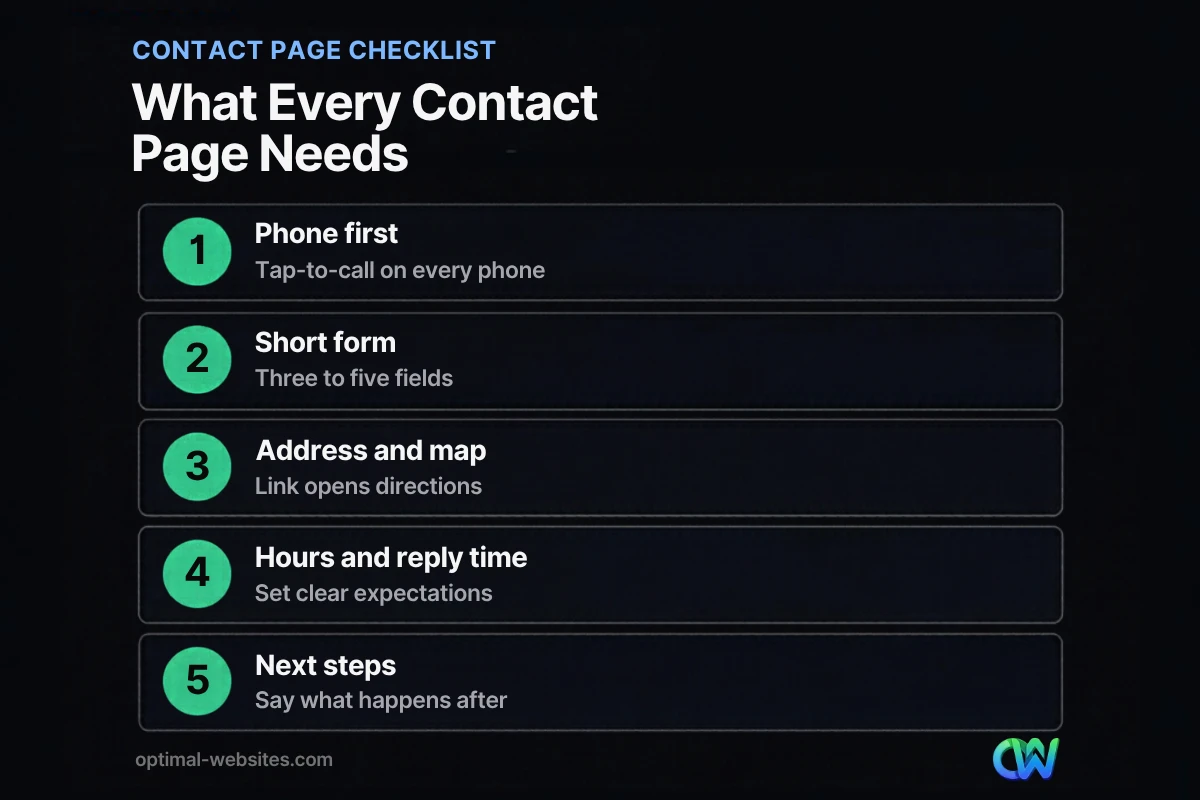
Quick answer: Good contact page design makes it easy to reach you in the way each visitor prefers. Put a tap-to-call phone number first, add a short form of three to five fields, show your email, address with a map link, hours and response time, and tell people exactly what happens after they get in touch.
The contact page is where a visitor who already wants to hire you decides whether reaching out feels easy. If the phone number is hidden, the form asks for ten things, or nothing says when you will reply, many of those people quietly go back to Google and call a competitor. That is a lost job you already paid to attract. This guide covers contact page design from top to bottom: what to put on the page, the order that works, click to call, form design, maps and hours, trust signals, industry examples and the mistakes we see most often on small business sites.
Key Takeaways
- Offer more than a form. A phone number and an email address belong on every contact page.
- Lead with the channel most of your customers use, and make the phone number tap-to-call on mobile.
- Keep the form to three to five fields and say what happens after someone sends it.
- Show hours, service area and a realistic response time, then meet it.
- Link “Contact” in the main navigation and footer so nobody has to hunt for it.
What is contact page design?
Contact page design is the planning of the content, layout and behavior of the page people use to reach your business. It covers which contact options you show, in what order, how the form works, and what the page says about response times and next steps.
For a service business, it is the last step before a sales conversation, so every choice on it either removes a reason to hesitate or adds one.
What should a contact page include?
At minimum, a contact page should include a phone number, an email address, a short form, your business address or service area, and your hours. Everything else on the page should support those core elements.
Nielsen Norman Group’s Contact Us page guidelines come from a usability study of 20 business professionals using 40 corporate websites. Their core advice is that a contact page should show at least a phone number and an email address, and that forms and chat should be added on top of those options, never in place of them.
Here is a practical breakdown for a small business contact page:
| Element | Include? | Why it matters |
|---|---|---|
| Phone number (tap-to-call) | Always | Many buyers want to talk to a person, especially for urgent or high-value jobs |
| Short contact form | Always | Captures people who cannot call during business hours |
| Email address | Always | Some people prefer to write, attach photos or forward documents |
| Address with map link | If you have a public location | Helps people get directions and confirms you are a real local business |
| Service area | If you travel to customers | Answers “do you work in my town?” before they ask |
| Hours with time zone | Always | Sets expectations for when someone will answer |
| Response time | Always | Reduces anxiety and repeat submissions |
| What happens next | Always | Explains the path from inquiry to quote or consultation |
| Social links or chat | Only if someone monitors them | An unanswered channel looks worse than no channel |
What is the best layout for a contact page?
The best layout puts the fastest contact option at the top, followed by the form, then supporting details like address, hours and next steps. On a phone, that same order should stack in a single column.
Start with a clear headline and one line of reassurance
A headline such as “Get a Free Roof Inspection Quote” or “Talk to an Attorney About Your Case” tells people they are in the right place. Add one sentence under it, like “We reply to every request within one business day.”
Put the primary contact option first
If most of your customers call, lead with a large phone button. If most send project details, lead with the form and keep the phone number right beside it. Your call logs and form submissions will tell you which.
Group the supporting details
Address, map, hours and service area work well in a side column on desktop and a block below the form on mobile.
Close with what happens next
A short list works well: “We review your request, call you within one business day, then schedule a visit or send a quote.”
How do you design a contact page for mobile and click to call?
Design the mobile contact page around a tap-to-call button near the top, a single-column form with large fields, and an address that opens directly in the visitor’s maps app. Most people who find a local business on their phone want to act with one tap.
According to Pew Research Center, 91% of U.S. adults own a smartphone. For local service searches, that phone is often the device people use to contact you.
Click to call is a link that dials your number when tapped. In HTML, it is a link that starts with `tel:` followed by the number. In Elementor Pro, you can set any Button widget link to your `tel:` number, which is how we usually build a phone button that stays visible on mobile.
Mobile details that make a difference:
- Make the phone number a tap-to-call link everywhere it appears, not just on the contact page.
- Size buttons and form fields so they are easy to tap with a thumb.
- Use the right input types so phones show a number pad for phone fields and an email keyboard for email fields.
- Link the address so it opens directions instead of making people copy and paste it.
- Keep the page fast: place any embedded map lower on the page.
How should you design the contact form?
A contact form should ask only for what you need to respond: name, the best way to reach the person, and a short description of what they need. Nielsen Norman Group recommends limiting contact forms to three to five fields.
We cover field choices, error messages, spam control and button wording in detail in our guide to lead capture form best practices. For the contact page specifically, focus on a few contact form design rules:
- Use visible labels. W3C’s guidance on labeling form controls says every field needs a label and that most users prefer or even need visible labels. Placeholder text that disappears when someone types is not a replacement.
- Add a service dropdown if you offer several services. It routes the request and helps you prepare a better first reply.
- Write a specific button label. “Request My Free Quote” or “Send My Question” beats “Submit.”
- Send people to a thank-you page. Confirm the request arrived, repeat the response time, and offer the phone number for anything urgent. It also makes conversion tracking simple.
Elementor Pro’s Form widget handles most of this out of the box, including required fields, dropdowns, email notifications and a redirect to a thank-you page after submission.
How do hours, response times and trust signals affect inquiries?
Clear hours, a stated response time and a few trust signals make people more comfortable reaching out, because they know when they will hear back and that a real business is on the other side.
Nielsen Norman Group found that most users expect a reply to an email or form submission within 24 hours and usually do not want to wait more than a few minutes on the phone or in chat. If you can reply within one business day, say so on the page. Then meet that promise every time.
Trust signals that fit naturally on a contact page:
- A short testimonial or star rating near the form
- License numbers, bar admissions or certifications where they matter for your industry
- A photo of your team or office
- Your street address with state and ZIP code, if you have a public location
- A privacy note under the form, such as “We never share your information”
For local businesses, keep your name, address and phone number on the contact page consistent with your Google Business Profile. If you want Google to understand those details as structured information, LocalBusiness structured data lets you describe your address, phone, hours and location in code. Google’s documentation notes that the markup can help it show business details in Search and Maps, though rich results are never guaranteed.
What do good contact page examples look like by industry?
The best contact page examples are tailored to how each type of customer buys. A roofer, a law firm and an engineering firm all need a contact page, but the questions their visitors bring are different.
| Industry | What visitors want to know | Contact page priorities |
|---|---|---|
| Roofing and home services | “Can you come soon, and do you serve my area?” | Big tap-to-call button, service area list, free estimate offer |
| Law firms | “Is this confidential, and will a lawyer call me?” | Consultation details, practice area dropdown, office map, a note that the form does not create an attorney-client relationship |
| Construction and engineering | “Can I send project details to the right person?” | Project type dropdown, scope and timeline field, direct email for bids |
| Healthcare and care facilities | “How do I book or ask a question?” | Separate appointment and general numbers, hours, directions, a reminder not to send health details through a basic form |
Our portfolio includes roofing companies like PCS Roofs, law firms like Wright Ryon & Maher and F. J. Collins Law, and engineering firms like E & S Construction Engineers. Across those industries, we plan the contact page around how that client’s customers actually reach out, instead of dropping in the same generic form on every site.
What contact page design mistakes cost you leads?
The most expensive contact page design mistakes are hiding the phone number, asking for too much, and leaving people unsure whether their message went anywhere. Each one turns an interested visitor into a lost lead.
Watch for these common problems:
- Form only, no phone or email. People who prefer to talk leave.
- A form with too many fields. Budget, address, company size and “how did you hear about us” can wait until the first call.
- A buried Contact link. Nielsen Norman Group recommends a visible “Contact Us” link in the main navigation and footer, not tucked under About Us.
- No hours or response time. Visitors wonder if anyone is there.
- A form that silently fails. Test it after every plugin or site update, and send notifications to an inbox someone checks.
- Heavy pages. A large map or background video at the top slows the page and pushes contact options down on mobile.
How do you measure if your contact page design is working?
Measure your contact page by the calls and form submissions it produces compared with its visits. If many people reach the page and few reach out, the page is the bottleneck.
A simple measurement setup for a small business:
- Track thank-you page visits as form conversions in your analytics.
- Track clicks on `tel:` and `mailto:` links as events.
- Review submissions monthly for spam or repeated questions you could answer on the page.
Remember that the contact page is the end of a path. If your service pages and homepage design best practices do not send people toward it, even a great contact page will be quiet. Our guide to getting more leads from your website covers the steps before the contact page, and the lead generation website guide shows how all the pages work together.
How Optimal Websites Can Help
Optimal Websites, a WordPress web design agency based in Delaware, builds fast, mobile-first websites with Elementor Pro where the contact page is planned as a lead tool, not an afterthought. That means tap-to-call buttons, short forms with thank-you pages and simple tracking from day one.
If your current site gets visits but few inquiries, our lead generation services can help you find where people drop off and fix it. You can also review our website packages and pricing: most projects launch in 2–4 weeks, and you get video tutorials so you can update your own contact details later.
Frequently Asked Questions
What should be on a contact us page?
A contact us page should include a phone number, an email address, a short form, your address or service area, and your business hours. Contact us page best practices also call for a stated response time and a short explanation of what happens after someone gets in touch.
How many fields should a contact form have?
Most contact forms work best with three to five fields: name, phone or email, a service or topic choice, and a short message. Nielsen Norman Group recommends this range and advises asking only for information you need to respond. Details like budget, address or company size can wait for the first conversation, when you can ask in context.
Should I put my phone number on my contact page?
Yes. A phone number is one of the most important parts of contact page design, because many people prefer talking to a person, especially for urgent or high-value services. Make it a tap-to-call link on mobile, show the hours when someone answers, and place it near the top of the page instead of hiding it below the form.
What is click to call on a website?
Click to call is a phone number link that starts a call when someone taps it on a smartphone. It uses a `tel:` link in the page code, and most website builders, including Elementor Pro, let you add it to any button or text link.
Should a contact page have a map?
A map is worth adding if customers visit your office, shop or clinic. Link your address so it opens directions in the visitor’s maps app, and place any embedded map below the main contact options so it does not slow the top of the page. If you travel to customers instead, a clear list of the towns or counties you serve is often more useful than a map.
How fast should I respond to contact form inquiries?
Aim to reply within one business day, and faster if you can. Nielsen Norman Group found that most users expect a response to an email or form submission within 24 hours. State your response time on the contact page and thank-you page, then build a simple process, such as instant email notifications to someone responsible, so you meet that promise every time.
Ready to Get Started?
If your contact page is not turning visitors into inquiries, we can help you rebuild it into one that does. Request your free quote or call us at (302) 554-9497 to talk about your website.